 Translate



Is it possible to import my profile and settings from my trados on my old computer to my new computer so that I don't have to figure out to set it up?
You are currently working on UAT

RWS Community
You are currently working on UAT
Is it possible to import my profile and settings from my trados on my old computer to my new computer so that I don't have to figure out to set it up?
Hello Ruth Rowinski ,
You can export your user profile easily (and import just as easily) as follows-
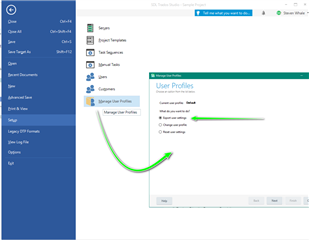
Also when migrating from one version to another- the following app should help simplyfy everything for you.
https://appstore.sdl.com/language/app/studio-migration-utility/481/
Oana Nagy | QA Engineer | RWS Group


Hi Steven, so if I want to do this and have already disabled my license on my old computer, can I just disable the license on the new computer, enable it on the old computer, export the user settings and them import them to the new one?

so if I want to do this and have already disabled my license on my old computer, can I just disable the license on the new computer, enable it on the old computer, export the user settings and them import them to the new one?
Ruth Rowinski, yes you can.
Paul Filkin | RWS
Design your own training!
You've done the courses and still need to go a little further, or still not clear?
Tell us what you need in our Community Solutions Hub
Thanks Paul, I have done that but can only find how to export and not how to import the profile. I tried Manage user profile, but it rejected the profile I exported from my old computer.
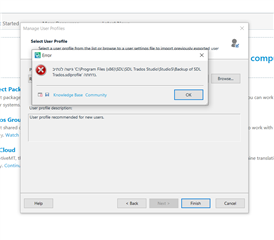

What version of Studio did your old profile come from?
Also, try backing up your old one into a user folder or your desktop as opposed to trying to select one from the program files.
Paul Filkin | RWS
Design your own training!
You've done the courses and still need to go a little further, or still not clear?
Tell us what you need in our Community Solutions Hub
Hi Paul, this finally resolved itself (not sure how :-))
Hi Paul, this finally resolved itself (not sure how :-))
