You are currently working on UAT 

Spell checker bug

The very old problem with false/overlapping red lines indicating misspellings when using the Word spell checker has survived at least from Studio 2011 to Studio 2019 with various versions of Word. Isn't it about time that it was fixed? I use Studio 2019 and the spellchecker from MS Word 2013.

This usually (only?) happens when I copy the source segment into the target segment and start editing it. Red lines will appear on top of each other and/or stationary red lines will appear that do not move even as I add text in front of the word originally marked by the red line. The wrong red lines disappear if you confirm the segment, deletes the segment from the editor and "reloads" the translation from the TM.

I am attaching 2 screendumps of the same segment. The first one shows the erroneous red lines, the second shows the segment after "refreshing" (saving to TM, deleting from editor and reloading from TM). In other words, in screendump 2 the red lines are correct, meaning that all red lines in screendump 1 that are not present in screendump 2 are erroneous. Please note especially in the top line of screendump 1 how some of the red lines do not fit with the words.


Screenshot of Trados Studio editor showing multiple overlapping red lines indicating misspellings, some of which do not align with the words they underline.

Screenshot of Trados Studio editor after refreshing the segment, showing correct red lines under misspelled words without any overlapping or misaligned errors.


Generated Image Alt-Text
[edited by: Trados AI at 4:20 PM (GMT 0) on 28 Feb 2024]

emoji
Parents Reply
  • Hi Steven,

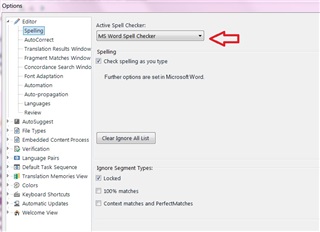
    I just want to clarify that my original post is not about an app, but about Studio's built-in option to use the MS Word spell-checker (please see attached screendump) - I am not sure if this is the same thing you are referring to? The suggested app Language Tool unfortunately does not support the one target language I work with, Danish, so that is not an option. In addition, the advantage with the Word spell-checker is that you get the benefit from the words which you have manually marked as correct (added to the user dictionary) when using the spell-checker in Word over the years. So for several reasons it would be fantastic if the functionality of the MS Word spell checker could be improved in Studio.

    Also, just to clarify an apparent misunderstanding in Simon Cole's post above, these erroneous red lines do not disappear on their own (except if I close and later re-open the document). I have to save the segment, delete the segment and have it re-load from the TM in order to clear the red lines.

    Trados Studio options menu with 'MS Word Spell Checker' selected, showing settings for 'Check spelling as you type' and 'Clear Ignore All List' button.

    emoji


    Generated Image Alt-Text
    [edited by: Trados AI at 4:20 PM (GMT 0) on 28 Feb 2024]
Children
No Data