

You are currently working on UAT 

trouble when importing translation units

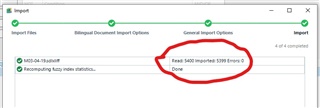
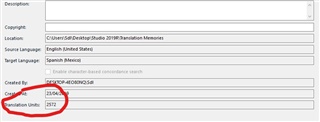
Trados Studio import wizard showing 5399 translation units imported successfully.Trados Studio translation memory settings displaying a total of 2572 translation units.

Hello,

I'm trying to import the translation units from an sdlxliff to a translation memory, I already tried by updatig the TM but I did not get the total number of units, I then tried by importing the translation units, but even when the wizard shows that 5399 units were imported, I then opened the TM and the settings show that it has only 2572 translation units (and this is not because of repetitions). ¿How do I get the  units from my sdlxliff to my memory?

Please, help


Generated Image Alt-Text
[edited by: Trados AI at 4:22 PM (GMT 0) on 28 Feb 2024]

emoji
Parents
  • Hi @

    When importing from bilingual document there is the option to Include or exclude segments based on translation status (confirmed , untranslated etc). If I am not wrong, the default is set to import the confirmed segments. Maybe retry the import and please check which options you have ticked. 

    Also during the import stage, there is the option to select if you want segments identical to the ones you have already on the TM to overwrite them or create new ones (which might create duplicate TUs). So there might be some some segments that have overwritten your TUs . To check if this is the case please retry adding the SDLXLIFF either in a blank TM and see if the same number of imported Tus appears. 

    I hope the will help. 

    Best regards, 

    Loredana

Reply
  • Hi @

    When importing from bilingual document there is the option to Include or exclude segments based on translation status (confirmed , untranslated etc). If I am not wrong, the default is set to import the confirmed segments. Maybe retry the import and please check which options you have ticked. 

    Also during the import stage, there is the option to select if you want segments identical to the ones you have already on the TM to overwrite them or create new ones (which might create duplicate TUs). So there might be some some segments that have overwritten your TUs . To check if this is the case please retry adding the SDLXLIFF either in a blank TM and see if the same number of imported Tus appears. 

    I hope the will help. 

    Best regards, 

    Loredana

Children