You are currently working on UAT 

Error message "Object reference not set to an instance of an object" is being shown more often recently

Recently, Studio 2019 has begun to throw the error message "Object reference not set to an instance of an object" more occasionally than before, which makes Studio 2019 appear unstable and also causes specific features or functions to be greyed out and become inaccessible.

Two examples of scenarios where Studio 2019 is (constantly) showing this error message are:

  • When opening multiple files either For Translation, For Review or For Sign-off and then applying a Display Filter on the Review tab in the Editor view, e.g. ”New translated content”, and after that using either the arrow buttons (down and up) or the left mouse button to go to a specific filtered segment and activate it. It doesn’t happen every time you go to a new filtered segment (there is no real pattern), but the error message is being shown quite often, when you do this.
  • When creating a project for Translation Quality Assessment of various files from different ofther projects for regular spot checking and then opening the files (individually) For Review (or For Translation, for that matter), the error message is sometimes being thrown right away, and you then won’t be able to activate ”Assess Quality” (nor ”Track Changes”) on the Review tab in the Editor view. These functions are greyed out and are inaccessible. It doesn’t happen all the time, and it doesn’t happen with all files in the project.

After the error message has been shown numerous times when working on the files in a project, it’s usually very wise to close Studio 2019 and reopen it. Otherwise, Studio 2019 will remain unstable and will often keep showing the error message, when starting working on another project. Sometimes, it will cause different buttons in Studio to be grayed out and made inaccessible. Or you won’t be able to save the project files after having worked on them.

Can you please advise on what to do about this? On how to prevent this error message from constantly being displayed?

Thanks in advance!

Parents
  • Hello ,

    Could you please post the full error stack please, as the object reference... error message does not really tell us anything much on its own

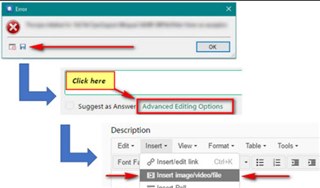
    Error dialog box with 'Object reference not set to an instance of an object' message, with 'Advanced Editing Options' highlighted in Trados Studio.

    Trados Studio forum post discussing an error, with options to insert link, imagevideo, emoticon, and special character visible.

    Oana Nagy | QA Engineer | RWS Group

    emoji


    Generated Image Alt-Text
    [edited by: Trados AI at 4:53 PM (GMT 0) on 28 Feb 2024]
  • <SDLErrorDetails time="16-04-2019 13:10:41">
      <ErrorMessage>Object reference not set to an instance of an object.</ErrorMessage>
      <Exception>
        <Type>System.NullReferenceException, mscorlib, Version=4.0.0.0, Culture=neutral, PublicKeyToken=b77a5c561934e089</Type>
        <HelpLink />
        <Source>SegmentInformationViewer</Source>
        <HResult>-2147467261</HResult>
        <StackTrace><![CDATA[   at SegmentInformationViewer.SegmentInformationViewerViewPartControl.RefreshView()
       at SegmentInformationViewer.SegmentInformationViewerViewPartControl.ActiveDocument_ActiveSegmentChanged(Object sender, EventArgs e)
       at System.EventHandler.Invoke(Object sender, EventArgs e)
       at Sdl.Desktop.Platform.Extensions.EventsExtensions.Raise(EventHandler e, Object sender)
       at Sdl.TranslationStudioAutomation.IntegrationApi.Document.OnActiveSegmentChanged(Object sender, EventArgs e)
       at System.EventHandler.Invoke(Object sender, EventArgs e)
       at Sdl.TranslationStudio.Editor.TranslationEditor.SideBySideDocumentEditingView.OnActiveSegmentChanged()
       at Sdl.TranslationStudio.Editor.TranslationEditor.SideBySideDocumentEditingView.SideBySideEditor_ActiveRowChanged(Object sender, ActiveRowChangedEventArgs e)
       at System.EventHandler`1.Invoke(Object sender, TEventArgs e)
       at SideBySideEditor.raise_ActiveRowChanged(Object value0, ActiveRowChangedEventArgs value1)
       at SideBySideEditor.OnActiveRowChanged(Object sender, ActiveRowChangedEventArgs args)
       at SideBySideEditor.set_ActiveRowNumber(Int32 rowNumber)
       at SideBySideEditor.UpdateActiveRow(IEditControl editControl)
       at SideBySideEditor.OnSelectionChanged(Object sender, SelectionChangedEventArgs args)
       at SideBySideEditor.Target_SelectionChanged(Object sender, SelectionChangedEventArgs args)
       at System.EventHandler`1.Invoke(Object sender, TEventArgs e)
       at AbstractFrameworkEditControl.raise_SelectionChanged(Object value0, SelectionChangedEventArgs value1)
       at FrameworkEditControl.OnSelectionChanged(Object sender, SelectionChangedEventArgs args)
       at FrameworkEditControlEventSource.SelectionChanged(FrameworkEditControlEventSource* )
       at Tree.InputManager.v_MoveSelection(InputManager* , TextRange* )
       at FrameworkSelection.MoveTo(Position destination, Boolean extendSelection)
       at Sdl.TranslationStudio.Editor.TranslationEditor.SideBySideDocumentEditingView.MoveToStartOfTargetSegment(ISegmentContainerNode targetSegmentContainerNode, Boolean autoScroll)
       at Sdl.TranslationStudio.Editor.TranslationEditor.SideBySideDocumentEditingView.MoveToNextSegment(IsValidNextSegment segmentValidator)
       at Sdl.TranslationStudio.Editor.TranslationEditor.SideBySideDocumentEditingView.MoveToNextSegment(Nullable`1 segmentNavigationFilter)
       at Sdl.TranslationStudio.Editor.TranslationEditor.SideBySideDocumentEditingView.ConfirmSegment(Nullable`1 segmentNavigationFilter)
       at Sdl.TranslationStudio.Editor.TranslationEditor.Actions.AbstractConfirmSegmentAction.ExecuteActiveSegment()
       at Sdl.TranslationStudio.Editor.TranslationEditor.Actions.AbstractConfirmSegmentAction.Execute()
       at Sdl.Desktop.Platform.Implementation.CommandBars.ActionService.<>c__DisplayClass30_0.<ExecuteAction>b__0()
       at Sdl.Desktop.Logger.Log.Resources(Object message, Action action)
       at Sdl.Desktop.Platform.Implementation.CommandBars.ActionService.ExecuteAction(IAction action, ActionOrigin origin, Boolean allowToggle)
       at Sdl.Desktop.Platform.Implementation.CommandBars.ActionService.ExecuteActionForShortcut(Keys shortcut)
       at Sdl.Desktop.Platform.WinForms.StudioWindowForm.OnKeyDown(KeyEventArgs e)
       at System.Windows.Forms.Control.ProcessKeyEventArgs(Message& m)
       at System.Windows.Forms.Form.ProcessKeyPreview(Message& m)
       at System.Windows.Forms.Control.ProcessKeyPreview(Message& m)
       at System.Windows.Forms.Control.ProcessKeyPreview(Message& m)
       at System.Windows.Forms.Control.ProcessKeyPreview(Message& m)
       at System.Windows.Forms.Control.ProcessKeyPreview(Message& m)
       at System.Windows.Forms.Control.ProcessKeyPreview(Message& m)
       at System.Windows.Forms.Control.ProcessKeyPreview(Message& m)
       at System.Windows.Forms.Control.ProcessKeyPreview(Message& m)
       at System.Windows.Forms.Control.ProcessKeyPreview(Message& m)
       at System.Windows.Forms.Control.ProcessKeyPreview(Message& m)
       at System.Windows.Forms.Control.ProcessKeyPreview(Message& m)
       at System.Windows.Forms.Control.ProcessKeyPreview(Message& m)
       at System.Windows.Forms.Control.ProcessKeyPreview(Message& m)
       at System.Windows.Forms.Control.ProcessKeyPreview(Message& m)
       at System.Windows.Forms.Control.ProcessKeyPreview(Message& m)
       at System.Windows.Forms.Control.ProcessKeyPreview(Message& m)
       at System.Windows.Forms.Control.ProcessKeyPreview(Message& m)
       at System.Windows.Forms.Control.ProcessKeyMessage(Message& m)
       at System.Windows.Forms.Control.WmKeyChar(Message& m)
       at System.Windows.Forms.Control.WndProc(Message& m)
       at System.Windows.Forms.Control.ControlNativeWindow.OnMessage(Message& m)
       at System.Windows.Forms.Control.ControlNativeWindow.WndProc(Message& m)
       at System.Windows.Forms.NativeWindow.Callback(IntPtr hWnd, Int32 msg, IntPtr wparam, IntPtr lparam)]]></StackTrace>
      </Exception>
      <Environment>
        <ProductName>SDL Trados Studio</ProductName>
        <ProductVersion>15.0.0.0</ProductVersion>
        <EntryAssemblyFileVersion>15.1.0.44109</EntryAssemblyFileVersion>
        <OperatingSystem>Microsoft Windows 7 Professional </OperatingSystem>
        <ServicePack>Service Pack 1</ServicePack>
        <OperatingSystemLanguage>1030</OperatingSystemLanguage>
        <CodePage>1252</CodePage>
        <LoggedOnUser>SEMLERNET\smcjmc</LoggedOnUser>
        <DotNetFrameWork>4.0.30319.42000</DotNetFrameWork>
        <ComputerName>DK000R90JN9Z9</ComputerName>
        <ConnectedToNetwork>True</ConnectedToNetwork>
        <PhysicalMemory>7785848 MB</PhysicalMemory>
      </Environment>
    </SDLErrorDetails>

    Hi ,

    Thanks for your reply. Please find the file attached here.

  • Hello

    The error stack would seem to suggest that this error is being generated from the Preview.

    Therefore I would suggest resetting the Windows layout in Studio (ViewTab) and then resatring Studio.

    If this does not fix the problem, please log a support ticket so we can take a look at this in more detail.

    Oana Nagy | QA Engineer | RWS Group

Reply Children
No Data