 Translate



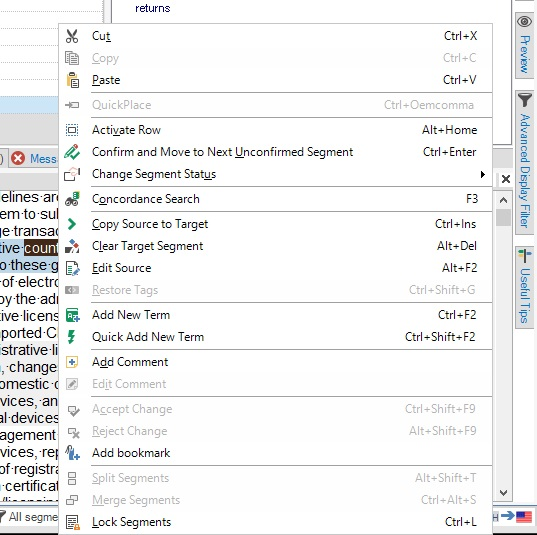
And when this happens shortcut Ctrl + A will not work either. It happens many times, and only restarting Studio helps solve the issue. Any ideas? Version 15.1.2.48878
Generated Image Alt-Text
[edited by: Trados AI at 4:11 PM (GMT 0) on 28 Feb 2024]

You are currently working on UAT

And when this happens shortcut Ctrl + A will not work either. It happens many times, and only restarting Studio helps solve the issue. Any ideas? Version 15.1.2.48878
Hello Yang Lifu (YangLifu),
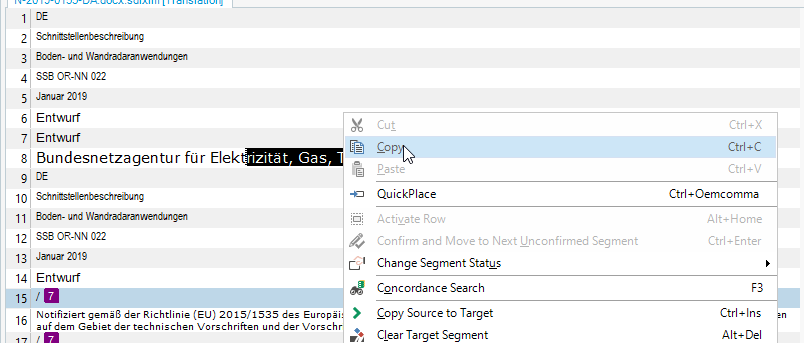
In order to have the "Copy" button active you need to right click on the exact string selected:
Ana-Maria Matefi | RWS Group
_____
Design your own training!
You've done the courses and still need to go a little further, or still not clear?
Tell us what you need in our Community Solutions Hub

Hello Yang Lifu (YangLifu),
In order to have the "Copy" button active you need to right click on the exact string selected:
Ana-Maria Matefi | RWS Group
_____
Design your own training!
You've done the courses and still need to go a little further, or still not clear?
Tell us what you need in our Community Solutions Hub
