You are currently working on UAT 

Split and merge segments

Hello everyone, I open this discussion in order to ask sdl for the comamds in trados studio to split and merge segments. they go out shadowed and take a lot of time so. they are saying from a lot of time ago also that they are going to make them function, but they do not do.

from here I encourage everyone to ask them to put them in functioning to be able to translate pdfs and word that are ocr from images.


Without any other particular,


Thanks and Regards from Jesus.

Parents
  • Hello  

    When you have documents from an OCR source, there will be many hard returns in the text where there should just be a line break.

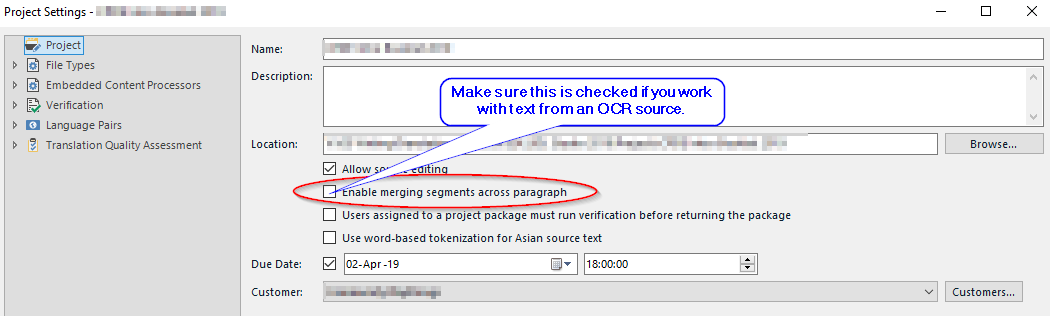
    Studio does provide the functionality of merging across paragraphs, but it is time-consuming and somewhat error-prone to do so extensively:

    Trados Studio project settings window with an option circled 'Clean up spaces across paragraphs' and a note 'Make sure this is checked if you work with text from OCR source'.

    But I think it is better to clean up the translation source so you can work properly.

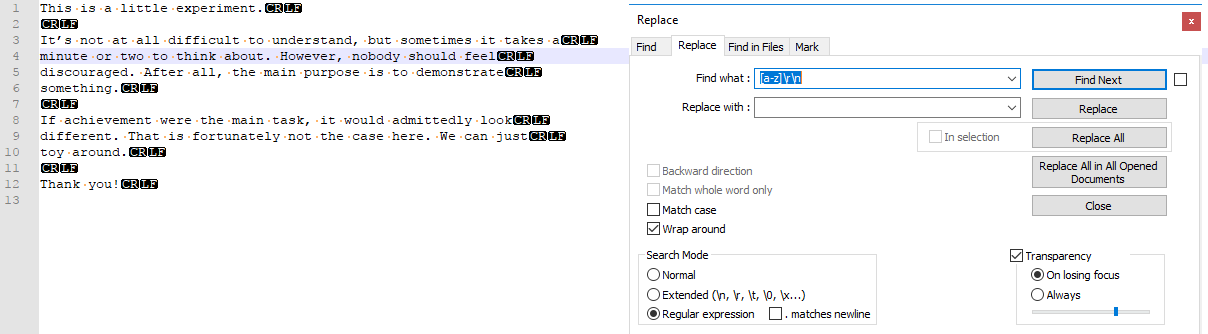
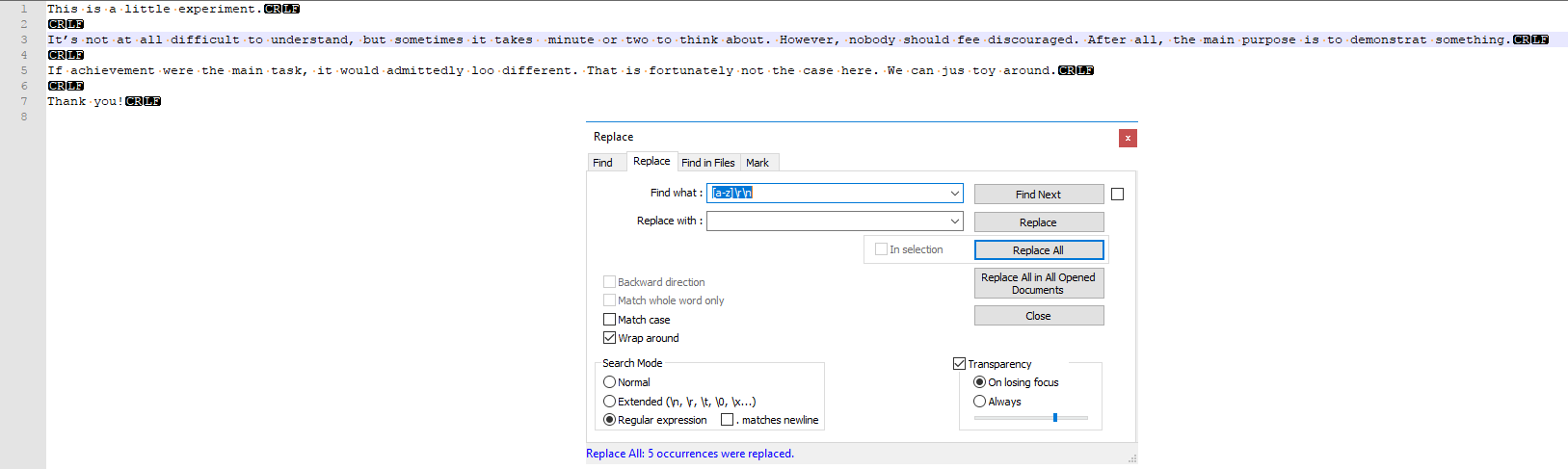
    If you don't want to do this manually (or as a first step) you might want to run a regex replace over your text. (I assume that you have a plain text file if you did an OCR.) A hard line break (or paragraph break, technically a carriage return followed by a line feed on Windows systems) that comes immediately after a lower case character is hardly ever "natural". So if you replace [a-z]\r\n with a space, you will remove a lot of those troublesome OCR artefacts from your translation source. This can of course be fine-tuned to reflect the source language and your particular situation. On the whole, however, there is no garbage-in, roses-out method.

    Here's what I mean:

    Pre-cleanup

    Trados Studio 'Find and Replace' window showing a regex pattern in the 'Find what' field to remove hard line breaks after lowercase letters, with 'Replace with' field containing a space.

    Post-cleanup

    Trados Studio 'Find and Replace' window after cleanup, showing the 'Find what' field empty and the 'Replace with' field containing a space, indicating the replacement has been completed.

    Hope it helps.

    Daniel

    emoji


    Generated Image Alt-Text
    [edited by: Trados AI at 4:04 PM (GMT 0) on 28 Feb 2024]
Reply
  • Hello  

    When you have documents from an OCR source, there will be many hard returns in the text where there should just be a line break.

    Studio does provide the functionality of merging across paragraphs, but it is time-consuming and somewhat error-prone to do so extensively:

    Trados Studio project settings window with an option circled 'Clean up spaces across paragraphs' and a note 'Make sure this is checked if you work with text from OCR source'.

    But I think it is better to clean up the translation source so you can work properly.

    If you don't want to do this manually (or as a first step) you might want to run a regex replace over your text. (I assume that you have a plain text file if you did an OCR.) A hard line break (or paragraph break, technically a carriage return followed by a line feed on Windows systems) that comes immediately after a lower case character is hardly ever "natural". So if you replace [a-z]\r\n with a space, you will remove a lot of those troublesome OCR artefacts from your translation source. This can of course be fine-tuned to reflect the source language and your particular situation. On the whole, however, there is no garbage-in, roses-out method.

    Here's what I mean:

    Pre-cleanup

    Trados Studio 'Find and Replace' window showing a regex pattern in the 'Find what' field to remove hard line breaks after lowercase letters, with 'Replace with' field containing a space.

    Post-cleanup

    Trados Studio 'Find and Replace' window after cleanup, showing the 'Find what' field empty and the 'Replace with' field containing a space, indicating the replacement has been completed.

    Hope it helps.

    Daniel

    emoji


    Generated Image Alt-Text
    [edited by: Trados AI at 4:04 PM (GMT 0) on 28 Feb 2024]
Children
No Data