You are currently working on UAT 

Not being able to "Save target as" for a XLF file in Trados 2014

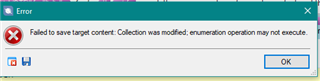
The PM asked me to deliver a XLF file in Trados 2014 by "saving target as" Error message in Trados Studio stating 'Failed to save target content: Collection was modified; enumeration operation may not execute.' with an OK button.and I can't generate it, receiving the error message in the attached image. I have installed the Memoq app from the appstore. Thanks!


Generated Image Alt-Text
[edited by: Trados AI at 3:49 PM (GMT 0) on 28 Feb 2024]

emoji
Parents Reply Children
  • Hi

    The .xlf file ending is for XLIFF files. An XLF file is an XLIFF file. So if you received a file like translate_me.xlf, you received an XLIFF file. (Check it out on Wikipedia to get a first impression:https://en.wikipedia.org/wiki/XLIFF) The first line of your source file should say something like this if you open it with Notepad:

    <xliff version="1.2">

    You can import an XLIFF or XLF file with Studio no problem as it is THE file standard for localization.

    Studio will convert this file to its own format, which is called SDLXLIFF, an XLIFF variant which contains additional information Studio needs.

    MemoQ may or may not be able to process SDLXLIFF files, but it surely is able to process XLIFF files. So if you get an XLF file, translate it and click "Finalize", Studio will generate an XLIFF file. (Check the first line of the target file with Notepad, it should start with "<xliff ...." and end with ">". Could you post just that one line here on the forum?

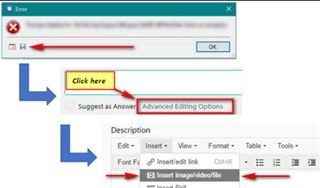
    How to get the stack trace:

    Error dialog box with 'OK' button, and a screenshot of Trados Studio interface highlighting 'Click here' and 'Advanced Editing Options' buttons.

    Daniel

    emoji


    Generated Image Alt-Text
    [edited by: Trados AI at 3:49 PM (GMT 0) on 28 Feb 2024]