

You are currently working on UAT 

All Studio versions: Filenames with scandinavian characters get corrupted inside the project packages created by Studio.

Steps to reproduce: create a Studio project for trans files containing [äöå] in their names. When Studio creates a project package for the project, the internal zipping algorithm corrupts these characters. At least in some scenarios this causes problems when the packages are opened/translated/returned and the files need to be renamed manually. It seems that the internal zipping function used by Studio does not handle these extended characters correctly.

Studio project source language folder:
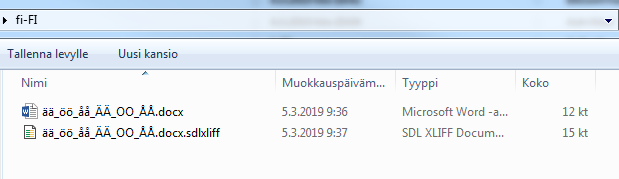
Screenshot of Trados Studio project source language folder showing two files with names containing special characters  .

Contents of the created sldppx file:

Screenshot of the contents of the created sldppx file in Trados Studio with file names containing special characters   displayed incorrectly.


Generated Image Alt-Text
[edited by: Trados AI at 5:48 PM (GMT 0) on 28 Feb 2024]

emoji
Parents
  • Looks rather like a problem of the tool used to display the package content... what application is that?
    Are you perhaps renaming the package to ZIP and then using the Windows Explorer compressed folder feature (or what is the official name) to display the content?
    That feature is notoriously known for being stupid and buggy and to NOT support Unicode inside ZIPs properly. You may want to make sure that your Region options in Control Panel are set correctly, i.e. that the Format is set to your country. And to be on the safe side, make sure that your Language for non-Unicode programs (on the Administrative tab) is also set correctly.

Reply
  • Looks rather like a problem of the tool used to display the package content... what application is that?
    Are you perhaps renaming the package to ZIP and then using the Windows Explorer compressed folder feature (or what is the official name) to display the content?
    That feature is notoriously known for being stupid and buggy and to NOT support Unicode inside ZIPs properly. You may want to make sure that your Region options in Control Panel are set correctly, i.e. that the Format is set to your country. And to be on the safe side, make sure that your Language for non-Unicode programs (on the Administrative tab) is also set correctly.

Children
