Translate



Greetings,
I want to improve Trados' performance when querying translation memories. It is faster for me to receive automated translation results from the SDL machine translation than fuzzy matches from my own translation memory on my hard disk.
I have two systems, both Dell laptops:
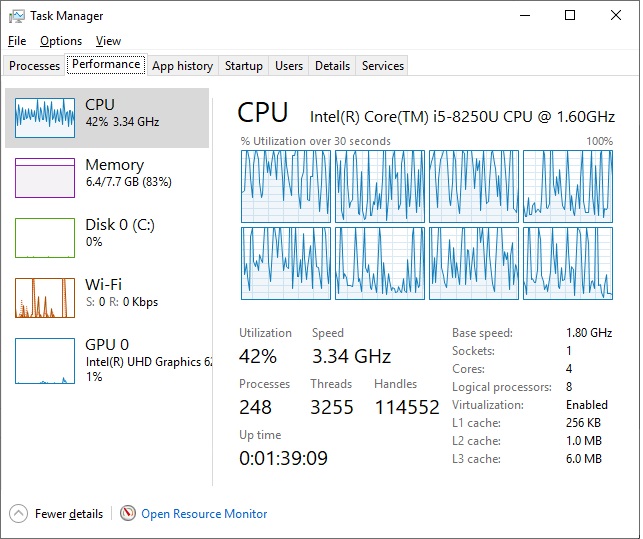
Intel i5-8250U-turbo speed of 3.4 GHz
8 GB RAM
128 GB M.2 SATA III SSD
Windows 10 Home
-AND AN-
Intel i7-8750H-turbo speed of 4.1 GHz
16 GB RAM
250 GB SATA III SSD
I also have a 100 Mbps Internet connection via ethernet on both.
Don't get me wrong, performance on both computers is great, especially when using SDL machine translation. Segments are loaded quickly. Segments are also loaded quickly when there is a concordance match or 100% match with my translation memory (which is not very large, only about 20,000 segments and 30MB.) The i7-H processor is slightly snappier and I'm not quite sure if it is due to the higher clock speed, but I imagine that is the factor because they both have SSDs that cap off at 500 Mbps. However, they both slow down significantly when it comes to searching for fuzzy matches, even if those fuzzy matches are in the 90s. Sometimes it doesn't even find the segment match when I know there is one. It just seems to time out and gives up. Both computers have fresh, brand new installations of Windows (which seems to fix a lot of stability issues with Trados for those that want a more definitive solution to fussy Trados installations.)
My questions are the following:
1. Are my SSDs bottlenecking the search time of the database? Would I see a speed bump upgrading to an NVME SSD with a higher capacity running at close to 3000 Mbps or would that just be overkill that won't be used? In Task Manager, I really don't see the hard disk moving the needle too much while doing a translation memory search.
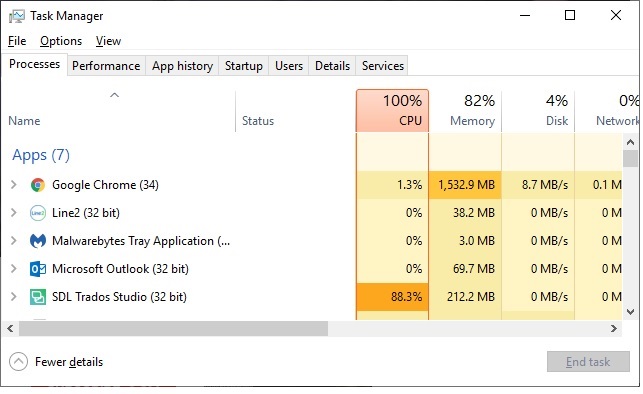
2. Are my mobile processors bottlenecking, despite being the latest generation mobile processors? Since Trados is a single-threaded application (and I do see Trados using up to 85% of the processor in the i5-8250 in Task Manager when running through matches in the translation memory), will a Core i9-9900k, with a turbo-boost speed of 5 GHz on the primary core, be utilized by Trados to speed up the performance or is that just overkill too?
3. How is it that machine translation results are much faster than matches that are on my own computer locally?
Although the 16 GB laptop allows me to have more browser tabs open for research, Trados never uses more than 500 MB of memory and that's even on a 50,000-word translation I did last week.
The translation memories are new and were created with Trados 2019.
I keep Microsoft OneDrive paused while I am working so that it isn't syncing in the background while I'm working.
I just want to know WHERE I need to beef things up or if I have simply hit a known ceiling with Trados.