 Translate



Already checked article 000001807, nothing changed. Can someone suggest something, please?
Thank you, Laura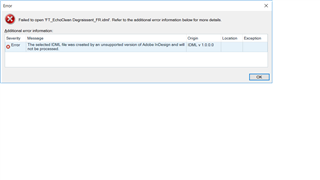
Generated Image Alt-Text
[edited by: Trados AI at 3:21 PM (GMT 0) on 28 Feb 2024]

You are currently working on UAT

Already checked article 000001807, nothing changed. Can someone suggest something, please?
Thank you, Laura
Hi Laura Laszkaraty,
your screenshot is almost unreadable (too small).
As you read the KB article already, my impression is this problem most frequently persists if the project settings are not applied to the project. One way of making sure-sure-sure they are would be first to create a project template which has the "Process unsupported file versions" box ticked, then create a new project based on that project template and add the idml file(s) you want to translate.
If you have the app "Apply Studio Project Template" installed, you can force these settings onto an existing project:
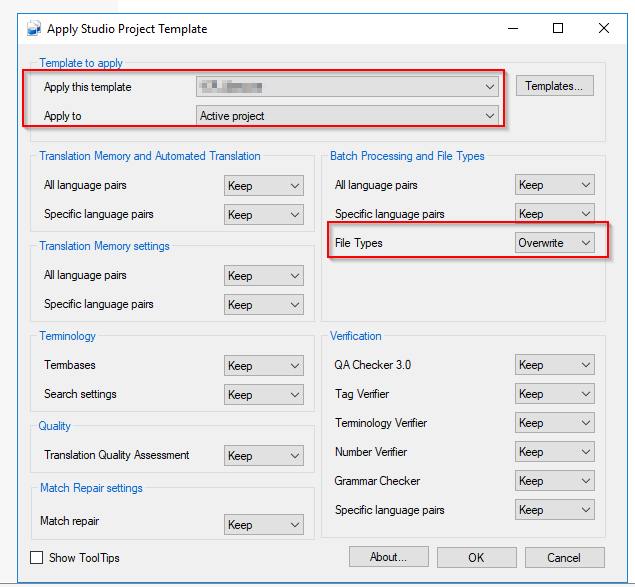
Once you've done this, you should to remove the file from the project (delete the source language version of it), add it again and prepare for translation.
At least this is how I handle this and who knows, it might work for you as well. All the best.
Daniel

Hi Laura Laszkaraty,
your screenshot is almost unreadable (too small).
As you read the KB article already, my impression is this problem most frequently persists if the project settings are not applied to the project. One way of making sure-sure-sure they are would be first to create a project template which has the "Process unsupported file versions" box ticked, then create a new project based on that project template and add the idml file(s) you want to translate.
If you have the app "Apply Studio Project Template" installed, you can force these settings onto an existing project:
Once you've done this, you should to remove the file from the project (delete the source language version of it), add it again and prepare for translation.
At least this is how I handle this and who knows, it might work for you as well. All the best.
Daniel

