You are currently working on UAT 

Update from bilingual review not working anymore

Hi everyone,

I am working with SDL Trados Studio 2017 Freelance (SR1 14.1.10015.44945) and update from bilingual review does not work anymore (still worked fine last month).

I have tried to recreate the review file by exporting again and copy-pasting the right column, but to no avail.

For some files, I get an error message : "Problem reading contents of segment #999". Each time, segment looks perfectly normal.

For some other files, I don't get any error message but when I check whether changes were actually made, they aren't. This happens, including for files that imported correctly last month.

Any idea?

Thanks!

Joëlle

Parents
  •  

    Try turning on hidden chars in Word and make sure you don't have any hard returns in there, particularly in the segments referred to. If that doesn't help review this article which covers a lot of scenarios and may help... I'd recommend reviewing the comments too as there is some good advice in there from users who found wasy to deal with this kind of problem:

    multifarious.filkin.com/.../

    Paul Filkin | RWS

    Design your own training!
    You've done the courses and still need to go a little further, or still not clear? 
    Tell us what you need in our Community Solutions Hub

  • Hi Paul,

    I had already turned on hidden chars, but the reviewed files only contain the hard return that appears normally at the end of a bilingual export.

    The "quick" solution, i.e. recreating an export then copy-pasting the target, does not work either.

    So I am left with the Glossary Converter/Pre-translate option, but for some reason, only 29% of my biggest file is lifted from the created TM. So I have to go through most of the files manually.

    For an operation that simply boils down to copy-pasting the target, this feels like having to use a bazooka just to kill a fly.


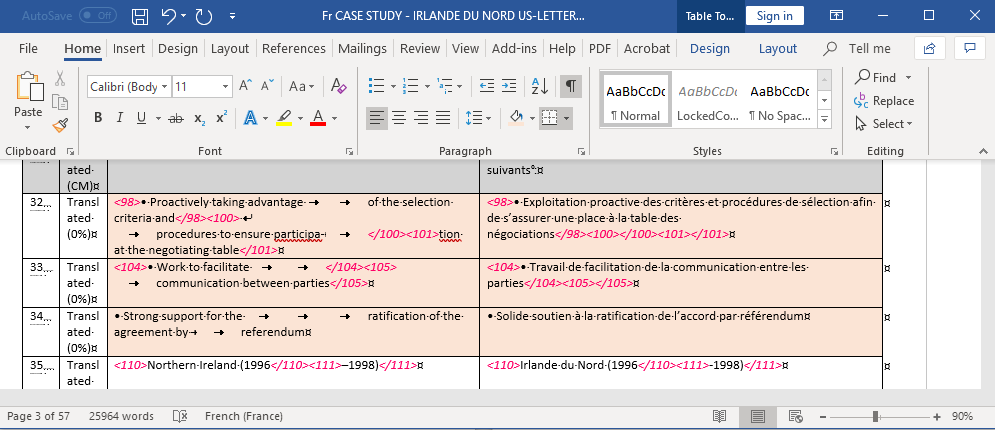
    Just another question: I am working on IDML files where the author sometimes added unnecessary line breaks, which I removed when translating (see screenshot below). Could this be seen as "altering the structure of the file" too and prevent import as well? Or is it just a matter of not altering the structure of the bilingual export itself?

    Screenshot of Trados Studio showing a bilingual export with visible hard returns at the end of segments. No other hidden characters or errors are displayed.

    Thanks for clarifying.

    Joëlle

    emoji


    Generated Image Alt-Text
    [edited by: Trados AI at 3:19 PM (GMT 0) on 28 Feb 2024]
Reply
  • Hi Paul,

    I had already turned on hidden chars, but the reviewed files only contain the hard return that appears normally at the end of a bilingual export.

    The "quick" solution, i.e. recreating an export then copy-pasting the target, does not work either.

    So I am left with the Glossary Converter/Pre-translate option, but for some reason, only 29% of my biggest file is lifted from the created TM. So I have to go through most of the files manually.

    For an operation that simply boils down to copy-pasting the target, this feels like having to use a bazooka just to kill a fly.


    Just another question: I am working on IDML files where the author sometimes added unnecessary line breaks, which I removed when translating (see screenshot below). Could this be seen as "altering the structure of the file" too and prevent import as well? Or is it just a matter of not altering the structure of the bilingual export itself?

    Screenshot of Trados Studio showing a bilingual export with visible hard returns at the end of segments. No other hidden characters or errors are displayed.

    Thanks for clarifying.

    Joëlle

    emoji


    Generated Image Alt-Text
    [edited by: Trados AI at 3:19 PM (GMT 0) on 28 Feb 2024]
Children
No Data