You are currently working on UAT 

Object reference not set to an instance of an object

Hello everybody,

I'm using SDL Trados Studio 2015. I normally use it without problem, apart when I use it with Excel files. Everytime I have a file in Excel, I can open it properly, save the project but, when I try to save the file as .xlsx I get the error message: "Impossible to save target content. Object reference not set to an instance of an object".

At first I thought at a problem with the source file. But it happens everytime I use SDL Trados with excel file.

Any suggestion?

Thanks in advance for your help

Best regards

Simona

  • Hello  ,


    Could you maybe post the full error stack please-

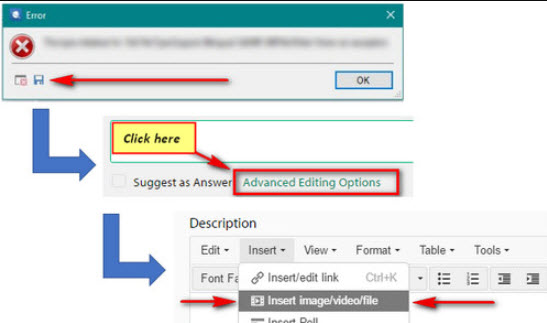
    Error dialog box with an 'OK' button, and a Trados Studio interface showing 'Click here' and 'Advanced Editing Options' highlighted.


    In the mean time the following solution might work (rearranging the sheets in the excel).


    Also it would be useful if you could let us know your operating systems/version of Office and the exact excel file type (which version of Excel the file was created in).

    Oana Nagy | QA Engineer | RWS Group

    emoji


    Generated Image Alt-Text
    [edited by: Trados AI at 3:16 PM (GMT 0) on 28 Feb 2024]
  • Hello Steven,

    I'm working in Windows 10.  I don't know the exact version it was created. It is a xlsx file.


    Here you are the full error stack:

    <?xml version="1.0"?>

    <SDLErrorDetails time="23/01/2019 15:42:59"><ErrorMessage>Impossibile salvare il contenuto di destinazione: Riferimento a un oggetto non impostato su un'istanza di oggetto.</ErrorMessage><Exception><Type>System.NullReferenceException, mscorlib, Version=4.0.0.0, Culture=neutral, PublicKeyToken=b77a5c561934e089</Type><HelpLink/><Source>Sdl.FileTypeSupport.Filters.Excel</Source><HResult>-2147467261</HResult><StackTrace><![CDATA[

    in Sdl.FileTypeSupport.Filters.Excel.FilterControllerFramework.OfficeController.UpdateDocumentFile(XsltArgumentList argsList, XslCompiledTransform xslTransform, XPathNavigator child) in Sdl.FileTypeSupport.Filters.Excel.FilterControllerFramework.OfficeController.IterateXsltFiles(XsltArgumentList argsList, FileMap rule, XPathNodeIterator iter, Boolean isUpdate, String targetFilePath) in Sdl.FileTypeSupport.Filters.Excel.FilterControllerFramework.OfficeController.IterateContentType(String xslFileNamesPath, Boolean isUpdate, String filePath, String filterStr, String targetFilePath, Boolean isCalledByRelsTableIteration) in Sdl.FileTypeSupport.Filters.Excel.FilterControllerFramework.OfficeController.serviceBackward() in Sdl.FileTypeSupport.Filters.Excel.PlugInFilter.FileParser.DocumentParser.Update() in Sdl.FileTypeSupport.Filters.Excel.PlugInFilter.FileParser.DocumentExtractImpl.Update(DocumentCollection srcCollection, String filename, String tgtFilePath) in Sdl.FileTypeSupport.Filters.Excel.PlugInFilter.FileWriterAndPreviewFileWriter.WriterImpl.EndOfInput() in Sdl.FileTypeSupport.Filters.Excel.PlugInFilter.FileWriterAndPreviewFileWriter.ExcelWriter.EndOfInput() in Sdl.FileTypeSupport.Framework.Integration.NativeWriterMessagesProxy.EndOfInput() in Sdl.FileTypeSupport.Framework.Integration.FileGenerator.CallEndOfInput() in Sdl.FileTypeSupport.Framework.Integration.FileGenerator.FileComplete() in Sdl.FileTypeSupport.Framework.Integration.AbstractBilingualProcessorContainer.FileComplete() in Sdl.FileTypeSupport.Framework.Integration.MultiFileConverter.FileComplete() in Sdl.FileTypeSupport.Framework.BilingualApi.AbstractBilingualContentProcessor.FileComplete() in Sdl.FileTypeSupport.Framework.Integration.AbstractBilingualProcessorContainer.FileComplete() in Sdl.FileTypeSupport.Bilingual.Tmfc.TmfcReaderImpl.vv_Visit(TmfcReaderImpl* , FrameworkFileContainerField* field) in FrameworkFileContainerField.vv_AcceptFrameworkVisitor(FrameworkFileContainerField* , FrameworkFieldVisitor* visitor) in Sdl.FileTypeSupport.Bilingual.Tmfc.TmfcReaderImpl.vv_VisitStartEndField(TmfcReaderImpl* , StartEndField* startEnd) in Sdl.FileTypeSupport.Bilingual.Tmfc.TmfcReaderImpl.b_VisitNext(TmfcReaderImpl* ) in Sdl.FileTypeSupport.Bilingual.Tmfc.TmfcReader.ParseNext() in Sdl.FileTypeSupport.Framework.Integration.FileExtractor.ParseNext() in Sdl.FileTypeSupport.Framework.Integration.MultiFileConverter.ParseNext() in Sdl.FileTypeSupport.Framework.Integration.MultiFileConverter.Parse() in Sdl.TranslationStudio.Editor.TranslationEditor.TranslatableDocument.SaveMonolingualAsJobRequest.Execute(IJobExecutionContext context) in Sdl.Desktop.Platform.Implementation.Services.Job.<_worker_DoWork>b__3() in Sdl.Desktop.Platform.Implementation.Services.Log.Resources(Object message, Action action) in Sdl.Desktop.Platform.Implementation.Services.Job._worker_DoWork(Object sender, DoWorkEventArgs e) in System.ComponentModel.BackgroundWorker.OnDoWork(DoWorkEventArgs e) in System.ComponentModel.BackgroundWorker.WorkerThreadStart(Object argument)

    ]]></StackTrace>


    <?x
  • Hello ,

    Thanks for the error stack.

    The problem appears that your Studio 2015 version simply does not support this later version of Excel (xlsx) file type.
    I think if i remember correctly XLSX versions were only properly supported from 2017 onwards,
    What you could do, is try and resave the file to an earlier version of Excel (xls) and reimport into Studio-
    Or maybe download the Studio2019 trial and work with the file in 2019.
    But long term and to ensure compatibility, I would probably suggest you consider upgrading at some time-
    especially as you will see more and more clients upgrading their office versions and switching to newer Excel formats.

    Oana Nagy | QA Engineer | RWS Group

  • Hello Steven,
    Thanks for your reply. I will follow your suggestions. Just an additional question: may I download the free trial of Studio2019 on the same PC where there is Studio2015 installed? Or this can create problem to Studio2015?
    Thanks
    Simona
  • Hello ,

    No not at all. There is no reason why you cannot run 2015 and 2019 on the same machine.

    Oana Nagy | QA Engineer | RWS Group