You are currently working on UAT 

Studio 2017 Translation memory data file is corrupt

I have been having this persistent problem for a while with one of my main translation memories. I have downloaded the SDLTM Repair app but when I open the installer it seems to install then disappears!

Does anyone have any tips as to how to retrieve the data in my now corrupted TM or how to open the SDLTM Repair app??


Thanks in advance

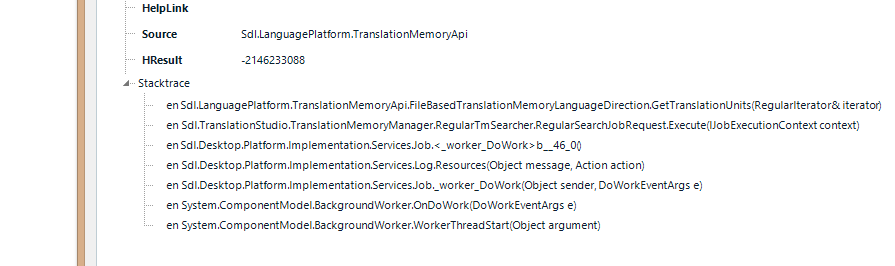
  • Screenshot of Trados Studio error stacktrace showing 'HelpLink', 'Source', 'HResult', and a list of method calls related to TranslationMemoryApi and ServicesJob.This is the stacktrace if anyone can make sense of it....

    emoji


    Generated Image Alt-Text
    [edited by: Trados AI at 3:17 PM (GMT 0) on 28 Feb 2024]
  • Hello @SK ,


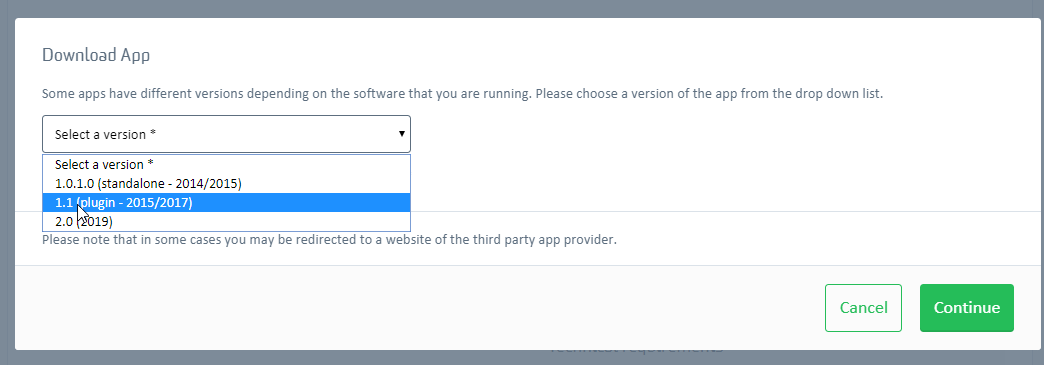
    First of all please check you are attempting to download the correct version- 

    Download App window with version selection dropdown showing Trados Studio versions 2019 SR2, 2021, and 2021 SR1.

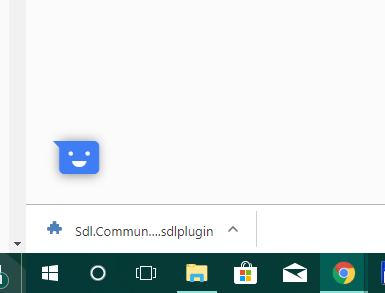
    Once the Plugin has downloaded-

    Downloaded SDL Plugin file named 'Sdl.Community.TMRepair.sdlplugin' visible in the browser's download bar.

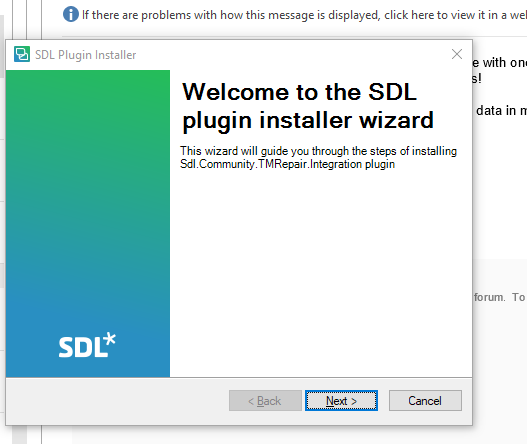
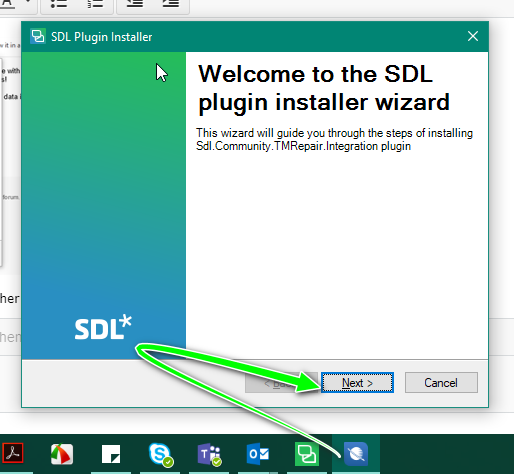
    Simply double click and you should then see the following-


    SDL Plugin installer window with the title 'Welcome to the SDL plugin installer wizard' for Sdl.Community.TMRepair Integration plugin.

    (if not the SDL Plugin installer window might be opening behind a different Window

    SDL Plugin installer window with a green arrow pointing to the 'Next' button, indicating to proceed with the installation.

    Click on the Studio icon to continue

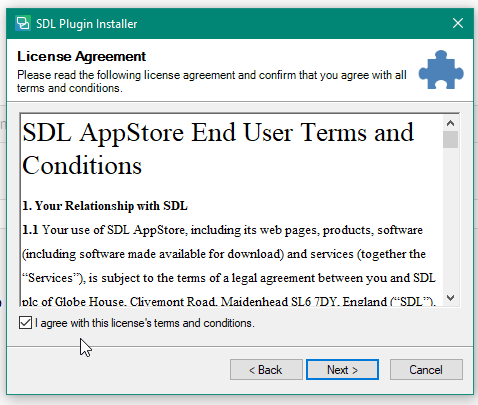
    SDL Plugin Installer License Agreement window with checkbox to agree with SDL AppStore End User Terms and Conditions.

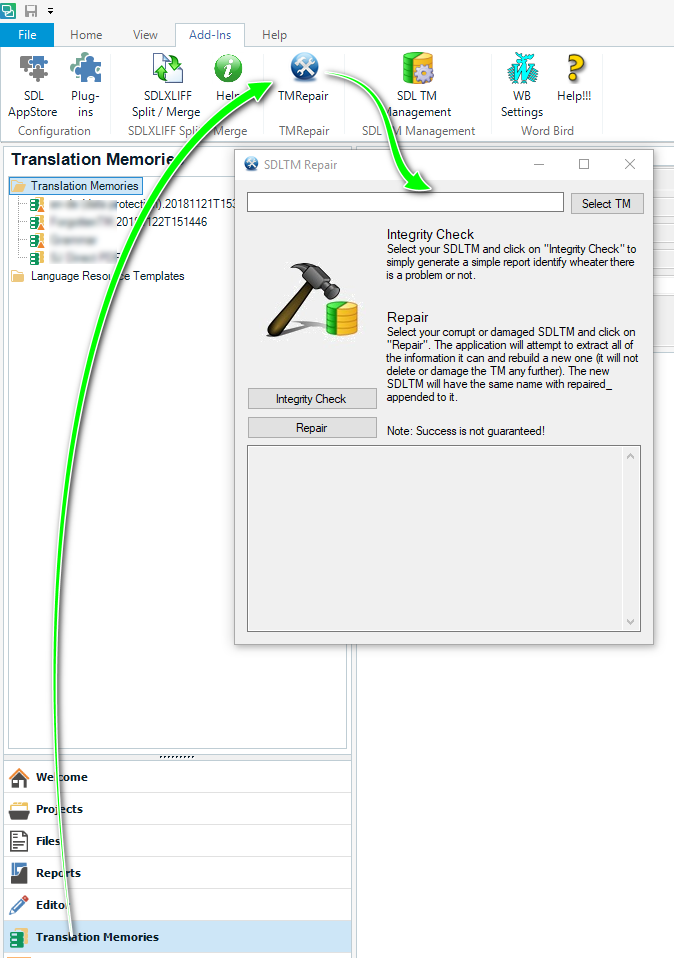
    You should now find it under Translation Memories View/Add Ins.

    Trados Studio interface showing the Translation Memories View with 'Add-Ins' tab selected and a green arrow pointing to the newly installed plugin.

    Oana Nagy | QA Engineer | RWS Group

    emoji


    Generated Image Alt-Text
    [edited by: Trados AI at 3:18 PM (GMT 0) on 28 Feb 2024]
  • Hello @SK,

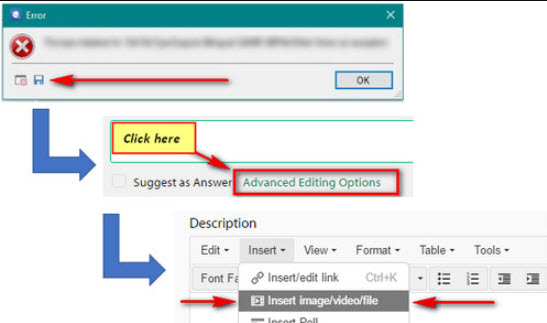
    It appears you have only posted part of the stack trace- It helps if you can post the whole of the message-

    Error dialog box with an 'OK' button. Below is an image of a text editor with 'Click here' and 'Advanced Editing Options' highlighted, and arrows pointing to these features.


    Also an explanation of what you were doing before the error appeared would also be helpful.

    Oana Nagy | QA Engineer | RWS Group

    emoji


    Generated Image Alt-Text
    [edited by: Trados AI at 3:18 PM (GMT 0) on 28 Feb 2024]
  • Thanks a lot Steven. The information on the download site said that it would be found on the desktop rather than the TM view, which I can see now. Unfortunately the tool does a very quick integrity check and very quick repair and then that's it. A window flashes up when these steps are taken but it closes too fast to be able to read what it says. I will post the full version of the stacktrace now.
  • <SDLErrorDetails time="22/01/2019 12:44:23">
      <ErrorMessage>Error al buscar en la memoria de traducción. La memoria de traducción puede contener unidades de traducción no válidas.</ErrorMessage>
      <Exception>
        <Type>Sdl.LanguagePlatform.Core.LanguagePlatformException, Sdl.LanguagePlatform.Core, Version=1.6.0.0, Culture=neutral, PublicKeyToken=c28cdb26c445c888</Type>
        <HelpLink />
        <Source>Sdl.LanguagePlatform.TranslationMemoryApi</Source>
        <HResult>-2146233088</HResult>
        <StackTrace><![CDATA[   en Sdl.LanguagePlatform.TranslationMemoryApi.FileBasedTranslationMemoryLanguageDirection.GetTranslationUnits(RegularIterator& iterator)
       en Sdl.TranslationStudio.TranslationMemoryManager.RegularTmSearcher.RegularSearchJobRequest.Execute(IJobExecutionContext context)
       en Sdl.Desktop.Platform.Implementation.Services.Job.<_worker_DoWork>b__46_0()
       en Sdl.Desktop.Platform.Implementation.Services.Log.Resources(Object message, Action action)
       en Sdl.Desktop.Platform.Implementation.Services.Job._worker_DoWork(Object sender, DoWorkEventArgs e)
       en System.ComponentModel.BackgroundWorker.OnDoWork(DoWorkEventArgs e)
       en System.ComponentModel.BackgroundWorker.WorkerThreadStart(Object argument)]]></StackTrace>
      </Exception>
      <Environment>
        <ProductName>SDL Trados Studio</ProductName>
        <ProductVersion>14.0.0.0</ProductVersion>
        <EntryAssemblyFileVersion>14.1.10014.38031</EntryAssemblyFileVersion>
        <OperatingSystem>Microsoft Windows 8.1</OperatingSystem>
        <ServicePack>NULL</ServicePack>
        <OperatingSystemLanguage>3082</OperatingSystemLanguage>
        <CodePage>1252</CodePage>
        <LoggedOnUser>SARAH-FIJO\sarah</LoggedOnUser>
        <DotNetFrameWork>4.0.30319.42000</DotNetFrameWork>
        <ComputerName>SARAH-FIJO</ComputerName>
        <ConnectedToNetwork>True</ConnectedToNetwork>
        <PhysicalMemory>4082288 MB</PhysicalMemory>
      </Environment>
    </SDLErrorDetails>

  • The error appears every time I activate this TM in editor (this has gone on for about a week). I am not conscious of having done anything odd to have caused it.
  • Hello @SK,

    You mention-

    SK said:
    he error appears every time I activate this TM in editor

    which suggests to me that the actual TM is the problem and is probably corrupted.

    Have you tried exporting the TM to TMX- then reimporting and updating in a new TM?

    Oana Nagy | QA Engineer | RWS Group

  • Yes I had figured out that the TM is corrupted hence my attempts to extract the data with the plug-in. And the first thing I did was try to export it but it was not possible. I have given up on this now as I have wasted more time in the last two weeks on Trados problems and trawling though Trados fora than actually translating. It is rather worrying that a TM (this one held more than 5 years' work) can suddenly become corrupted and unusable like that.
  •  

    SK said:
    Yes I had figured out that the TM is corrupted hence my attempts to extract the data with the plug-in.

    The description of how to access the plugin on the appstore is incorrect.  It was a standalone installer for Studio 2014 but for the sdlplugin installers you access it through the Add-ins menu in Studio.  If you still want some help with this feel free to send the SDLTM to me and I'll see if I can recover it for you (no guarantees!)

    SK said:
    It is rather worrying that a TM (this one held more than 5 years' work) can suddenly become corrupted and unusable like that.

    Fortunately this doesn't happen very often, probably less so than the old TMW files in Trados.  But like any file it's possible for it to become corrupted and this can be caused by other software you have running on your machine that may interact with these files (security software for example), or by accessing the files over a poor network connection, or through a faulty file transfer for example.  But the best thing to do is to regularly back your TMs up.  I'd recommend you do this to a flat file text format, such as TMX, as this is always going to be easier to recover in the case you have a problem.  It's also going to be easier to use these resources in another tool if you decide to change as they are designed to be exchange files.

    Paul Filkin | RWS

    Design your own training!
    You've done the courses and still need to go a little further, or still not clear? 
    Tell us what you need in our Community Solutions Hub