You are currently working on UAT 

Various possible bugs/suggestions/questions re. Studio 2019

Hi,

I have collected a few observations of possible bugs, suggestions and questions about Studio 2019 which I would like to present here. If there is a more formalized way to submit bug reports and suggestions, please let me know, but since I am not sure if all my observations are bugs, or if perhaps I just don't know how to do what I want to do, I thought it would be OK to post here.

1) Bug: When confirming a segment and moving on to the next segment, if Studio finds Fragment Matches, focus is sometimes moved away from the active segment, meaning I have to click in the segment in order to be able to type in the translation. Usually after saving one segment and moving on to the next, focus (the cursor) will automatically be in the next segment to be translated, and I can just continue writing without having to click in the segment.

2) Bug: When adding (large) TMs to a project or a project template, Studio often freezes for 1-2 minutes before you can move on to the next step.

3) Bug/question: How do I change the separator sign used for auto-substitution of dates and times? In Danish, the correct separator in dates and times is a period (full stop), not a dash or a colon, eg. "16.01.2019" for 16 January 2019, but I cannot see how to change it. The only option is dashes in dates and colons in times, and only the order of the elements can be changed, not the separator sign. If it cannot be changed, it must be considered a bug that should be fixed quickly since these types of separator signs are as different from language to language as all the other things that we have to localize in a text when we translate.

4) Bug: The very old problem with false/overlapping red lines indicating misspellings when using the Word spell checker has survived at least from Studio 2011 to Studio 2019. Isn't it about time that it was fixed?

5) Suggestion: In the New Project wizard (and elsewhere), it would be great if the Next button could have a color other than white. As it is, the button Finish is green, which draws your attention to it, while all other buttons, including Next and Cancel, are white, but most times I want to move step by step using the Next button rather than jumping directly to Finish, and it would help if the Next button was eg. light green or perhaps yellow or another color than white to make it easier to find and to avoid pressing the very visible and "attention-grabbing" green Finish button by mistake.

6) Question/suggestion: Is it possible to add expressions to auto-substitution settings? In Danish, there must be a space between eg. the number and a paragraph sign (§) - is it possible to add this so that it is recognized by auto-substitution and can be inserted with Ctrl+Comma? It works for eg. percentage signs (also requires a space in Danish), but not for the paragraph sign - probably because it is not a measurement, but it would be practical to be able to add it.

That's all I've got right now. Thanks in advance for all replies!

Parents
  •  

    Much better to raise separeat issues in separate threads as you soon lose track of what's sorted and what's not when they're all in one place like this.

    Unknown said:
    1) Bug: When confirming a segment and moving on to the next segment, if Studio finds Fragment Matches, focus is sometimes moved away from the active segment, meaning I have to click in the segment in order to be able to type in the translation. Usually after saving one segment and moving on to the next, focus (the cursor) will automatically be in the next segment to be translated, and I can just continue writing without having to click in the segment.

    I've not seen this before, but if you can give me some instructions to reproduce this I can log it as a bug.  If I can't reliably reproduce it I can't log it as a bug.

    Unknown said:
    2) Bug: When adding (large) TMs to a project or a project template, Studio often freezes for 1-2 minutes before you can move on to the next step.

    Again, we'd need reproducible steps to be able to address this. Not one I have a problem with at all.

    Unknown said:
    3) Bug/question: How do I change the separator sign used for auto-substitution of dates and times? In Danish, the correct separator in dates and times is a period (full stop), not a dash or a colon, eg. "16.01.2019" for 16 January 2019, but I cannot see how to change it. The only option is dashes in dates and colons in times, and only the order of the elements can be changed, not the separator sign. If it cannot be changed, it must be considered a bug that should be fixed quickly since these types of separator signs are as different from language to language as all the other things that we have to localize in a text when we translate.

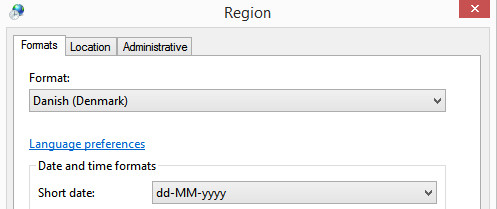
    Studio uses the regional settings on your computer.  So you probably have this:

    Region settings window showing 'Format: Danish (Denmark)' selected with 'Short date' format as 'dd-MM-yyyy'.

    You might be able to address this by changing the short date in windows, but it doesn't always work.  Otherwise the best approach is to allow Studio to convert the dates correctly (albeit the format incorrectly for your needs) and then correct them afterwards with a little regex.

    Unknown said:
    4) Bug: The very old problem with false/overlapping red lines indicating misspellings when using the Word spell checker has survived at least from Studio 2011 to Studio 2019. Isn't it about time that it was fixed?

    If you can tell me how to reproduce it we can fix it.  I've never been able to reproduce this one but have seen it mentioned a few times.

    Unknown said:
    5) Suggestion: In the New Project wizard (and elsewhere), it would be great if the Next button could have a color other than white. As it is, the button Finish is green, which draws your attention to it, while all other buttons, including Next and Cancel, are white, but most times I want to move step by step using the Next button rather than jumping directly to Finish, and it would help if the Next button was eg. light green or perhaps yellow or another color than white to make it easier to find and to avoid pressing the very visible and "attention-grabbing" green Finish button by mistake.

    Best to make this suggestion in the ideas site.

    Unknown said:
    6) Question/suggestion: Is it possible to add expressions to auto-substitution settings? In Danish, there must be a space between eg. the number and a paragraph sign (§) - is it possible to add this so that it is recognized by auto-substitution and can be inserted with Ctrl+Comma? It works for eg. percentage signs (also requires a space in Danish), but not for the paragraph sign - probably because it is not a measurement, but it would be practical to be able to add it.

    Best bet is to use something like the regex auto-suggest provider from the appstore where you could create all the rules you wanted for this type of thing.

    Paul Filkin | RWS

    Design your own training!
    You've done the courses and still need to go a little further, or still not clear? 
    Tell us what you need in our Community Solutions Hub

    emoji


    Generated Image Alt-Text
    [edited by: Trados AI at 6:55 PM (GMT 0) on 28 Feb 2024]
  • Hi Paul,

    A while ago you helped me solve the problem that Studio "inherited" wrong date formats from Windows. In the meantime I have bought a new PC, and although I changed the date formats in Windows, Studio is keeping the old (wrong) ones. What can I do about this? My PC runs Windows 10 Pro, and I have Studio 2019 SR2.

    Thanks!

    Best regards,

    Dennis

  • Former Member
    0 Former Member in reply to Dennis Boffy

    that's the Real world

    confused, intermixed and dirty one.

Reply Children
No Data