You are currently working on UAT 

Various possible bugs/suggestions/questions re. Studio 2019

Hi,

I have collected a few observations of possible bugs, suggestions and questions about Studio 2019 which I would like to present here. If there is a more formalized way to submit bug reports and suggestions, please let me know, but since I am not sure if all my observations are bugs, or if perhaps I just don't know how to do what I want to do, I thought it would be OK to post here.

1) Bug: When confirming a segment and moving on to the next segment, if Studio finds Fragment Matches, focus is sometimes moved away from the active segment, meaning I have to click in the segment in order to be able to type in the translation. Usually after saving one segment and moving on to the next, focus (the cursor) will automatically be in the next segment to be translated, and I can just continue writing without having to click in the segment.

2) Bug: When adding (large) TMs to a project or a project template, Studio often freezes for 1-2 minutes before you can move on to the next step.

3) Bug/question: How do I change the separator sign used for auto-substitution of dates and times? In Danish, the correct separator in dates and times is a period (full stop), not a dash or a colon, eg. "16.01.2019" for 16 January 2019, but I cannot see how to change it. The only option is dashes in dates and colons in times, and only the order of the elements can be changed, not the separator sign. If it cannot be changed, it must be considered a bug that should be fixed quickly since these types of separator signs are as different from language to language as all the other things that we have to localize in a text when we translate.

4) Bug: The very old problem with false/overlapping red lines indicating misspellings when using the Word spell checker has survived at least from Studio 2011 to Studio 2019. Isn't it about time that it was fixed?

5) Suggestion: In the New Project wizard (and elsewhere), it would be great if the Next button could have a color other than white. As it is, the button Finish is green, which draws your attention to it, while all other buttons, including Next and Cancel, are white, but most times I want to move step by step using the Next button rather than jumping directly to Finish, and it would help if the Next button was eg. light green or perhaps yellow or another color than white to make it easier to find and to avoid pressing the very visible and "attention-grabbing" green Finish button by mistake.

6) Question/suggestion: Is it possible to add expressions to auto-substitution settings? In Danish, there must be a space between eg. the number and a paragraph sign (§) - is it possible to add this so that it is recognized by auto-substitution and can be inserted with Ctrl+Comma? It works for eg. percentage signs (also requires a space in Danish), but not for the paragraph sign - probably because it is not a measurement, but it would be practical to be able to add it.

That's all I've got right now. Thanks in advance for all replies!

Parents
  •  

    Much better to raise separeat issues in separate threads as you soon lose track of what's sorted and what's not when they're all in one place like this.

    Unknown said:
    1) Bug: When confirming a segment and moving on to the next segment, if Studio finds Fragment Matches, focus is sometimes moved away from the active segment, meaning I have to click in the segment in order to be able to type in the translation. Usually after saving one segment and moving on to the next, focus (the cursor) will automatically be in the next segment to be translated, and I can just continue writing without having to click in the segment.

    I've not seen this before, but if you can give me some instructions to reproduce this I can log it as a bug.  If I can't reliably reproduce it I can't log it as a bug.

    Unknown said:
    2) Bug: When adding (large) TMs to a project or a project template, Studio often freezes for 1-2 minutes before you can move on to the next step.

    Again, we'd need reproducible steps to be able to address this. Not one I have a problem with at all.

    Unknown said:
    3) Bug/question: How do I change the separator sign used for auto-substitution of dates and times? In Danish, the correct separator in dates and times is a period (full stop), not a dash or a colon, eg. "16.01.2019" for 16 January 2019, but I cannot see how to change it. The only option is dashes in dates and colons in times, and only the order of the elements can be changed, not the separator sign. If it cannot be changed, it must be considered a bug that should be fixed quickly since these types of separator signs are as different from language to language as all the other things that we have to localize in a text when we translate.

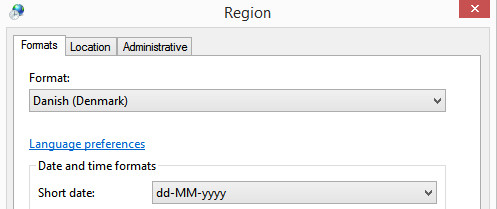
    Studio uses the regional settings on your computer.  So you probably have this:

    Region settings window showing 'Format: Danish (Denmark)' selected with 'Short date' format as 'dd-MM-yyyy'.

    You might be able to address this by changing the short date in windows, but it doesn't always work.  Otherwise the best approach is to allow Studio to convert the dates correctly (albeit the format incorrectly for your needs) and then correct them afterwards with a little regex.

    Unknown said:
    4) Bug: The very old problem with false/overlapping red lines indicating misspellings when using the Word spell checker has survived at least from Studio 2011 to Studio 2019. Isn't it about time that it was fixed?

    If you can tell me how to reproduce it we can fix it.  I've never been able to reproduce this one but have seen it mentioned a few times.

    Unknown said:
    5) Suggestion: In the New Project wizard (and elsewhere), it would be great if the Next button could have a color other than white. As it is, the button Finish is green, which draws your attention to it, while all other buttons, including Next and Cancel, are white, but most times I want to move step by step using the Next button rather than jumping directly to Finish, and it would help if the Next button was eg. light green or perhaps yellow or another color than white to make it easier to find and to avoid pressing the very visible and "attention-grabbing" green Finish button by mistake.

    Best to make this suggestion in the ideas site.

    Unknown said:
    6) Question/suggestion: Is it possible to add expressions to auto-substitution settings? In Danish, there must be a space between eg. the number and a paragraph sign (§) - is it possible to add this so that it is recognized by auto-substitution and can be inserted with Ctrl+Comma? It works for eg. percentage signs (also requires a space in Danish), but not for the paragraph sign - probably because it is not a measurement, but it would be practical to be able to add it.

    Best bet is to use something like the regex auto-suggest provider from the appstore where you could create all the rules you wanted for this type of thing.

    Paul Filkin | RWS

    Design your own training!
    You've done the courses and still need to go a little further, or still not clear? 
    Tell us what you need in our Community Solutions Hub

    emoji


    Generated Image Alt-Text
    [edited by: Trados AI at 6:55 PM (GMT 0) on 28 Feb 2024]
  • Hi Paul,

    Thanks for taking the time to help out. I will follow your suggestion and create separate threads next time. It has taken me a while to reply since I wanted to gather some more info and documentation (screendumps).

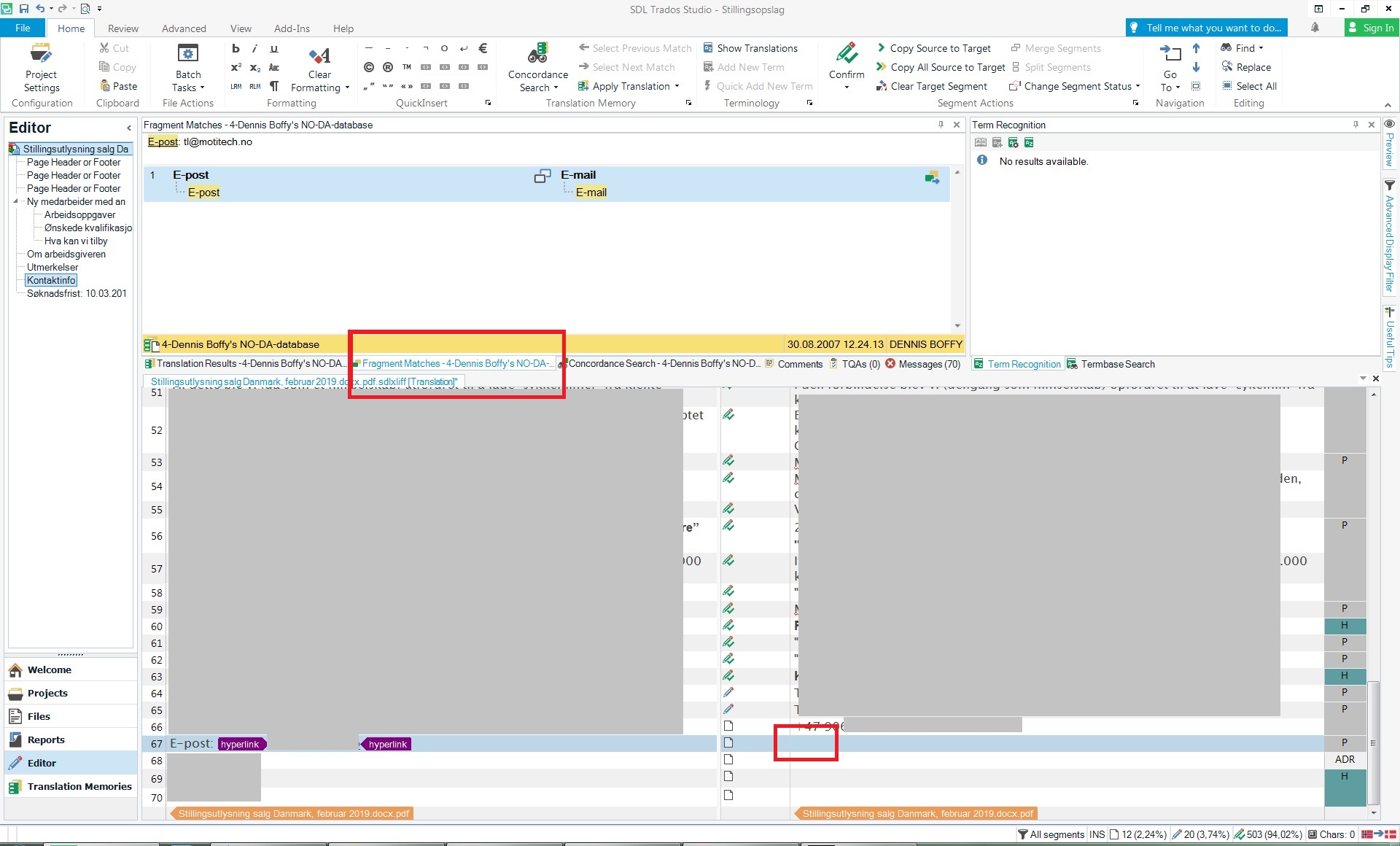
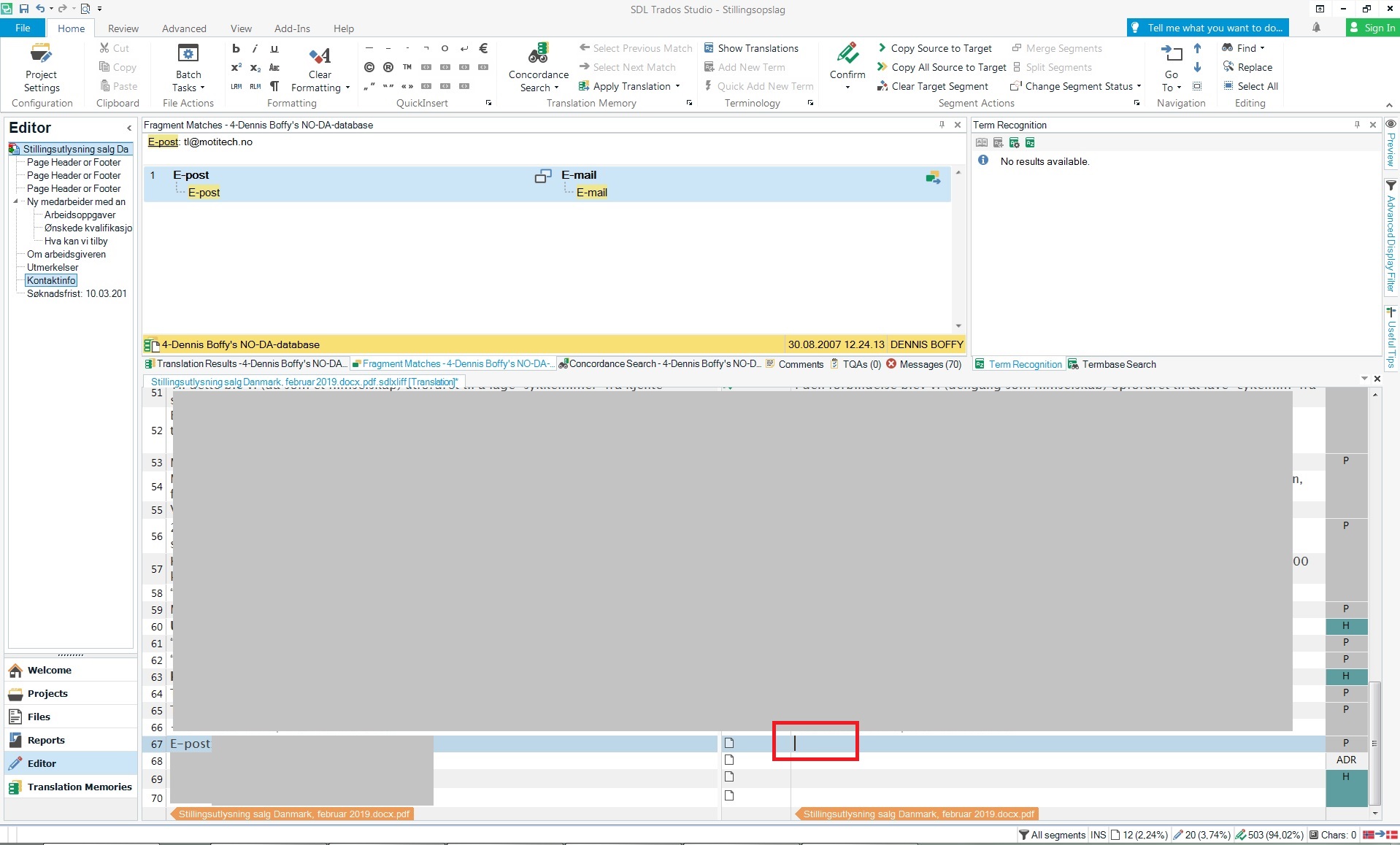
    1) With regard to reproducing the problem, it is fairly simple, apart from the fact that it only happens sometimes. When I have a document open for translation in the editor, and I move the cursor (focus) to an unconfirmed segment (make the segment active) by confirming the previous segment, and if Studio then finds and shows a Fragment Match, the cursor sometimes disappears from the target segment (the segment becomes inactive/loses focus). I will then have to click in the target segment with the mouse in order to be able to write the translation. It does not happen every time. I have been unable to determine which factors may influence whether it happens or not. EDIT: It seems to primarily happen the first time a Fragment Match is encountered after opening a document for translation. I am attaching 2 screendumps, one showing the screen right after the cursor has disappeared from the target segment and a Fragment Match showing, the second one after I have clicked in the target segment to make the cursor return. My system has Win7 (fully updated) and Studio 2019 SR1.

    Screenshot of Trados Studio editor showing a Fragment Match with the cursor missing from the target segment.

    Screenshot of Trados Studio editor after clicking in the target segment to return the cursor for translation.

    2) To reproduce, try creating a project with a large TM. When I am creating a project using the New Project wizard and add my main TM (2GB+) by clicking Use... in the Translation Resources step, Studio will freeze and be unresponsive for a period of time up to about 1-2 minutes. The length of the period of time that Studio freezes seems to be more or less proportional to the size of the TM being added. My PC is not particularly slow, it has an Intel i5 processor, 8 GB RAM and plenty of harddisk space.

    3) Fixed! You were correct, it was Windows' fault. I changed the regional settings for date and time formats, and Studio now inserts the correct formats.

    4) Same system as mentioned under question 1 - I use the spellchecker from MS Word 2013. This usually (only?) happens when I copy the source segment into the target segment and start editing it. Red lines will appear on top of each other and/or stationary red lines will appear that do not move even as I add text in front of the word originally marked by the red line, causing the red lines to become "detached" from words. The wrong red lines disappear if you confirm the segment, delete the segment from the editor and "reloads" the translation from the TM. I am very surprised that you have never encountered this problem - it is even prevalent enough that someone has created an AutoHotKey script to "reload" the segment the way I described in order to clear the wrong red lines. I am again attaching 2 screendumps, one showing the erroneous red lines, the second showing the segment with correct red lines (in fact indicating spelling errors) after "refreshing" - in the screendump, the top line is in Danish and spelled correctly, the bottom line is in Norwegian and thus correctly triggers spelling errors. Please note especially in the top line of screendump 1 how some of the red lines do not fit with the words.

    Screenshot showing erroneous red lines on top of each other in the Trados Studio spellchecker.

    Screenshot showing the segment with correct red lines indicating spelling errors after refreshing in Trados Studio.

    5) Can you tell me where to find the ideas site?

    6) I guess I did not mean auto-substition, but quick insert? What I wanted was to be able to press Ctrl+Comma in order to insert eg. "§ 1" if "§1" is present in the source text. Is this possible?

    emoji


    Generated Image Alt-Text
    [edited by: Trados AI at 6:56 PM (GMT 0) on 28 Feb 2024]
  • With respect to #1, I have a different cursor problem. Who knows, maybe they are related because Studio uses a non-standard window design.

    My cursor problem generally disappears when I restart Studio, so I have my suspicions that it might be due to a communication problem between Studio and the Windows 10 environment. Maybe a restart would solve your cursor problem, too ?

    Here is what happens to me:

    When I am in a different window, say Word, Acrobat Reader, Chrome, etc., and I click on a Studio target segment in the editor, the cursor may in fact show up in the target segment -- even though the focus has remained in the previous window.

    This is very frustrating, as the visual cue provided by the cursor showing up in the target segment becomes unreliable. No matter how often this happens, there is always a second or two of confusion before I realize that it is happening again.

    Then I have to move my attention back to the "previous" window (actually still the "current" window) and correct whatever has happened due to the text being incorrectly typed there. Then I click in the Studio target segment again -- generally I start clicking twice, just to make sure the cursor is actually where it appears to be.

    This doesn't happen all the time, but once it starts happening I generally don't have to wait long before it happens again. (By the way, I have never had this problem with any other program.)

    So when I get the chance, I save everything and restart Studio -- hoping I will be lucky and the problem will disappear.

    I already mentioned this problem years ago when I was on a different computer -- but I'm not holding my breath waiting for a solution. If this is due to Studio's non-standard window design, I doubt SDL has any desire to bring the UI up-to-date any time soon.

    Best regards,
    Bruce Campbell
    ASAP Language Services

Reply
  • With respect to #1, I have a different cursor problem. Who knows, maybe they are related because Studio uses a non-standard window design.

    My cursor problem generally disappears when I restart Studio, so I have my suspicions that it might be due to a communication problem between Studio and the Windows 10 environment. Maybe a restart would solve your cursor problem, too ?

    Here is what happens to me:

    When I am in a different window, say Word, Acrobat Reader, Chrome, etc., and I click on a Studio target segment in the editor, the cursor may in fact show up in the target segment -- even though the focus has remained in the previous window.

    This is very frustrating, as the visual cue provided by the cursor showing up in the target segment becomes unreliable. No matter how often this happens, there is always a second or two of confusion before I realize that it is happening again.

    Then I have to move my attention back to the "previous" window (actually still the "current" window) and correct whatever has happened due to the text being incorrectly typed there. Then I click in the Studio target segment again -- generally I start clicking twice, just to make sure the cursor is actually where it appears to be.

    This doesn't happen all the time, but once it starts happening I generally don't have to wait long before it happens again. (By the way, I have never had this problem with any other program.)

    So when I get the chance, I save everything and restart Studio -- hoping I will be lucky and the problem will disappear.

    I already mentioned this problem years ago when I was on a different computer -- but I'm not holding my breath waiting for a solution. If this is due to Studio's non-standard window design, I doubt SDL has any desire to bring the UI up-to-date any time soon.

    Best regards,
    Bruce Campbell
    ASAP Language Services

Children
No Data