 Translate



I can't use "Apply translation" function. It has simply disappeared. It appears only in some cases. Even when TM segment has 100% score, it isn't in context menu. What 's going on?
No Paul, this is TM Window, not Concordance window.
You are currently working on UAT

I can't use "Apply translation" function. It has simply disappeared. It appears only in some cases. Even when TM segment has 100% score, it isn't in context menu. What 's going on?
No Paul, this is TM Window, not Concordance window.
Paul Filkin | RWS
Design your own training!
You've done the courses and still need to go a little further, or still not clear?
Tell us what you need in our Community Solutions Hub
Hi Kamil, I was wondering whether this might be a misunderstanding as Studio 2019 has only one green/yellow icon on top of the translation window
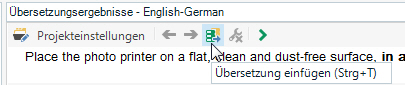
instead of three in Studio 2017 (when changing versions, this made me think that the function Add Translation has disappeared).
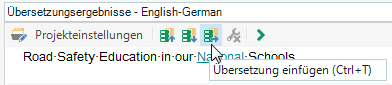
But, as Paul said before - it might be good to test the keyboard shortcut Strg + T. Best - Renate Dockhorn


