Translate



Hello,
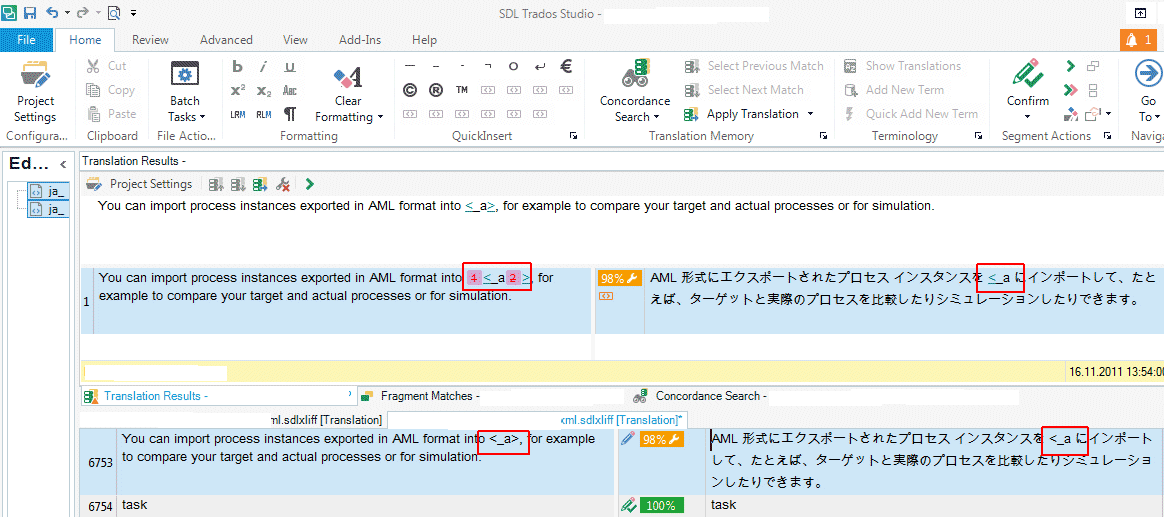
I have a problem with missing brackets (>) from the translations in the TM.
There are a lot of sentences including texts enclosed with <> (e.g. <_product>) translated and saved in a TM. When I translate a new sentence with the brackets, the TM does not offer the existing translations correctly. Closing brackets go missing from the translations.
I will explain this problem with an example.
There is a source text: Import the calendar to [tag]<_product>[/tag]
This was translated and saved in TM (カレンダーを [tag]<_product>[/tag] にインポート). In a new file, there is exactly the same sentence, but without the tags. When I open the segment in Studio, the closing bracket is missing from the translation:
カレンダーを <_product にインポート
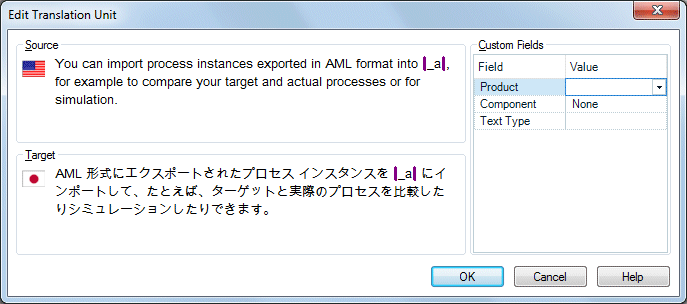
Does Studio understand brackets (<>) as a part of the tag? Unfortunately, I cannot see what kind of tags were used in the translation. When I open the TU via Edit Translation Unit, only purple lines are shown where tags and <> are...
Thank you in advance!
Regards,
Satoe