You are currently working on UAT 

I need tips for using Studio 2019 on 2 different laptops

Hello,

I live in the US and part time in Europe. I have a laptop both places and a Studio licence valid for both (Freelance Plus). I am fairly new to Studio and would like some tips on how to do this, for example:

- can I access TMs from both ends? Are they stored on a cloud? 

- what about apps? do I need to install them separately on both computers? 

- I see that Trados now has a product called Online Translation Editor, would this be useful for me?

- same question for SDL Language cloud

- any other tip or thing I need to know will help greatly!

Thank you!

Parents
  • Hello  ,

    I think it would help to answer each question in turn.

    Marguerite Storm said:
    - can I access TMs from both ends? Are they stored on a cloud? 

    TM's are normally stored locally on your machine- meaning you would need to transfer these manually from one PC to the other each time.

    However, you can store the TM in the cloud if you wish- (DropBox for instance) and access the resources as long as you have a stable internet connection.

    If you decide to use cloud storage- always make sure you have a back up copy locally.

    Marguerite Storm said:
    - what about apps? do I need to install them separately on both computers? 

    Yes- you will need to install these individually on each machine.

    - I see that Trados now has a product called Online Translation Editor, would this be useful for me?

    Not really as you are using Studio- OTE is more for the casual 'gist' translator

    Marguerite Storm said:
    - same question for SDL Language cloud

    As a professional translator using Studio- Language Cloud will I am sure benefit you and help speed up translations.

    Although you will probably need to edit the suggestions, once done you can save these to your TM and reuse them.

    If you need any more help, please don't hesitate to ask.


    Oana Nagy | QA Engineer | RWS Group

  • Thank you Steven, and one more: I use Dropbox and would love to store TMS there. Pls tell me how and can I set it up so that All TMs are then automatically stored on DP?
  • Hello

    You will store TM's on DropBox pretty much the same way as you store them locally- but instead of the address being your C: drive, (C:\Users\yourname\Documents\SDL Studio 2019\Studio 2019\Projects\Samples\SampleProject\TMs you will do this on DP

    First of all you should install the desktop application- this makes everything that little easier.

    Then create the TM folder in DropBox and save (copy) your TM's to the folder (I would suggest renaming the TM's you store on DB so you know which TM's are local and which are in the cloud.

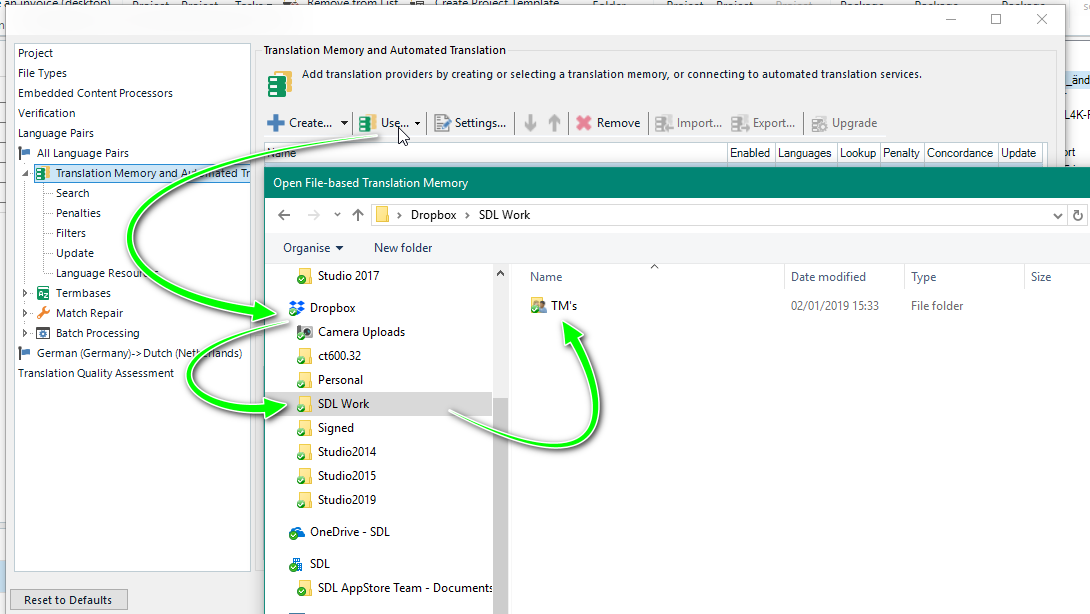
    Now when you create a project, you can simple choose use file based translations and select those that you have in the 'cloud'

    Screenshot of Trados Studio showing the process of adding Translation Memory from a DropBox folder, with arrows indicating the flow of action.

    Oana Nagy | QA Engineer | RWS Group

    emoji


    Generated Image Alt-Text
    [edited by: Trados AI at 3:01 PM (GMT 0) on 28 Feb 2024]
Reply
  • Hello

    You will store TM's on DropBox pretty much the same way as you store them locally- but instead of the address being your C: drive, (C:\Users\yourname\Documents\SDL Studio 2019\Studio 2019\Projects\Samples\SampleProject\TMs you will do this on DP

    First of all you should install the desktop application- this makes everything that little easier.

    Then create the TM folder in DropBox and save (copy) your TM's to the folder (I would suggest renaming the TM's you store on DB so you know which TM's are local and which are in the cloud.

    Now when you create a project, you can simple choose use file based translations and select those that you have in the 'cloud'

    Screenshot of Trados Studio showing the process of adding Translation Memory from a DropBox folder, with arrows indicating the flow of action.

    Oana Nagy | QA Engineer | RWS Group

    emoji


    Generated Image Alt-Text
    [edited by: Trados AI at 3:01 PM (GMT 0) on 28 Feb 2024]
Children