You are currently working on UAT 

Alignment uses different import settings for source and target file (IDML)

Hello,

With Studio 2019 Professional, I am trying to align two IDML files generated with InDesign 2019, each containing hidden text. The file type is set to not extract hidden text.

The aligner reportedly uses the file type of the currently active project. (This is a bit odd and it would be better if that could be defined in the aligning wizard: "Choose project or project template for file types" or such)

Both the source file in the aligner and any idml files I open in that project do not extract the hidden text - so far so good.

Very surprisingly, the target text in the aligner does extract both hidden and shown text. Is that a bug or a feature? Is there a separate place where I can set the parsing rules for the target file type of an alignment process?

Daniel

[Edit] I should add that the aligner does a pretty nice job of getting the corresponding segments in parallel, so my current procedure is just to disconnect all and then go through the document to connect the corresponding segments. Having said this, I am working on small files. For a large file, I would find this rather time-consuming.


Parents
  • Hi  

    Unknown said:
    The aligner reportedly uses the file type of the currently active project. (This is a bit odd and it would be better if that could be defined in the aligning wizard: "Choose project or project template for file types" or such)

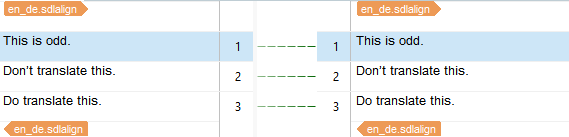
    There was a time when I think this is how it worked, but I don't believe it does this anymore.   might be able to confirm this properly.  I ran a very simple test using Word files with just three entences and hid the middle one.  I then aligned with default filetype settings under File -> Options, not Project Settings.  This is what I get:

    Trados Studio alignment comparison showing two segments with 'This is odd.' and 'Do translate this.' in both source and target columns.

    I then change the setting under File -> Options and did it again.  This time I get this:

    Trados Studio alignment result with three segments, including 'This is odd.', 'Don't translate this.', and 'Do translate this.' in both source and target columns.

    To be sure I think changed the Project Settings of the active project to extract hidden text and left File -> Options as default.  It followed the setting in File -> Options.

    I also checked to see what difference it made if I changed the default Project Template and this clearly replicated the settings in my File -> Options.

    I'm pretty sure things were not as consistent as this in the past but they seem to be now.  Perhaps you can check this with your IDML files?

    Paul Filkin | RWS

    Design your own training!
    You've done the courses and still need to go a little further, or still not clear? 
    Tell us what you need in our Community Solutions Hub

    emoji


    Generated Image Alt-Text
    [edited by: Trados AI at 2:58 PM (GMT 0) on 28 Feb 2024]
  • Hello Paul,

    I think we are getting closer to the phenomenon I observed, which is odd indeed.

    Using InDesign CC2019 I opened an indd file, which was generated with CC2018. I hid some (English) text and exported to idml, then I undid the hiding and hid some (German) text and exported that to another idml.

    So I arrived at two idml files, let's call them Only_EN.idml and Only_DE.idml

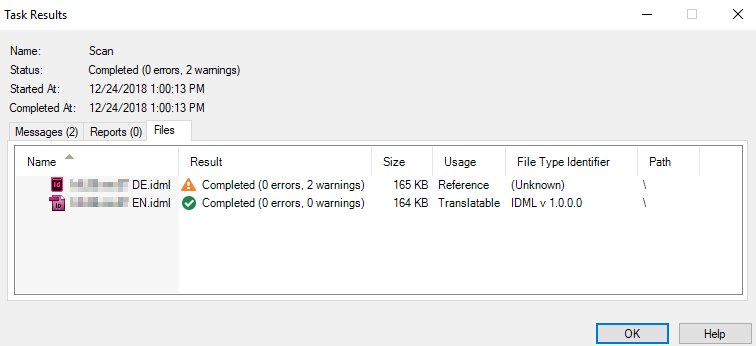
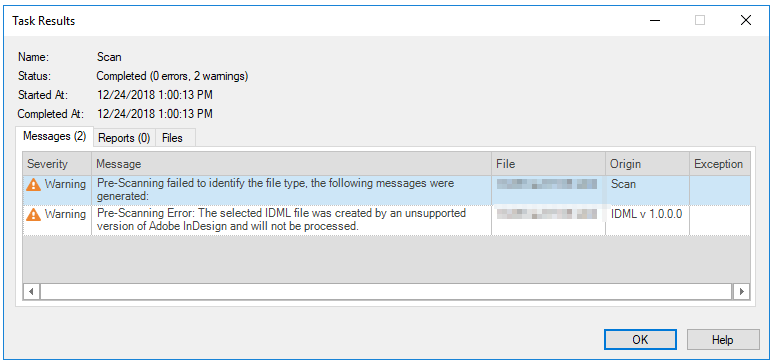
    I now wanted to see how they are imported into a normal project, and added them to a project that had "process unsupported file versions" unticked. The Only_EN file imported as translatable, the Only_DE file imported as "Reference":

    Trados Studio task results window showing two files: 'Only_EN.idml' marked as 'Completed (0 errors, 2 warnings)' and 'Only_DE.idml' marked as 'Completed (0 errors, 0 warnings)'. Both files are 194 KB in size.

    Trados Studio task results window with a warning message stating 'Pre-Scanning Error: The selected file, Only_EN.idml, was created by an unsupported version of Adobe InDesign and will not be processed.'

    When check the "unsupported versions" box I can process both, but the EN file does not show hidden text while the DE one does. (The surprise is here that they were both created with CC2019 in what looks like an identical process to me.)

    But it is not simply that Studio always imports texts from CC2019 generated idmls. I generated a simple indd file with "Hello World" and "Hallo Welt" text boxes, hiding one as I exported to idml. These files are correcly processed (when the "unsupported versions" box is checked).

    So this is not an aligner issue, but an issue with the idml file type and CC2019.

    Daniel

    emoji


    Generated Image Alt-Text
    [edited by: Trados AI at 2:58 PM (GMT 0) on 28 Feb 2024]
Reply
  • Hello Paul,

    I think we are getting closer to the phenomenon I observed, which is odd indeed.

    Using InDesign CC2019 I opened an indd file, which was generated with CC2018. I hid some (English) text and exported to idml, then I undid the hiding and hid some (German) text and exported that to another idml.

    So I arrived at two idml files, let's call them Only_EN.idml and Only_DE.idml

    I now wanted to see how they are imported into a normal project, and added them to a project that had "process unsupported file versions" unticked. The Only_EN file imported as translatable, the Only_DE file imported as "Reference":

    Trados Studio task results window showing two files: 'Only_EN.idml' marked as 'Completed (0 errors, 2 warnings)' and 'Only_DE.idml' marked as 'Completed (0 errors, 0 warnings)'. Both files are 194 KB in size.

    Trados Studio task results window with a warning message stating 'Pre-Scanning Error: The selected file, Only_EN.idml, was created by an unsupported version of Adobe InDesign and will not be processed.'

    When check the "unsupported versions" box I can process both, but the EN file does not show hidden text while the DE one does. (The surprise is here that they were both created with CC2019 in what looks like an identical process to me.)

    But it is not simply that Studio always imports texts from CC2019 generated idmls. I generated a simple indd file with "Hello World" and "Hallo Welt" text boxes, hiding one as I exported to idml. These files are correcly processed (when the "unsupported versions" box is checked).

    So this is not an aligner issue, but an issue with the idml file type and CC2019.

    Daniel

    emoji


    Generated Image Alt-Text
    [edited by: Trados AI at 2:58 PM (GMT 0) on 28 Feb 2024]
Children
No Data