You are currently working on UAT 

Mismatching in the formatting of the Farsi Trados Studio project which is exported for bilingual reviewing

Hi!

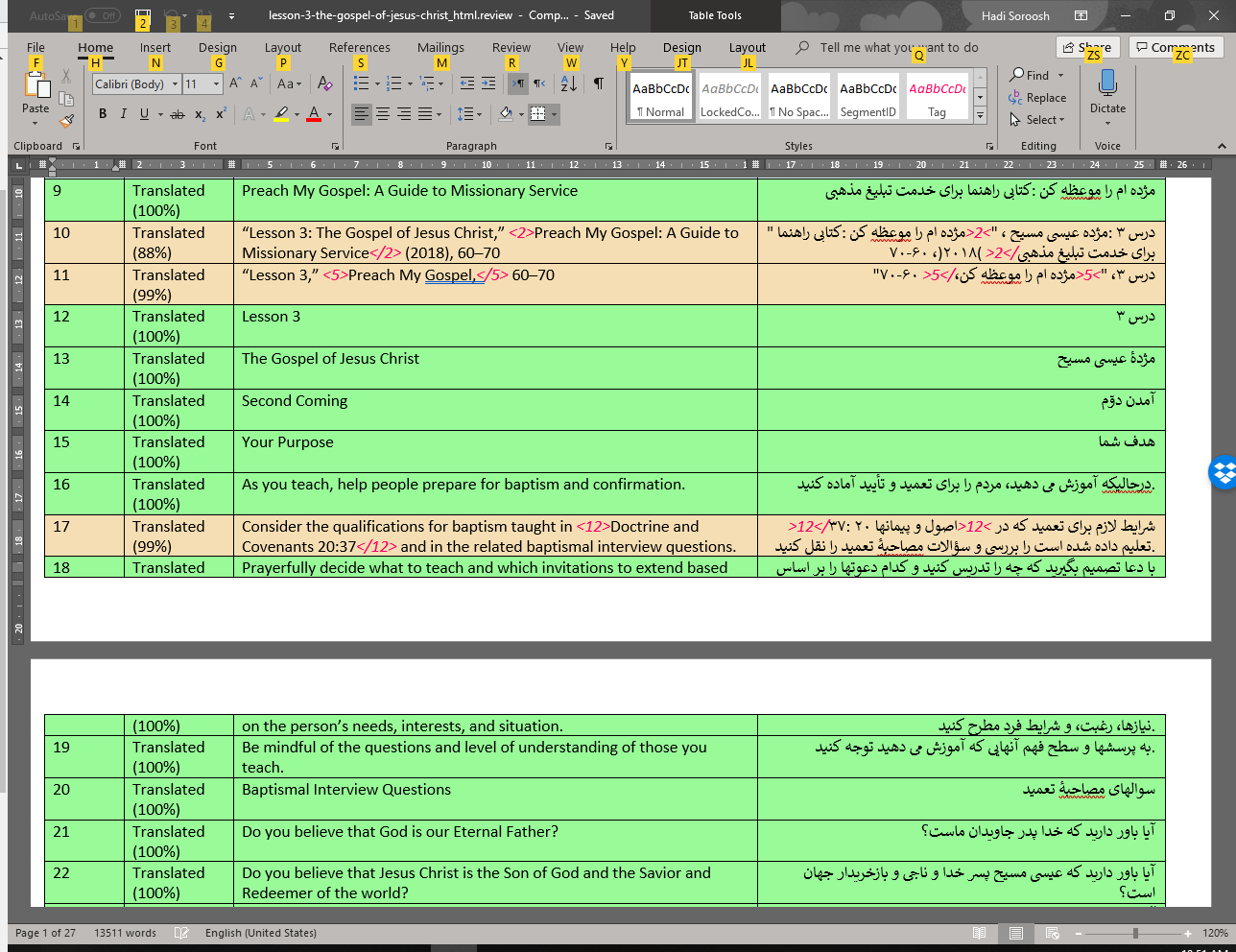
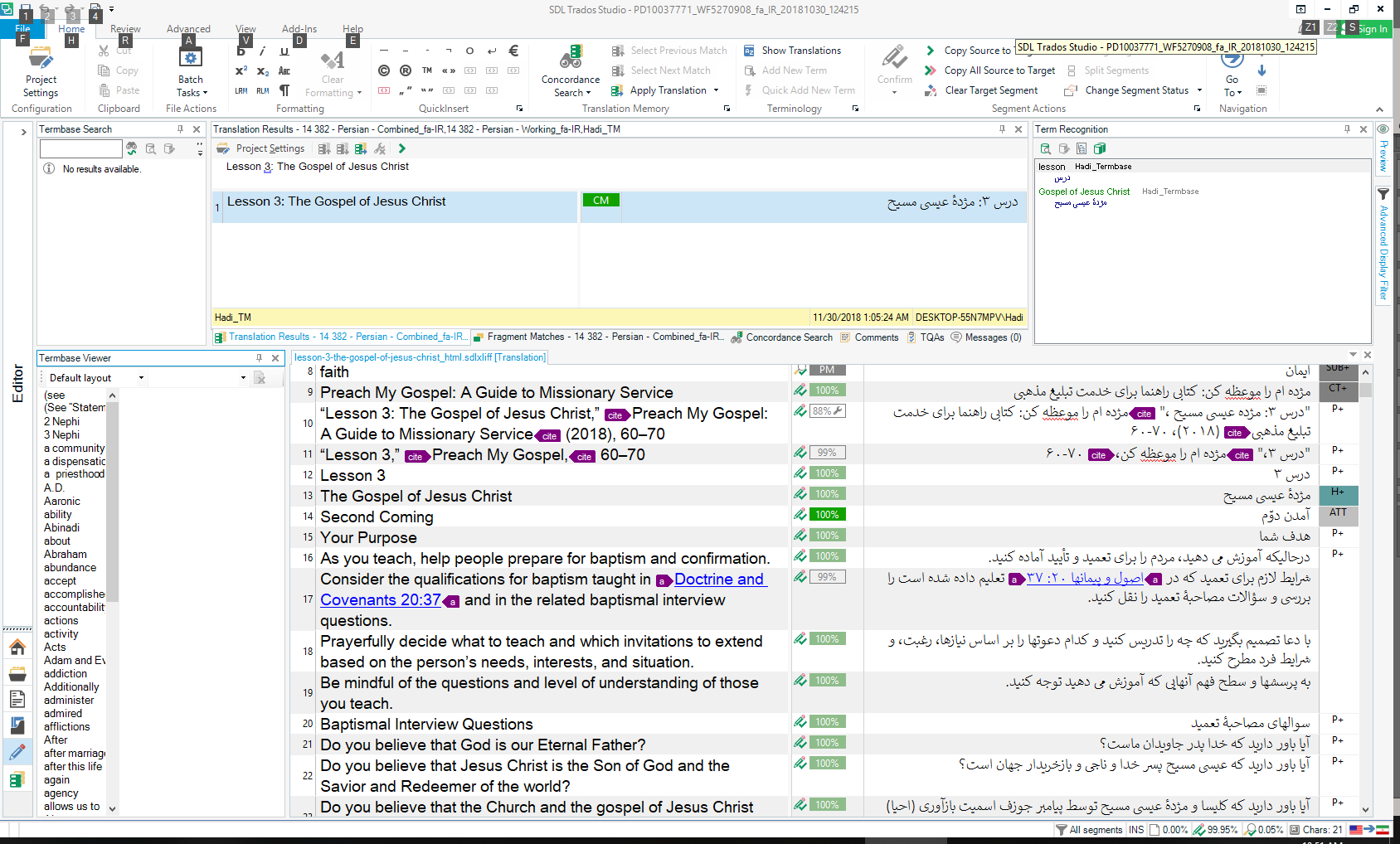
I just finished a translation project with Trados Studio 2017 Freelance. For content reviewing, the project has to be exported because our reviewer does not have Trados Studio on his machine. I used the Batch Task> Export for Bilingual Review and followed the steps and the MS-Word files are created. When I opened the word files, I see the Farsi text is somehow messed up wherever there is a tag, number or a symbol. An example of what I see:
Screenshot of Trados Studio 2017 showing a translation project with Farsi text correctly aligned and formatted within the software interface.

You can see that the periods at the end of sentences (segments 16,17,19) are misplaced and they show up at the beginning of the line. You can see that the tags and numbers are misplaced. But the same segments look perfect when I see them in the Studio:
Screenshot of an exported MS-Word file with Farsi text from Trados Studio where periods, tags, and numbers are misplaced, demonstrating formatting issues.

In the exported files, you can see that the parenthesis for seg. 10 is like )2018( instead of (2018), the quotation marks are at the wrong place and the "60-70" is changed to "70-60" in Farsi. These sort of problems apply to the entire of my project which make the text uneditable. What should I do to get the exported text straight like how it is in the Studio?

Thank you for your help.

Hadi


Generated Image Alt-Text
[edited by: Trados AI at 3:21 PM (GMT 0) on 28 Feb 2024]

emoji
Parents
  • Hello ,

    Thank you for providing these screenshots.

    In this case, where you see the Farsi content mismatching is the external review file, it's because Microsoft Word cannot handle bilingual documents where one language is left to right and the other is right to left.
    This means that Word can only display the content they way it's seen in your file, but provided that no structural changes are made to the document (tag modification, changes in numbers and periods in this case), Studio should still be able to import the content properly.

    Still, when it comes to an external reviewer, it is hard to explain what not to modify during the review.

    The best solution would be if your reviewer could use a Studio Starter license, and then they would be able to review the SDLXLIFF file itself directly.

    Another possibility might be to export the target file for the reviewer, and then use the 'Export from reviewed target file (reftrofit)' option is Studio but again it's not fail safe either as Word might have difficulties displaying the target content. However that way the tags are not visible there, so the reviewer cannot edit them.

    Sorry that we could not help you more.

    Best wishes,
    Greta

    Greta Magyar - Customer Success Representative - SDL
Reply
  • Hello ,

    Thank you for providing these screenshots.

    In this case, where you see the Farsi content mismatching is the external review file, it's because Microsoft Word cannot handle bilingual documents where one language is left to right and the other is right to left.
    This means that Word can only display the content they way it's seen in your file, but provided that no structural changes are made to the document (tag modification, changes in numbers and periods in this case), Studio should still be able to import the content properly.

    Still, when it comes to an external reviewer, it is hard to explain what not to modify during the review.

    The best solution would be if your reviewer could use a Studio Starter license, and then they would be able to review the SDLXLIFF file itself directly.

    Another possibility might be to export the target file for the reviewer, and then use the 'Export from reviewed target file (reftrofit)' option is Studio but again it's not fail safe either as Word might have difficulties displaying the target content. However that way the tags are not visible there, so the reviewer cannot edit them.

    Sorry that we could not help you more.

    Best wishes,
    Greta

    Greta Magyar - Customer Success Representative - SDL
Children