Translate



Hi everybody. After an update to SR1, the freelance version of Studio can't open wsxz packages that contain xlf files as a result of the following error: ‘Could not load file or assembly 'log4net Version=1.2.10.0’. The source language is en-US, the target language is sr-Latn-CS. Other wsxz packages open without any problems. Here is what I did to test the issue:
- I repaired WorldServer Components via Control Panel, but the issue remained.
- I tried opening the package in Studio 2017 which I still have on my machine precisely in case of any issues. The package opened without any problems.
- I tried opening non-xlf wsxz packages in Studio 2019 SR1 and they were working perfectly (the source and the target languages were the same as above). They contained sdlxliff files.
- I tried opening the problematic wsxz package on another Windows 10 machine where I had a previous 2019 version (prior to SR1) and the package opened regularly. That machine has only Studio 2019 installed and not any other CAT tool, so there’s no interference with other Studio/CAT products. Moreover, the window layout on this machine is default.
- I updated Studio to SR1 on that second machine as well and the issue was the same: the wsxz package with xlf files could not be opened in Studio 2019 SR1 on two different machines. The project I should be working on contains 8 wsxz packages and none of them could be opened.
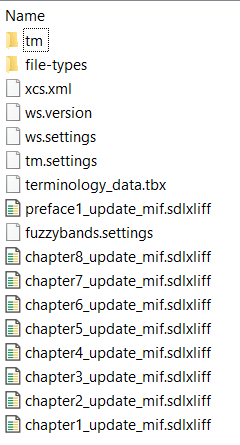
For the time being, this is not an urgent case for me because I can work on my project in Studio 2017. I can also revert to 2019 version prior to SR1 update since it works perfectly with these packages. However, I would appreciate if the issue could be addressed so as to see whether the problem is within packages, my machines or Studio SR1. I’m not sure whether the ‘ws.version’ file indicates the version of WorldServer the package was created in, but when opened in a text editor, it reads 10.2.1 in both xlf and non-xlf packages. The following is an internal structure of an unopened wsxz project package that works in Studio 2019 SR1:
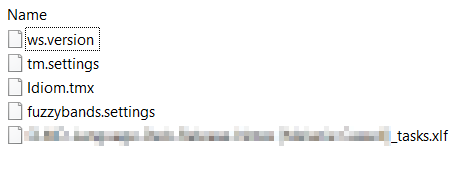
And this is the structure of the unopened wsxz package that is not working in SR1:
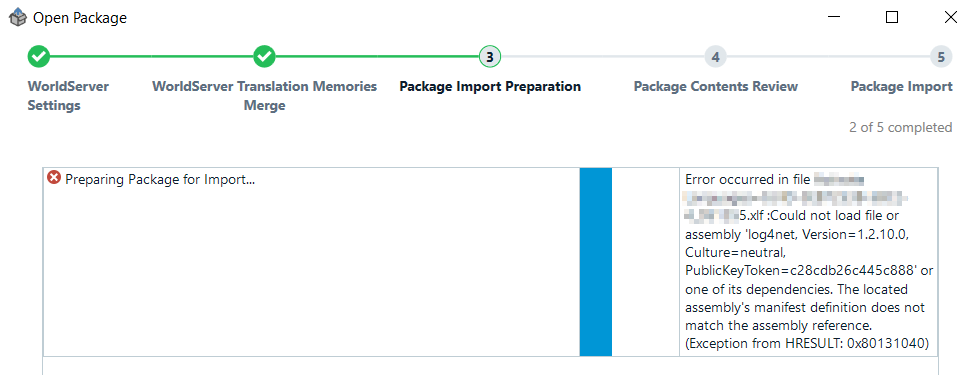
Here is the screenshot of the error message that appears upon opening the package:
And the error log is as follows:
<SDLErrorDetails time="13.12.2018. 01:23:58">
<ErrorMessage>Error occurred in file XXXX.xlf :Could not load file or assembly 'log4net, Version=1.2.10.0, Culture=neutral, PublicKeyToken=c28cdb26c445c888' or one of its dependencies. The located assembly's manifest definition does not match the assembly reference. (Exception from HRESULT: 0x80131040)</ErrorMessage>
<Exception>
<Type>System.Exception, mscorlib, Version=4.0.0.0, Culture=neutral, PublicKeyToken=b77a5c561934e089</Type>
<HelpLink />
<Source>Sdl.TranslationStudio.Packaging.Convertors.WorldServer</Source>
<HResult>-2146233088</HResult>
<StackTrace><![CDATA[ at Sdl.TranslationStudio.Packaging.Convertors.WorldServer.WsPackageConvertor.CheckTaskFileResults(ITaskFile[] taskFiles)
at Sdl.TranslationStudio.Packaging.Convertors.WorldServer.Ws2RivelinConverter.ConvertWsXliffToSdlXliff(IPackageProject targetPackage)
at Sdl.TranslationStudio.Packaging.Convertors.WorldServer.Ws2RivelinConverter.Convert(Boolean runAnalysisTask)
at Sdl.TranslationStudio.Packaging.Convertors.WorldServer.WsPackageConvertor.ConvertPackage(String wsPackageFilePath, String targetPackagePath, Boolean runAnalysisTask, ImportSettings tmImportSettings)
at Sdl.TranslationStudio.Packaging.PackageImport.ConvertProjectPackageJobRequest.Execute(IJobExecutionContext context)
at Sdl.Desktop.Platform.Implementation.Services.Job.<_worker_DoWork>b__47_0()
at Sdl.Desktop.Logger.Log.Resources(Object message, Action action)
at Sdl.Desktop.Platform.Implementation.Services.Job._worker_DoWork(Object sender, DoWorkEventArgs e)
at System.ComponentModel.BackgroundWorker.OnDoWork(DoWorkEventArgs e)
at System.ComponentModel.BackgroundWorker.WorkerThreadStart(Object argument)]]></StackTrace>
<InnerException>
<Type>System.IO.FileLoadException, mscorlib, Version=4.0.0.0, Culture=neutral, PublicKeyToken=b77a5c561934e089</Type>
<FileName>log4net, Version=1.2.10.0, Culture=neutral, PublicKeyToken=c28cdb26c445c888</FileName>
<FusionLog>WRN: Assembly binding logging is turned OFF.
To enable assembly bind failure logging, set the registry value [HKLM\Software\Microsoft\Fusion!EnableLog] (DWORD) to 1.
Note: There is some performance penalty associated with assembly bind failure logging.
To turn this feature off, remove the registry value [HKLM\Software\Microsoft\Fusion!EnableLog].
</FusionLog>
<HelpLink />
<Source>Sdl.FileTypeSupport.Bilingual.WsXliff</Source>
<HResult>-2146234304</HResult>
<StackTrace><![CDATA[ at Sdl.FileTypeSupport.Bilingual.WsXliff.WsXliffReader.ParseNext()
at Sdl.FileTypeSupport.Framework.Integration.FileExtractor.ParseNext()
at Sdl.FileTypeSupport.Framework.Integration.MultiFileConverter.ParseNext()
at Sdl.FileTypeSupport.Framework.Integration.MultiFileConverter.Parse()
at Sdl.ProjectApi.AutomaticTasks.Conversion.ConversionTask.ProcessFile(IExecutingTaskFile executingTaskFile)
at Sdl.ProjectApi.AutomaticTasks.AbstractFileLevelAutomaticTaskImplementation.Execute()]]></StackTrace>
</InnerException>
</Exception>
<Environment>
<ProductName>SDL Trados Studio</ProductName>
<ProductVersion>15.0.0.0</ProductVersion>
<EntryAssemblyFileVersion>15.1.0.44109</EntryAssemblyFileVersion>
<OperatingSystem>Microsoft Windows 10 Pro</OperatingSystem>
<ServicePack>NULL</ServicePack>
<OperatingSystemLanguage>1033</OperatingSystemLanguage>
<CodePage>1250</CodePage>
<LoggedOnUser>DESKTOP-XXX</LoggedOnUser>
<DotNetFrameWork>4.0.30319.42000</DotNetFrameWork>
<ComputerName>DESKTOP-XXX</ComputerName>
<ConnectedToNetwork>True</ConnectedToNetwork>
<PhysicalMemory>8284804 MB</PhysicalMemory>
</Environment>
</SDLErrorDetails>
If there’s anything else I can do, feel free to ask.
Generated Image Alt-Text
[edited by: Trados AI at 2:56 PM (GMT 0) on 28 Feb 2024]