You are currently working on UAT 

Where are my files??

I need urgent help. This afternoon I had to shut down Studio 2017 because my computer overheated. I saved all. When I accessed Studio again, ALL my projects and packages disappeared!!! Hundreds of them... Studio is completely empty, but on my PC the files are present. How is this possible and what can I do to resolve??

Parents
  • Hi

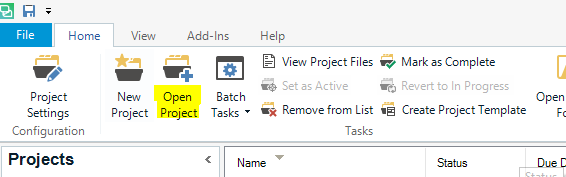
    You can open your projects again from the Home tab in the Projects View in Studio here:

    Trados Studio interface showing the Home tab with options for Project Settings Configuration, New Project, Open Project, and Batch Tasks. The Projects list is visible below.

    Navigate to each project folder (icon similar to that of 'Open project') in the same way as you would in Windows Explorer.

    The project will then re-appear in your Projects list. You can add and remove as many Projects as you wish.

    I tend to only keep those I'm actually working on listed in the Projects list as it's less confusing.

    I don't 'finalise' the projects when I've finished with them, in case I need to refer back to them. I just right-click them in the projects list and select 'Remove from list'. That way I can open them again via 'Open Project' in future if I need to.

    I hope this explanation is enough, let me know if not and I'll clarify further.

    All the best,

    Alison

    emoji


    Generated Image Alt-Text
    [edited by: Trados AI at 2:51 PM (GMT 0) on 28 Feb 2024]
Reply
  • Hi

    You can open your projects again from the Home tab in the Projects View in Studio here:

    Trados Studio interface showing the Home tab with options for Project Settings Configuration, New Project, Open Project, and Batch Tasks. The Projects list is visible below.

    Navigate to each project folder (icon similar to that of 'Open project') in the same way as you would in Windows Explorer.

    The project will then re-appear in your Projects list. You can add and remove as many Projects as you wish.

    I tend to only keep those I'm actually working on listed in the Projects list as it's less confusing.

    I don't 'finalise' the projects when I've finished with them, in case I need to refer back to them. I just right-click them in the projects list and select 'Remove from list'. That way I can open them again via 'Open Project' in future if I need to.

    I hope this explanation is enough, let me know if not and I'll clarify further.

    All the best,

    Alison

    emoji


    Generated Image Alt-Text
    [edited by: Trados AI at 2:51 PM (GMT 0) on 28 Feb 2024]
Children
No Data