
 Translate



Has someone noticed that in certain text entry fields, the cursor in Trados Studio 2019 does not seem to indicate the same place where the pointer is? Let me explain. Control A is a shortcut that hightlights the entire contents of the field where the cursor is located. While that ALWAYS Works in the target text field in the Trados Editor , that is not the case in other text entry fields such as the Concordance Search field, or the Termbase Search field.
It is as Trados knows the cursor is at a certain place (allowing introduction of text, for instance) but believes it's in a different place when using shortcuts.
for example, let's take the Concordance search text entry field.
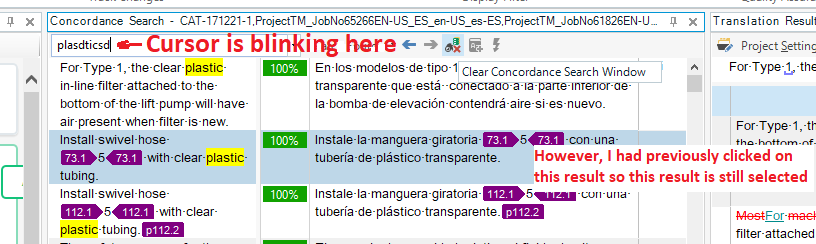
In the case shown in the picture above, the cursor is blinking in the Concordance Search text entry box, but a Concordance result is also selected in blue. To see what happens, I initially clicked on the concordance result and THEN i clicked in the text field (where plasdticsd appears). In this situation, if I press a key, it will appear in the text field, BUT if I press Control+A, the entire concordance result will be selected instead, as this image below shows.
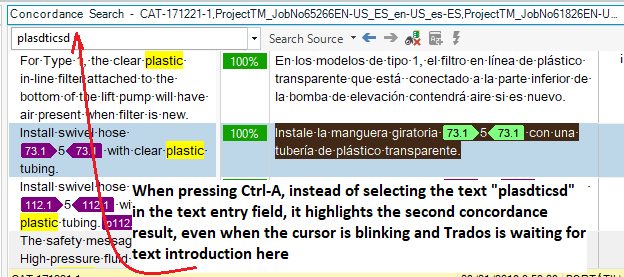
That is a wrong behaviour, but what makes it worse is that even though in this case I have been able to identify the problem, in others I haven't. Simply, Control-A does not work because apparently Trados is lost or confused as to where it should apply the Ctrl-A shortcut.
This is somewhat important because I use some Autohotkey scripts that need to be able to select an entire text entry field! I can safely declare this problem NEVER happened in Trados 2017.
Generated Image Alt-Text
[edited by: Trados AI at 4:27 PM (GMT 0) on 28 Feb 2024]

