
 Translate



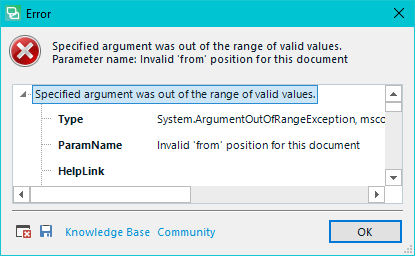
I was just running a simple Find and Replace function.
Stacktrace here:
<SDLErrorDetails time="12/2/2018 8:32:42 PM">
<ErrorMessage>Specified argument was out of the range of valid values.
Parameter name: Invalid 'from' position for this document</ErrorMessage>
<Exception>
<Type>System.ArgumentOutOfRangeException, mscorlib, Version=4.0.0.0, Culture=neutral, PublicKeyToken=b77a5c561934e089</Type>
<ParamName>Invalid 'from' position for this document</ParamName>
<HelpLink />
<Source>Sdl.TranslationStudio.Common</Source>
<HResult>-2146233086</HResult>
<StackTrace><![CDATA[ at Sdl.TranslationStudio.Common.SearchFramework.InteractiveFind.UpdateRangeFrom(Position from)
at Sdl.TranslationStudio.Common.FindAndReplace.FindInDocument.UpdateRangeFrom(ContentRange range)
at Sdl.TranslationStudio.Common.FindAndReplace.AbstractFindAndReplaceProvider.dialogReplaceInvoked(Object sender, ReplaceEventArgs e)
at Sdl.TranslationStudio.Common.FindAndReplace.ReplaceControl.replaceButton_Click(Object sender, EventArgs e)
at System.Windows.Forms.Control.OnClick(EventArgs e)
at System.Windows.Forms.Button.OnClick(EventArgs e)
at System.Windows.Forms.Button.OnMouseUp(MouseEventArgs mevent)
at System.Windows.Forms.Control.WmMouseUp(Message& m, MouseButtons button, Int32 clicks)
at System.Windows.Forms.Control.WndProc(Message& m)
at System.Windows.Forms.ButtonBase.WndProc(Message& m)
at System.Windows.Forms.Button.WndProc(Message& m)
at System.Windows.Forms.Control.ControlNativeWindow.OnMessage(Message& m)
at System.Windows.Forms.Control.ControlNativeWindow.WndProc(Message& m)
at System.Windows.Forms.NativeWindow.Callback(IntPtr hWnd, Int32 msg, IntPtr wparam, IntPtr lparam)]]></StackTrace>
</Exception>
<Environment>
<ProductName>SDL Trados Studio</ProductName>
<ProductVersion>15.0.0.0</ProductVersion>
<EntryAssemblyFileVersion>15.0.1.36320</EntryAssemblyFileVersion>
<OperatingSystem>Microsoft Windows 10 Pro</OperatingSystem>
<ServicePack>NULL</ServicePack>
<OperatingSystemLanguage>1033</OperatingSystemLanguage>
<CodePage>1252</CodePage>
<DotNetFrameWork>4.0.30319.42000</DotNetFrameWork>
<ConnectedToNetwork>True</ConnectedToNetwork>
<PhysicalMemory>8378192 MB</PhysicalMemory>
</Environment>
</SDLErrorDetails>
Generated Image Alt-Text
[edited by: Trados AI at 3:13 PM (GMT 0) on 28 Feb 2024]


