You are currently working on UAT 

Studio 2014 package not picking up terms from the TM and Concordance not working either.

I've got Trados Studio 2014. I'm working on a package provided by my client which contains several (apparently quite large) TMs. The problem is that, as I translate, I'm not picking up any terms from the TM and they do not show up in Concordance searches either. I'm certain that a lot of the source text I'm working on is somewhere in the TMs so what am I doing wrong? Any suggestions gratefully received - but please make any instructions really clear and easy to follow as I'm not a techie by any stretch of the imagination... TIA

  • Hi 

    The most likely reason for this would be that you've added the TM via File>Options rather than via Project settings.

    Firstly, if you have only added the translation memory/ies (and/or termbase/s) to your profile via File>Options then they won't appear in your project.

    You need to add them via Project settings, which you can access from the top Home toolbar or by right-clicking the project in your projects list in the Project pane. Also you can add access Project settings via a button on the Translation memory window when you're in the Editor view.

    This is because project settings always overrule the same settings made under File>Options, which are your profile settings and are only carried over into projects created yourself based on your profile settings. Thus, you don't have to add the translation memory or the termbase to File>Options at all unless you wish to use them for projects you create yourself.

    TMs:

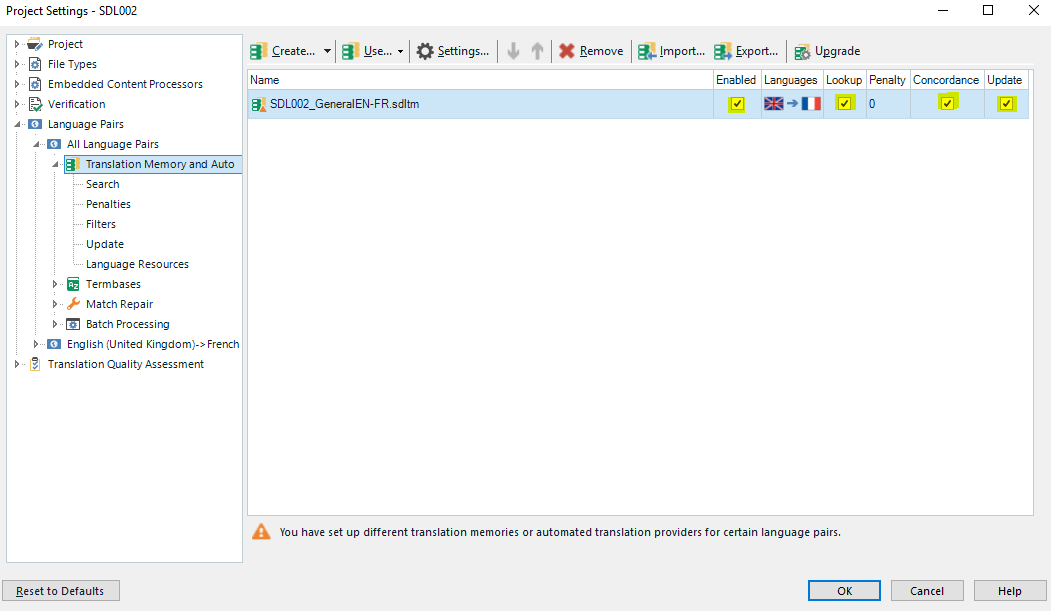
    So, open your project settings then, to get results from the translation memory/ies (TM) you have to add it/them here:

    Trados Studio Project Settings window showing a warning message that no translation memories or automated translation providers are set for certain language pairs.

    and the boxes I've highlighted need to be ticked. This will enable the Translation memory window to display any results that are found.

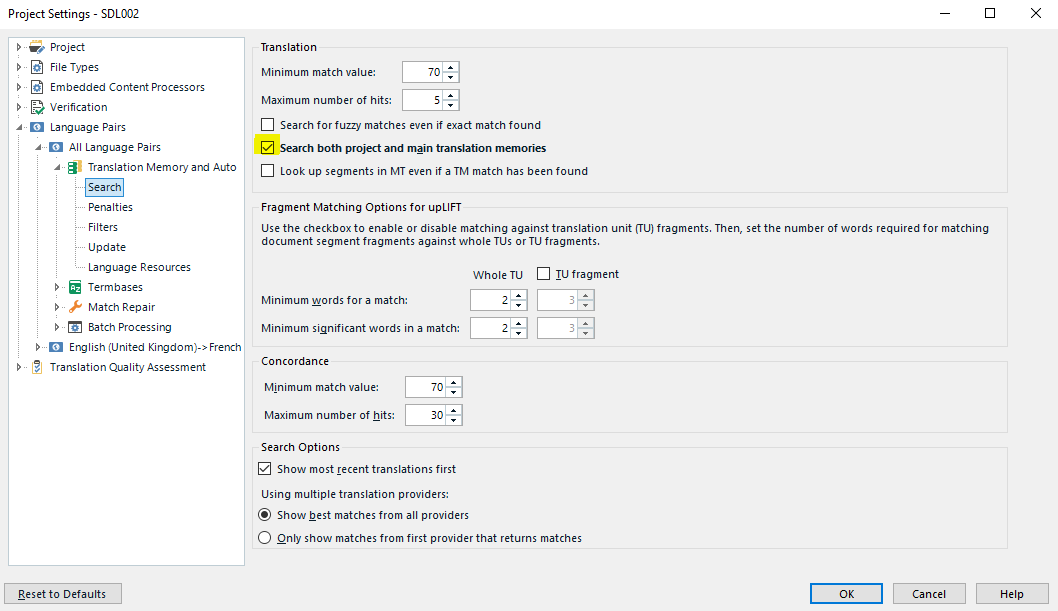
    Then, in the Search window just beneath if you click on the down arrow next to 'Translation Memory and Automated Translation' you need to tick 'Search both project and main translation memories' in the 2014 version of this window:

    Trados Studio Project Settings window with Translation Memory and Automated Translation options, including a checked box for 'Search both project and main translation memories'.

    I also have the entry 'Search for fuzzy' ticked because I like to see as many instances of similar TUs (translation units) present in the TM.

    TBs:

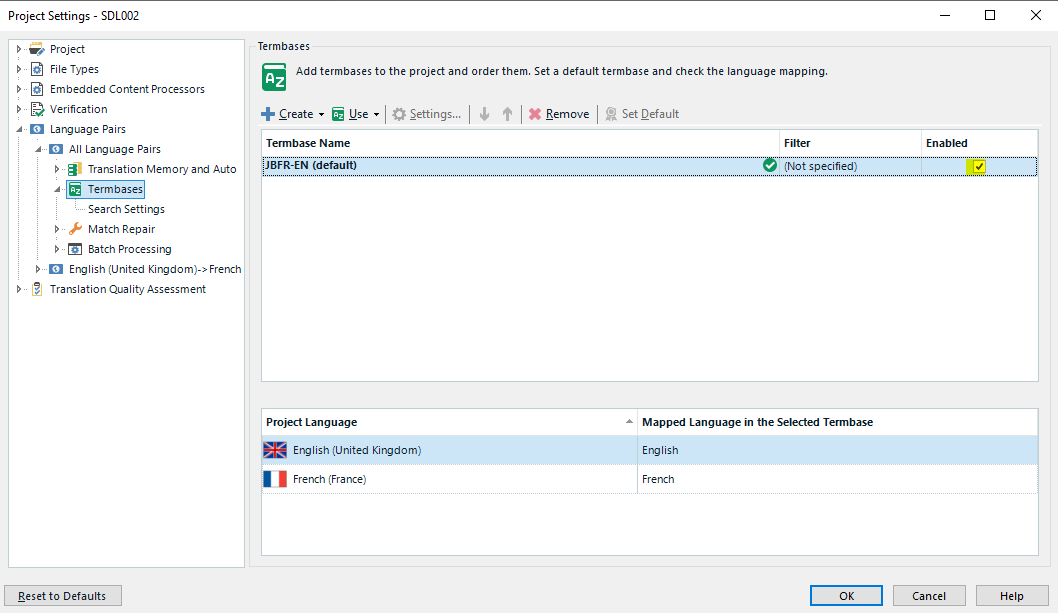
    To show results from the termbase/s (TB) it/they must be added here in your project settings here:

    Trados Studio Project Settings window displaying Termbase options with a selected termbase for French (France) language.

    and the box highlighted needs to be ticked also.

    This will enable your Term Recognition Window/Termbase Viewer to display any terms in the active segment that are in the termbase.

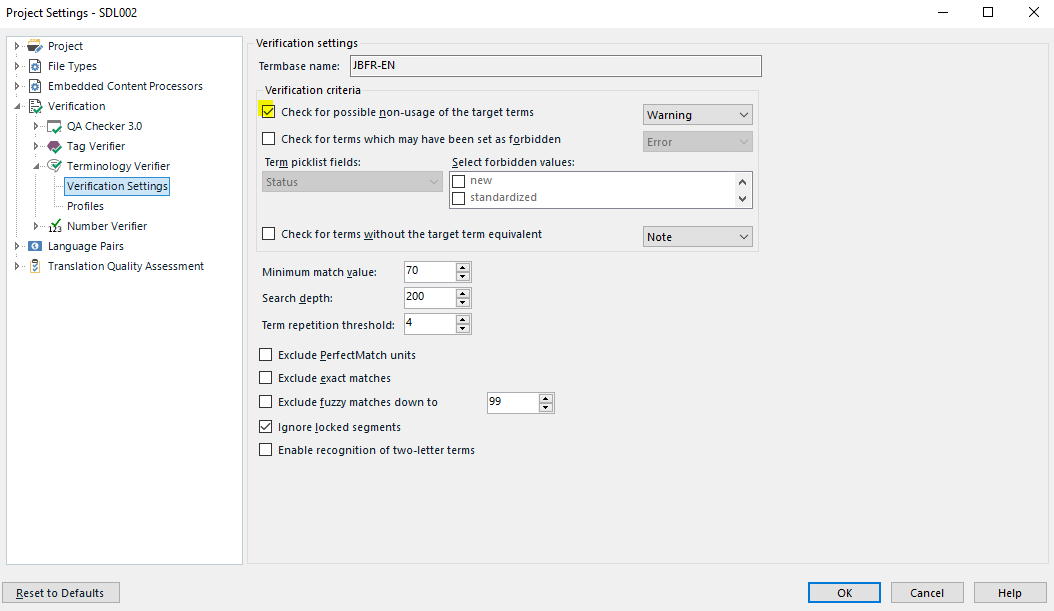
    If you want it to actively verify as you work and when you run a verification at the end,  you need to tick this box:

    Trados Studio Project Settings window showing Verification settings with options for term consistency checks and a checked box for 'Enable term verification'.

    If you've set all of the above in the project settings, you should be able to work in the project SDLXLIFF document/s with the TM/s and the TB/s you (or the client) added to the project.

    Please ask for deeper explanation of any of the above if I haven't been clear enough. If you'd like me to provide the 2014 screens instead, I can. It just means turning on my second computer which would take seconds.

    All the best,

    Alison [:D]

    emoji


    Generated Image Alt-Text
    [edited by: Trados AI at 2:42 PM (GMT 0) on 28 Feb 2024]