You are currently working on UAT 

Studio 2017 - An unexpected error has ocurred while loading the application plug-ins

 Hello,


some time ago, I started receivng this error. I tried renaming the plugin folder, deleting the 14.0.0.0 subfolder in Roaming folder, uninstalling all plugins and even re-installing Trados 2017, but nothing helped. Can someone help me? The error details:


<SDLErrorDetails time="21.11.2018 19:36:37">
<ErrorMessage>An unexpected error has occurred while loading the application plug-ins.</ErrorMessage>
<Exception>
<Type>Sdl.Core.PluginFramework.PluginFrameworkException, Sdl.Core.PluginFramework, Version=1.8.0.0, Culture=neutral, PublicKeyToken=c28cdb26c445c888</Type>
<HelpLink />
<Source>Sdl.Core.PluginFramework</Source>
<HResult>-2146233088</HResult>
<StackTrace><![CDATA[ at Sdl.Core.PluginFramework.DefaultPluginLocator..ctor()
at Sdl.Desktop.Platform.Implementation.Studio.LoadPlugins(Boolean loadThirdPartyPlugins)]]></StackTrace>
</Exception>
<Environment>
<ProductName>SDL Trados Studio</ProductName>
<ProductVersion>14.0.0.0</ProductVersion>
<EntryAssemblyFileVersion>14.1.10014.38031</EntryAssemblyFileVersion>
<OperatingSystem>Microsoft Windows 10 Home</OperatingSystem>
<ServicePack>NULL</ServicePack>
<OperatingSystemLanguage>1029</OperatingSystemLanguage>
<CodePage>1250</CodePage>
<LoggedOnUser>KUBA\Kuba</LoggedOnUser>
<DotNetFrameWork>4.0.30319.42000</DotNetFrameWork>
<ComputerName>KUBA</ComputerName>
<ConnectedToNetwork>True</ConnectedToNetwork>
<PhysicalMemory>8253668 MB</PhysicalMemory>
</Environment>
</SDLErrorDetails>


Thanks

Parents
  • Hello

    The error message would appear to suggest that the problem is still arising from a rogue plugin (or the remains of one that has not uninstalled properly.

    As you have already tried a re-install- in this case it might be worth removing Studio completely from the system (and then re-installing)

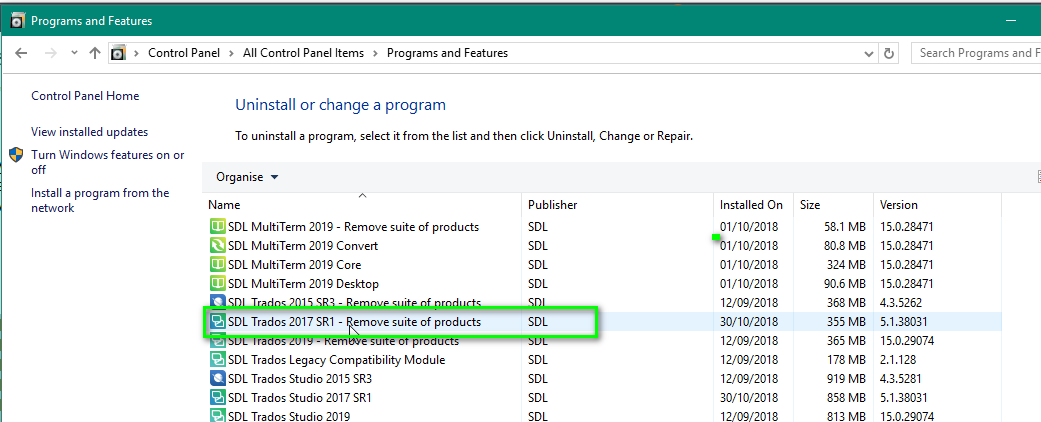
    Please go to your Windows control panel and remove SDL Trados 2017 SR1 SUITE of Products

    Windows Control Panel showing SDL Trados 2017 SR1 SUITE of Products selected for removal.

    Then go to each of the following and delete if anything still remains.

    c:\Users\[USERNAME]\AppData\Roaming\SDL\SDL Trados Studio\14\

    c:\Users\[USERNAME]\AppData\Roaming\SDL\SDL Trados Studio\14.0.0.0\

    c:\Users\[USERNAME]\AppData\Roaming\SDL\ProjectApi\14.0.0.0\

    c:\Users\[USERNAME]\AppData\Local\SDL\SDL Trados Studio\14\

    c:\Users\[USERNAME]\AppData\Local\SDL\SDL Trados Studio\14.0.0.0\

    c:\ProgramData\SDL\SDL Trados Studio\14\

    c:\ProgramData\SDL\SDL Trados Studio\14.0.0.0\

    c:\ProgramData\SDL\SDL Trados Studio\Studio5\

    c:\Program Files (x86)\SDL\SDL Trados Studio\Studio5\


    Now you can reinstall Studio and all should be good now.

    Oana Nagy | QA Engineer | RWS Group

    emoji


    Generated Image Alt-Text
    [edited by: Trados AI at 2:41 PM (GMT 0) on 28 Feb 2024]
Reply
  • Hello

    The error message would appear to suggest that the problem is still arising from a rogue plugin (or the remains of one that has not uninstalled properly.

    As you have already tried a re-install- in this case it might be worth removing Studio completely from the system (and then re-installing)

    Please go to your Windows control panel and remove SDL Trados 2017 SR1 SUITE of Products

    Windows Control Panel showing SDL Trados 2017 SR1 SUITE of Products selected for removal.

    Then go to each of the following and delete if anything still remains.

    c:\Users\[USERNAME]\AppData\Roaming\SDL\SDL Trados Studio\14\

    c:\Users\[USERNAME]\AppData\Roaming\SDL\SDL Trados Studio\14.0.0.0\

    c:\Users\[USERNAME]\AppData\Roaming\SDL\ProjectApi\14.0.0.0\

    c:\Users\[USERNAME]\AppData\Local\SDL\SDL Trados Studio\14\

    c:\Users\[USERNAME]\AppData\Local\SDL\SDL Trados Studio\14.0.0.0\

    c:\ProgramData\SDL\SDL Trados Studio\14\

    c:\ProgramData\SDL\SDL Trados Studio\14.0.0.0\

    c:\ProgramData\SDL\SDL Trados Studio\Studio5\

    c:\Program Files (x86)\SDL\SDL Trados Studio\Studio5\


    Now you can reinstall Studio and all should be good now.

    Oana Nagy | QA Engineer | RWS Group

    emoji


    Generated Image Alt-Text
    [edited by: Trados AI at 2:41 PM (GMT 0) on 28 Feb 2024]
Children