You are currently working on UAT 

How to ignore escape sequences?

Hey,

let's say I do have a sentence in my source segment which I want to translate. Beside the regular sentence however I've got escape sequences, "\n" for example. I noticed, that the AT for example sometimes struggles with these escape sequences ( "\n\nSentenceA" becomes "\n\SentenceA" for example). 

Is there a way I can make the AT ignore the escape sequences? GoogleAPI for example puts spaces like "\ n \ n " or sometimes "\ N \ N".
I feel parser rules won't help me with that. Xpath probably neither? Has anyone had similar issues and has a solution for this? Because if you translate an xml with quite a few of those escape sequences, you really will miss some of those mess ups and end up with problems later on (when the line break doesn't appear, for example). 


Appreciate any help :)


Thanks!

Parents
  • Hi

    Perhaps you can use the option in the MT Enhanced plugin to send plain text to the MT provider and not the markup? If you make sure these are tagged correctly, using parser rules, then it would be pretty simple.

    Alternatively if you do properly tag the file with parser rules (you said it was XML) then I would expect most MT engines to be able to handle these anyway.

    Cleanup Tasks may be available for 2019 soon, but really you should not need this. Can you provide a small sample XML that messes up when using MT?

    Paul Filkin | RWS

    Design your own training!
    You've done the courses and still need to go a little further, or still not clear? 
    Tell us what you need in our Community Solutions Hub

  • <?xml version="1.0" encoding="utf-8"?>
    <resources>
    <string name="abteilung">Ein Satz.\n\nEin weiterer Satz.</string>
    <string name="abteilung">Ein Satz.\n\nein weiterer Satz.</string>
    <string name="abteilung">Ein Satz.\n\n Ein weiterer Satz.</string>
    <string name="abteilung">Ein Satz.\n\nein weiterer Satz.</string>
    <string name="abteilung">Ein Satz.\n\nEin weiterer Satz.</string>
    <string name="abteilung">Ein Satz.\nEin weiterer Satz. Einzelner Escape</string>
    <string name="abteilung">Ein Satz.\n Ein weiterer Satz. Einzelner Escape</string>
    <string name="abteilung">Ein Satz.\nein weiterer Satz. Einzelner Escape</string>
    <string name="abteilung">Ein Satz.\n ein weiterer Satz. Einzelner Escape</string>
    <string name="abteilung">Ein Satz.\n</string>
    <string name="abteilung">Ein Satz.\n\n</string>
    <string name="abteilung">Ein Satz.\n\n\n</string>
    
    <string name="daidalos_confirm_create_folder">Verzeichnis \'$file_name\' existiert nicht. Sind Sie sicher, dass Sie dieses erzeugen möchten?</string>
    <string name="daidalos_confirm_create_folder">Verzeichnis \'$file_name\' existiert nicht.\nSind Sie sicher, dass Sie dieses erzeugen möchten?</string>
    </resources>
    

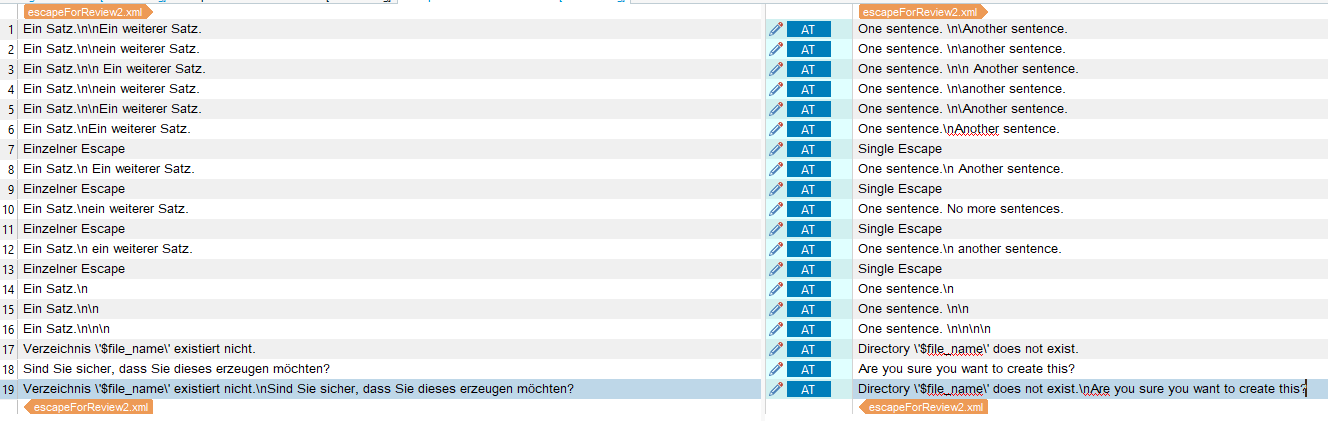
    So I hope the file upload worked. Here also an image that should illustrate the problem quite clearly:

    Screenshot of Trados Studio showing a list of strings with a warning message about a missing directory for file upload, and a query if the user wants to create it.

    Can you already figure which solution solves my problem the easiest way?


    [edit]: I'm currently using DeepL for AT... so the Enhanced MT Add-In doesn't work for me. :(

    emoji


    Generated Image Alt-Text
    [edited by: Trados AI at 2:27 PM (GMT 0) on 28 Feb 2024]
  •  

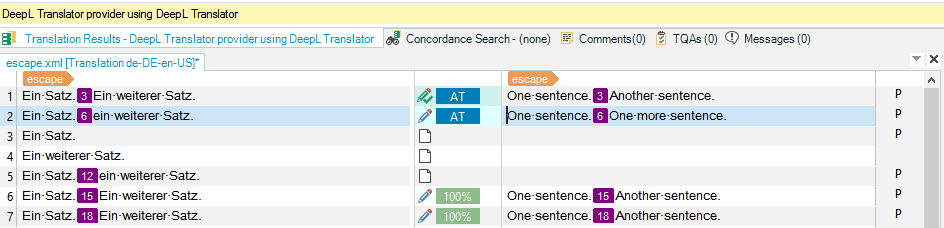
    Easiest way is parser rules... then you get this:

    Trados Studio interface showing translation results with DeepL Translator, highlighting matched segments with numbers and percentage of translation match.

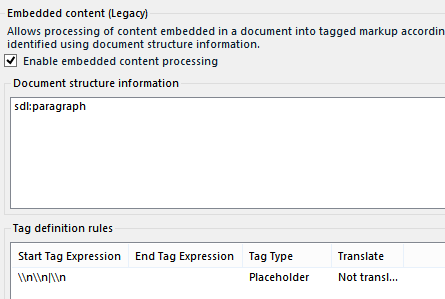
    All I did was create a custom XML to handle your file with a single regex rule to handle the embedded content:

    Trados Studio parser rules settings showing two rules: 'string' as always translatable and '*' as not translatable.

    Trados Studio embedded content legacy settings with 'Enable embedded content processing' checked and tag definition rules for placeholders.

    Your problem is you are trying to handle the content as translatable text.

    Paul Filkin | RWS

    Design your own training!
    You've done the courses and still need to go a little further, or still not clear? 
    Tell us what you need in our Community Solutions Hub

    emoji


    Generated Image Alt-Text
    [edited by: Trados AI at 2:27 PM (GMT 0) on 28 Feb 2024]
  • Hey Paul. This looks promising. I'm just having trouble following some steps.
    I was able to define the rules (copied it from you) in the embedded content section.
    You have a "//*" Rule in the general parsers settings however, is this needed or where does that come from?

    I also haven't worked with tags. Do I need to set anything up in the options for that?
    So far, I copied your settings from the embedded content (legacy) to my project, but that alone doesn't do the trick for me. Maybe you can help me out what I'm missing here. :)
Reply Children