

You are currently working on UAT 

Unable to load termbase

I moved my TM and termbase from the cloud to my local drive. When I open Trados, I can't load my termbase. 
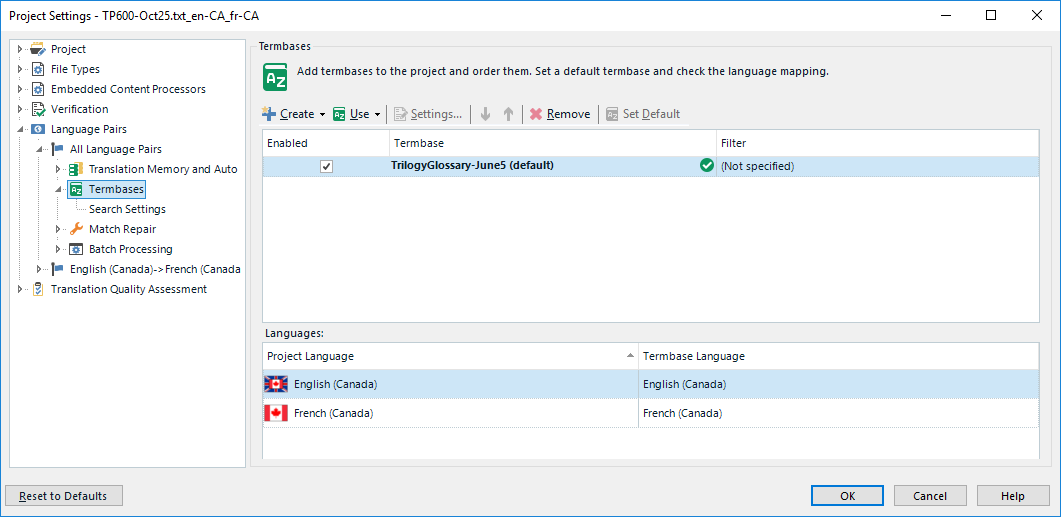
Trados Studio Project Settings window showing the Termbases tab with 'No open termbase' message displayed after attempting to add a local termbase.

I'm pointing it to the new location but when I click OK, I see 'No open termbase' in Trados. I had no issues with the TM; it loads properly. Any suggestions? Thanks. 


Generated Image Alt-Text
[edited by: Trados AI at 2:27 PM (GMT 0) on 28 Feb 2024]

emoji
Parents Reply
  • I've tried both ways. I opened an existing project. I get a msg that says it cannot find the termbase. When I try to load it, I have the same issue as previously reported. I created a new project today and got error msgs.

    I go to the settings to tell it where to find the termbase. It appears in the list as the default but when I get back to the editor window, it says: No open termbase.


    This is soooo frustrating. I moved the TM and TB from the cloud cause I was told these were not meant to reside in the cloud. I ran into issues when I tried to edit a term in the glossary (at times, I'd get a message that an entry was being edited by another user if I tried to make a change to an entry; I'm the only user so this does not make any sense). So, the folks at Trados told me to move the TB to a local drive which is what I've done. But it's not working! :(


Children