

You are currently working on UAT 

Automatic duplicates in Multiterm with CU 13 and Multiterm 14.2.623639

Hi,


The issue discussed in https://community.sdl.com/product-groups/translationproductivity/f/90/p/19310/66292#pi6614=2 is back, since the upgrade of studio 2017 with CU13.

In short: when,in the editor window, adding a new term to Multiterm, the source term and the target terms are being multiplied + the target language (French) appears twice . Only one target window is being filled.
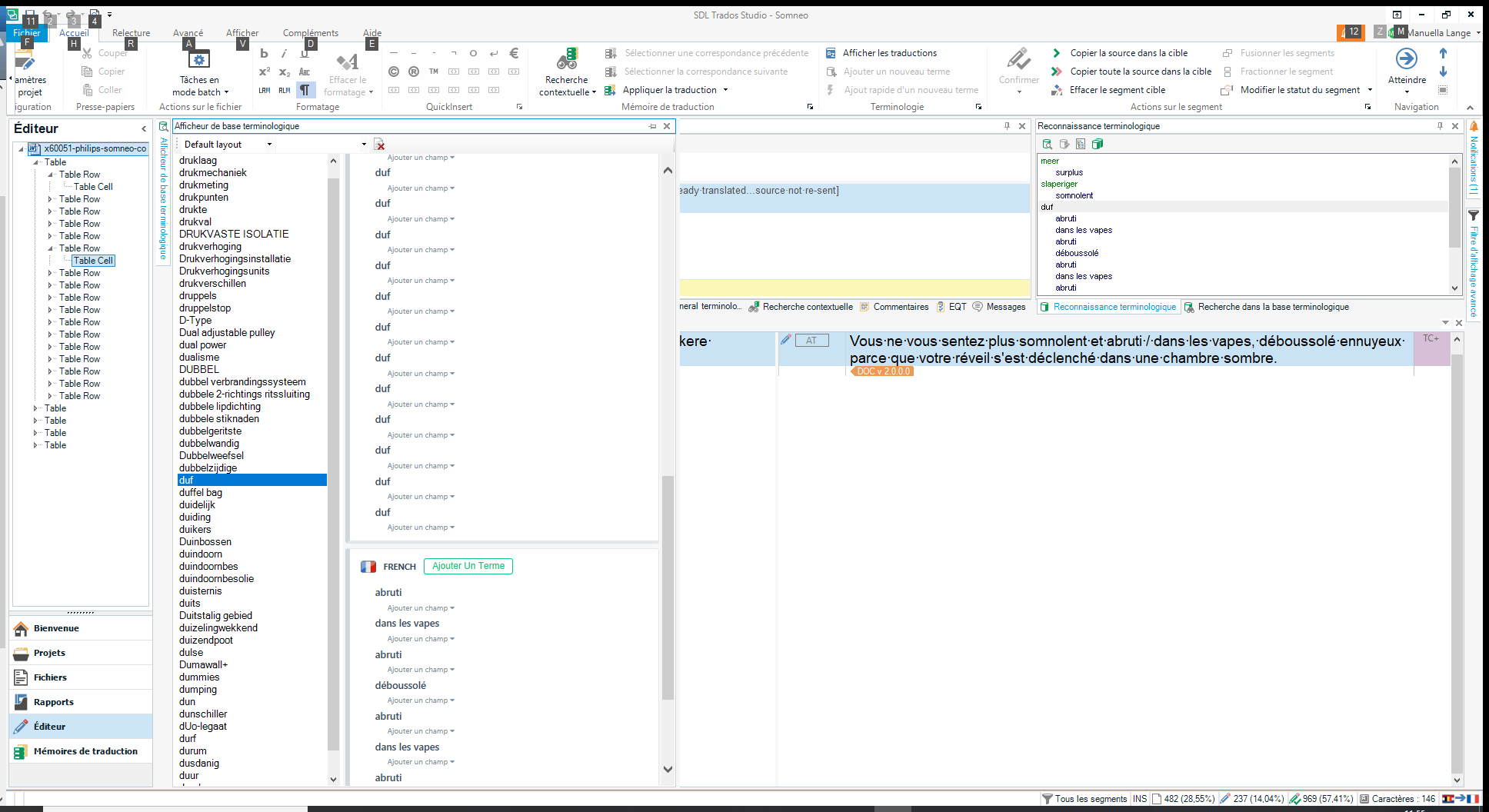
Screenshot of Trados Studio editor window showing an error message indicating that the source term and target terms are being multiplied and the target language French appears twice.


I hope that the answer to this recurring issue will not be to revert to previous versions of Studio and Multiterm because if this is the case I will never ever do any upgrades anymore.


Generated Image Alt-Text
[edited by: Trados AI at 2:34 PM (GMT 0) on 28 Feb 2024]

emoji
Parents
  • Hi 

    Apologies for the late response... your email got lost in my inbox.

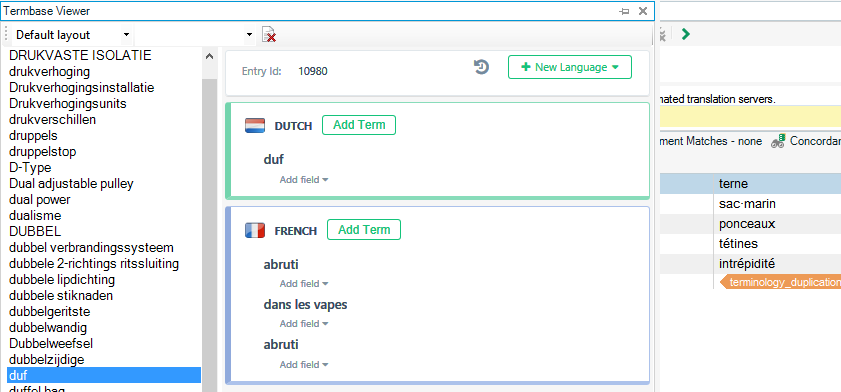
    I could reproduce this with your termbase, so I created the termbase by exporting the SDLTB to Excel and then back using the Glossary Converter.  That fixed the issue for me.

    Screenshot of Trados Studio's Termbase Viewer showing a list of terms with a highlighted error message indicating a terminology duplication in French.

    So the only conclusion I can come to is that the termbase was corrupted somehow.  You will have to clean it up and remove all the ones that in there and already duplicated, but the problem doesn't seem to happen anymore for me.

    I'll send you the updated termbase in case it helps you, but I think it could do with a little cleaning up.  You might find the Excel sheet is useful for that too as you can see very easily where you have entries that you might want to change to improve your leverage irrespective of this issue.

    Paul Filkin | RWS

    Design your own training!
    You've done the courses and still need to go a little further, or still not clear? 
    Tell us what you need in our Community Solutions Hub

    emoji


    Generated Image Alt-Text
    [edited by: Trados AI at 2:34 PM (GMT 0) on 28 Feb 2024]
Reply
  • Hi 

    Apologies for the late response... your email got lost in my inbox.

    I could reproduce this with your termbase, so I created the termbase by exporting the SDLTB to Excel and then back using the Glossary Converter.  That fixed the issue for me.

    Screenshot of Trados Studio's Termbase Viewer showing a list of terms with a highlighted error message indicating a terminology duplication in French.

    So the only conclusion I can come to is that the termbase was corrupted somehow.  You will have to clean it up and remove all the ones that in there and already duplicated, but the problem doesn't seem to happen anymore for me.

    I'll send you the updated termbase in case it helps you, but I think it could do with a little cleaning up.  You might find the Excel sheet is useful for that too as you can see very easily where you have entries that you might want to change to improve your leverage irrespective of this issue.

    Paul Filkin | RWS

    Design your own training!
    You've done the courses and still need to go a little further, or still not clear? 
    Tell us what you need in our Community Solutions Hub

    emoji


    Generated Image Alt-Text
    [edited by: Trados AI at 2:34 PM (GMT 0) on 28 Feb 2024]
Children
