You are currently working on UAT 

Difference between words (source) and characters (source) for Analysis Statistics

Hi there,

I created a project translating 2 Chinese files to English. Under Files -> Analysis Statistics, words (source) show 9179 in total, and characters (source) show 10460 in total. And I found 10460 characters from Reports -> Analyze files. 

Here I want to ask the difference between words (source) and characters (source) for Analysis Statistics, and which one is more accurate so I should use.

In addition, I want to know the difference between Files -> Analysis Statistics and Reports -> Analyze files, except analysis statistics cannot be saved as a file.

Attached is a zip package of screenshots for your reference.

I look forward to your answer, and thank you so much for your help in advance!screenshots.zip

Parents
  • Hi

    The Analysis statistics is a quick snapshot. The full analysis report is the more accurate, although you might find the WIP (Work In Progress) report more useful as you progress through your project.

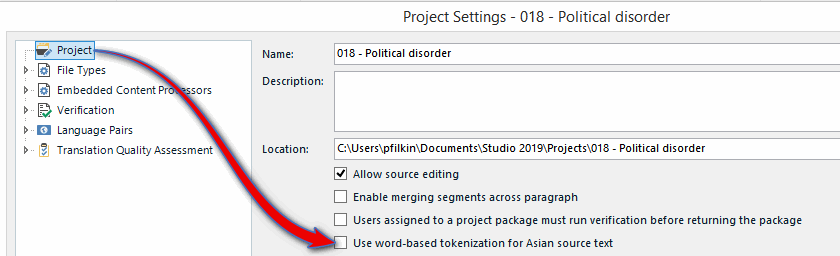
    Also note the setting in your Project Settings -> Use Word based tokenization for Asian source text. This will "switch word counting in Trados Studio from a character to character basis to a word to word basis. This will provide a more accurate, word-based result in the Analysis and Confirmation statistics."

    Paul Filkin | RWS

    Design your own training!
    You've done the courses and still need to go a little further, or still not clear? 
    Tell us what you need in our Community Solutions Hub

  • Hi Paul, thanks for getting back to me. While, I feel more confused. Kindly help explain further.
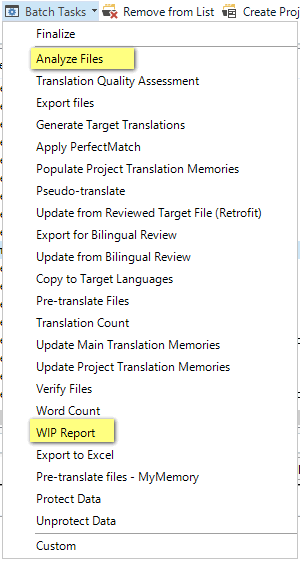
    1. Which is "the full analysis report" and which one is "WIP report"?
    2. How to set "Use Word based tokenization for Asian source text"? Can you please be more specific?

    Or do you mean in the case I provided, 9179 is more accurate?
    If you could answer my questions in a more direct way, that will help me understand it more easily. Thank you so much for your help!
  • Hi  

    Unknown said:
    1. Which is "the full analysis report" and which one is "WIP report"?

    If you look in your batch tasks you'll see it:

    Screenshot of Trados Studio Batch Tasks menu with 'Analyze Files' and 'WIP Report' options highlighted.

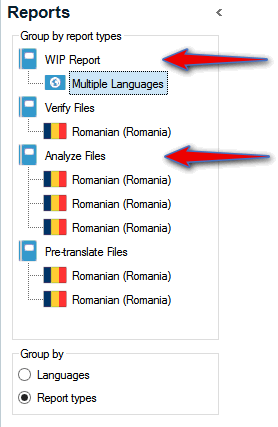
    If you run the reports, then look in the Reports View, and sort by report type then you will see something like this:

    Screenshot of Trados Studio Reports View sorted by report type showing 'WIP Report' and 'Analyze Files' for Romanian language.

    You can select the report you want, the most recent being the one at the top of each group.

    Unknown said:
    2. How to set "Use Word based tokenization for Asian source text"? Can you please be more specific?

    Just go to your Project Settings here:

    Screenshot of Trados Studio Project Settings with 'Use word-based tokenization for Asian source text' option checked.

    Check this item so it's active and then the analysis will reflect this method of counting.

    Hope that helps you understand it better.  Just have a play with the different types of reporting and see for yourself.  You won't break anything.

    Paul Filkin | RWS

    Design your own training!
    You've done the courses and still need to go a little further, or still not clear? 
    Tell us what you need in our Community Solutions Hub

    emoji


    Generated Image Alt-Text
    [edited by: Trados AI at 2:21 PM (GMT 0) on 28 Feb 2024]
Reply
  • Hi  

    Unknown said:
    1. Which is "the full analysis report" and which one is "WIP report"?

    If you look in your batch tasks you'll see it:

    Screenshot of Trados Studio Batch Tasks menu with 'Analyze Files' and 'WIP Report' options highlighted.

    If you run the reports, then look in the Reports View, and sort by report type then you will see something like this:

    Screenshot of Trados Studio Reports View sorted by report type showing 'WIP Report' and 'Analyze Files' for Romanian language.

    You can select the report you want, the most recent being the one at the top of each group.

    Unknown said:
    2. How to set "Use Word based tokenization for Asian source text"? Can you please be more specific?

    Just go to your Project Settings here:

    Screenshot of Trados Studio Project Settings with 'Use word-based tokenization for Asian source text' option checked.

    Check this item so it's active and then the analysis will reflect this method of counting.

    Hope that helps you understand it better.  Just have a play with the different types of reporting and see for yourself.  You won't break anything.

    Paul Filkin | RWS

    Design your own training!
    You've done the courses and still need to go a little further, or still not clear? 
    Tell us what you need in our Community Solutions Hub

    emoji


    Generated Image Alt-Text
    [edited by: Trados AI at 2:21 PM (GMT 0) on 28 Feb 2024]
Children