You are currently working on UAT 

Problem with the Verify feature

Hi,

I work every single day using Trados Studio 2018 and I always do the F8 check (Verify) without any sort of problem. From a couple of days, I have some troubles: Studio does not detect errors in the source, neither grammatical nor other kind of errors (numbers were wrong in the last file). Additionally, the Verify feature takes approximately from 20 to 40 minutes to generate a report (and this does not depend on my PC, since it has 16 GB RAM and it works properly) even for a 1000-word-file.

Furthermore, the last file showed a different kind of error, i.e. "Original file before conversion". Obviousely, I have not changed the location of the file on my computer. I have no idea if the two problems are related, but I just would like to have my Studio working normally again because right now I am wasting time and money. Please answer as soon as you can.

Thanks a lot.

Valentina

Parents
  • Hi 

    Are you talking about Studio 2017 or 2019?

    You say "Studio does not detect errors in the source" - do you mean in the target? Studio doesn't check the source text.

    If verify is taking too long, do you have Studio and MultiTerm added to your AntiVirus exceptions lists?

    I have not heard of an 'original file before conversion' error - The closest thing I can guess is that you verified the source SDLXLIFF rather than the target. This would happen if you had the Source language selected on the left hand pane rather than the Target language, which would bring the source file/s into view instead of the target file/s and then the batch task would attempt to run on the source sdlxliff file instead of the target sdlxliff file. 

    OR you might have attempted to verify a reference file, which would then have been a single language file, PDF or Word for example, which would also have triggered an error message.

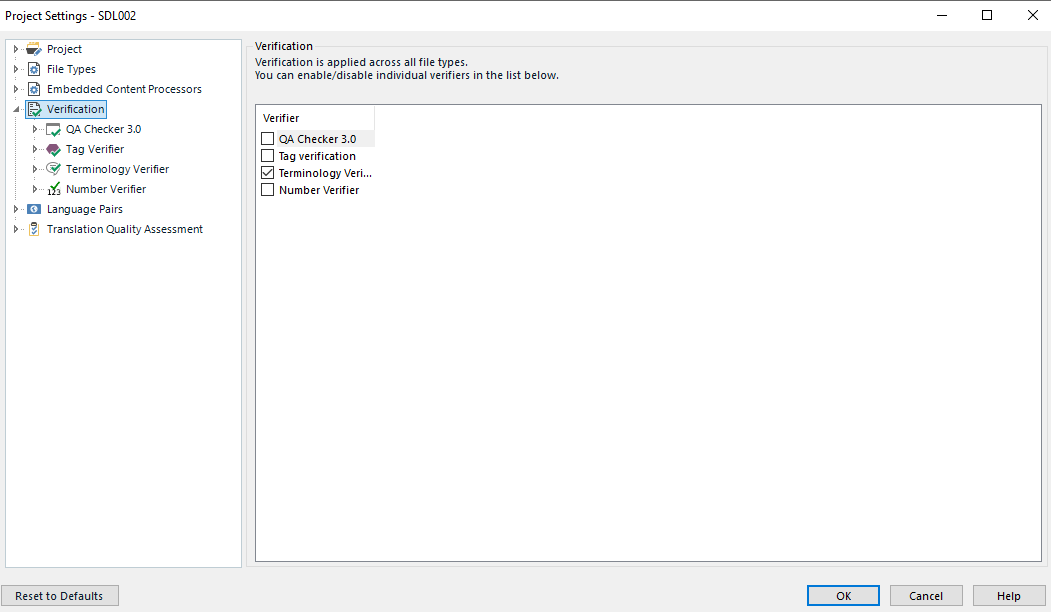
    Now we come to F8. This function key triggers only the verifications that have been set up here:

    Trados Studio Project Settings window showing Verification tab with unchecked options for QA Checker 3.0 and Number Verifier.

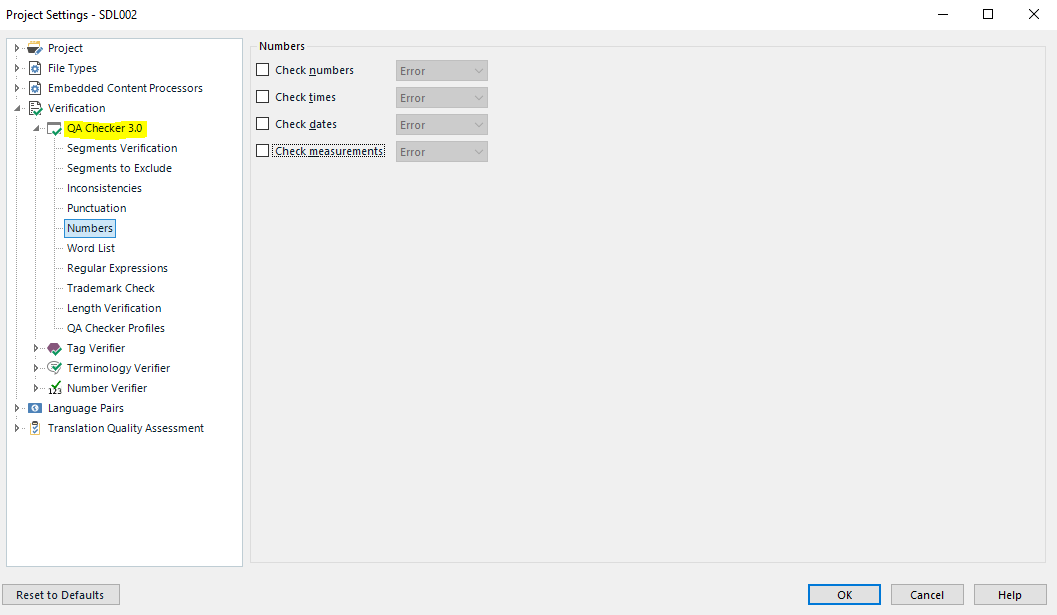
    F8 will only trigger the verification for which the boxes have been ticked, along with everything as selected in the corresponding dropdowns such as here:

    Trados Studio Verification settings with options for Check tags, Check spaces, and Check punctuation errors.

    As you'll see I don't have number checks ticked, because I have the Number Verifier plug-in added and select what I want checked numerically and alphanumerically there. This will also be triggered by F8.

    You have the grammar checker added I presume as you need this to check grammar.

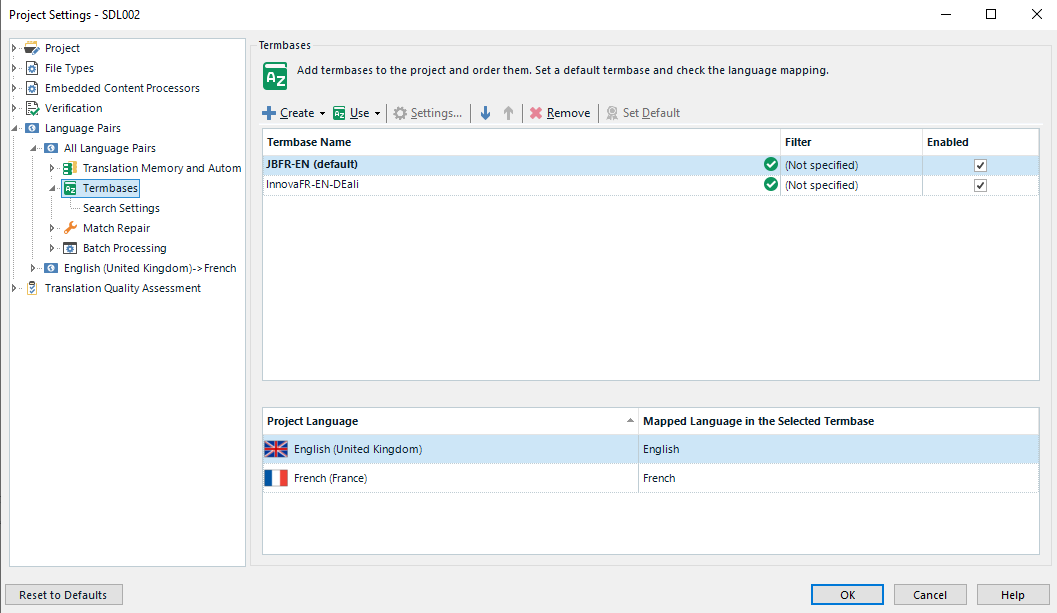
    Do you work with packages from a client? If so, it is likely that they have not selected the correct settings for verification in the above sections of their project settings. You can select these yourself. You can also select the termbase you wish to verify terminology with, here:

    Trados Studio Project Settings displaying Language Pairs tab with English (United States) - French (France) selected.

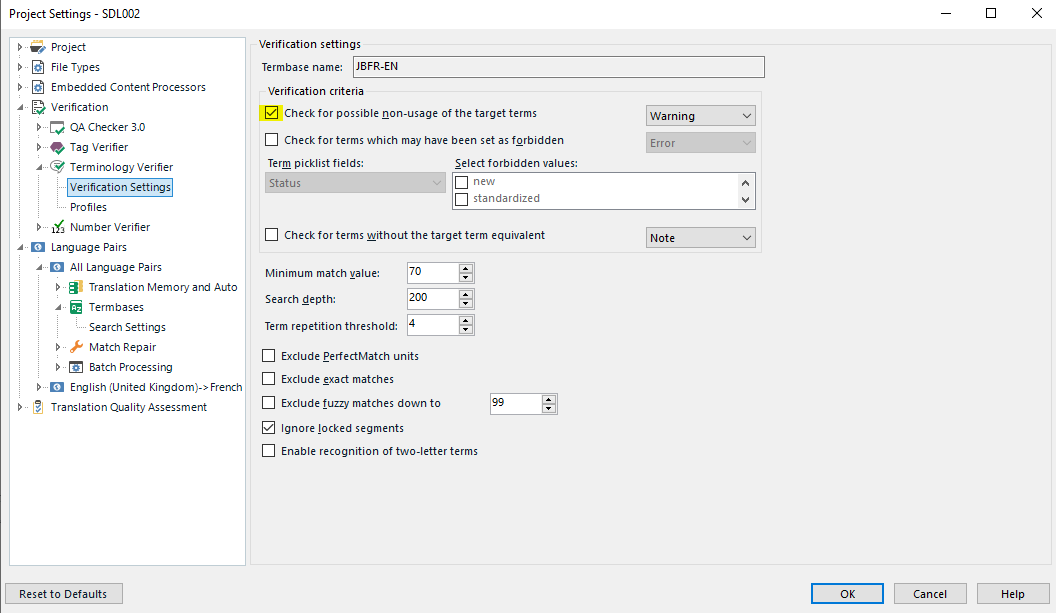
    Then of course you need to select the correct options here:

    Trados Studio Verification settings window with options for checking for extra spaces, missing translations, and maximum text length.

    Feel free to ask further questions if the above does not help your situation.

    All the best

    Alison

    emoji


    Generated Image Alt-Text
    [edited by: Trados AI at 2:18 PM (GMT 0) on 28 Feb 2024]
Reply
  • Hi 

    Are you talking about Studio 2017 or 2019?

    You say "Studio does not detect errors in the source" - do you mean in the target? Studio doesn't check the source text.

    If verify is taking too long, do you have Studio and MultiTerm added to your AntiVirus exceptions lists?

    I have not heard of an 'original file before conversion' error - The closest thing I can guess is that you verified the source SDLXLIFF rather than the target. This would happen if you had the Source language selected on the left hand pane rather than the Target language, which would bring the source file/s into view instead of the target file/s and then the batch task would attempt to run on the source sdlxliff file instead of the target sdlxliff file. 

    OR you might have attempted to verify a reference file, which would then have been a single language file, PDF or Word for example, which would also have triggered an error message.

    Now we come to F8. This function key triggers only the verifications that have been set up here:

    Trados Studio Project Settings window showing Verification tab with unchecked options for QA Checker 3.0 and Number Verifier.

    F8 will only trigger the verification for which the boxes have been ticked, along with everything as selected in the corresponding dropdowns such as here:

    Trados Studio Verification settings with options for Check tags, Check spaces, and Check punctuation errors.

    As you'll see I don't have number checks ticked, because I have the Number Verifier plug-in added and select what I want checked numerically and alphanumerically there. This will also be triggered by F8.

    You have the grammar checker added I presume as you need this to check grammar.

    Do you work with packages from a client? If so, it is likely that they have not selected the correct settings for verification in the above sections of their project settings. You can select these yourself. You can also select the termbase you wish to verify terminology with, here:

    Trados Studio Project Settings displaying Language Pairs tab with English (United States) - French (France) selected.

    Then of course you need to select the correct options here:

    Trados Studio Verification settings window with options for checking for extra spaces, missing translations, and maximum text length.

    Feel free to ask further questions if the above does not help your situation.

    All the best

    Alison

    emoji


    Generated Image Alt-Text
    [edited by: Trados AI at 2:18 PM (GMT 0) on 28 Feb 2024]
Children
No Data