
 Translate



When I updated from Studio 2011 to 2019 I already had problems and I had to use a turnaround (clicking directly the .msi files in C:\ProgramData\Package Cache\SDL\SDLTradosStudio2019\modules) to install it. Now I have to update it to version 15.0.36320.1 and I get the error message below:
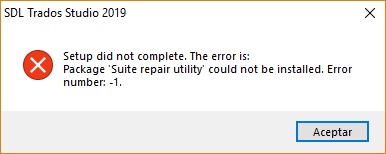
Any idea?
Thanks!
Generated Image Alt-Text
[edited by: Trados AI at 2:17 PM (GMT 0) on 28 Feb 2024]

