
 Translate



Hello Team,
After updating Microsoft Excel 365-2016, I've been having this issue when I'm working with Excel files. The weird thing is that I'm able to create a project using the excel source files, but at the moment of trying to generate the target I get the know error "Object reference not set to an instance of an object". Before opening this Discussion I've been doing some researches in this site and I've found the following related issues:
- https://community.sdl.com/product-groups/translationproductivity/f/90/t/17938
- https://gateway.rws.com/csm?id=kb_article_view&sysparm_article=KB0031066
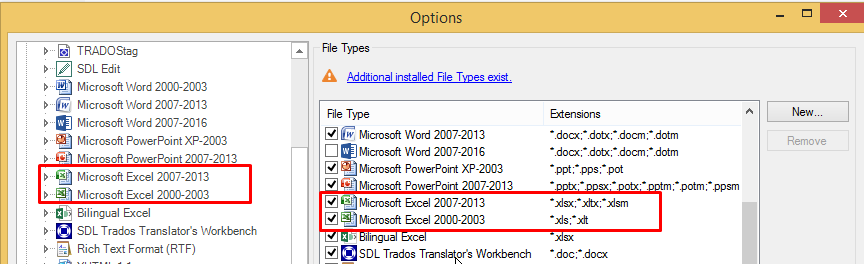
Just to clarify, I already did the upgrade of SDL Trados Studio 2015 - 12.0.4996.3 to SR3 - 12.3.5281.10 and now it says that the program is totally updated. Anyway I still don't see the "Microsoft Excel 2007-2016" filter that above links talk about:
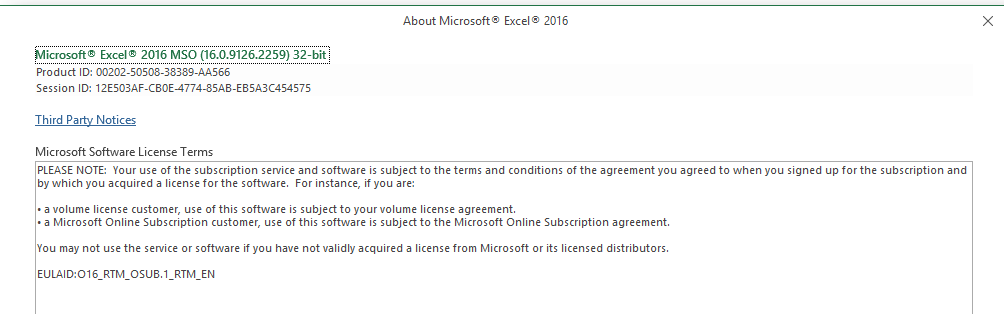
I tried with a lot of Excel files and I've also prepared a simple Excel file with a few strings and it doesn't work. However if I save the same excel file using Microsoft Excel 2013 it works fine and allow me to generate the target file. The issue is that in my current computer I only have Microsoft Office 2016 (below you can see the version details)
Also, just in case, I'm sharing the exported XML file with the error's details:
<SDLErrorDetails time="9/19/2018 04:39:24 PM">
  <ErrorMessage>Failed to save target content: Object reference not set to an instance of an object.</ErrorMessage>
  <Exception>
    <Type>System.NullReferenceException, mscorlib, Version=4.0.0.0, Culture=neutral, PublicKeyToken=b77a5c561934e089</Type>
    <HelpLink />
    <Source>Sdl.FileTypeSupport.Filters.Excel</Source>
    <HResult>-2147467261</HResult>
    <StackTrace><![CDATA[   at Sdl.FileTypeSupport.Filters.Excel.FilterControllerFramework.OfficeController.UpdateDocumentFile(XsltArgumentList argsList, XslCompiledTransform xslTransform, XPathNavigator child)
   at Sdl.FileTypeSupport.Filters.Excel.FilterControllerFramework.OfficeController.IterateXsltFiles(XsltArgumentList argsList, FileMap rule, XPathNodeIterator iter, Boolean isUpdate, String targetFilePath)
   at Sdl.FileTypeSupport.Filters.Excel.FilterControllerFramework.OfficeController.IterateContentType(String xslFileNamesPath, Boolean isUpdate, String filePath, String filterStr, String targetFilePath, Boolean isCalledByRelsTableIteration)
   at Sdl.FileTypeSupport.Filters.Excel.FilterControllerFramework.OfficeController.serviceBackward()
   at Sdl.FileTypeSupport.Filters.Excel.PlugInFilter.FileParser.DocumentParser.Update()
   at Sdl.FileTypeSupport.Filters.Excel.PlugInFilter.FileParser.DocumentExtractImpl.Update(DocumentCollection srcCollection, String filename, String tgtFilePath)
   at Sdl.FileTypeSupport.Filters.Excel.PlugInFilter.FileWriterAndPreviewFileWriter.WriterImpl.EndOfInput()
   at Sdl.FileTypeSupport.Filters.Excel.PlugInFilter.FileWriterAndPreviewFileWriter.ExcelWriter.EndOfInput()
   at Sdl.FileTypeSupport.Framework.Integration.NativeWriterMessagesProxy.EndOfInput()
   at Sdl.FileTypeSupport.Framework.Integration.FileGenerator.CallEndOfInput()
   at Sdl.FileTypeSupport.Framework.Integration.FileGenerator.FileComplete()
   at Sdl.FileTypeSupport.Framework.Integration.AbstractBilingualProcessorContainer.FileComplete()
   at Sdl.FileTypeSupport.Framework.Integration.MultiFileConverter.FileComplete()
   at Sdl.FileTypeSupport.Framework.BilingualApi.AbstractBilingualContentProcessor.FileComplete()
   at Sdl.FileTypeSupport.Framework.Integration.AbstractBilingualProcessorContainer.FileComplete()
   at Sdl.FileTypeSupport.Bilingual.Tmfc.TmfcReaderImpl.vv_Visit(TmfcReaderImpl* , FrameworkFileContainerField* field)
   at FrameworkFileContainerField.vv_AcceptFrameworkVisitor(FrameworkFileContainerField* , FrameworkFieldVisitor* visitor)
   at Sdl.FileTypeSupport.Bilingual.Tmfc.TmfcReaderImpl.vv_VisitStartEndField(TmfcReaderImpl* , StartEndField* startEnd)
   at Sdl.FileTypeSupport.Bilingual.Tmfc.TmfcReaderImpl.b_VisitNext(TmfcReaderImpl* )
   at Sdl.FileTypeSupport.Bilingual.Tmfc.TmfcReader.ParseNext()
   at Sdl.FileTypeSupport.Framework.Integration.FileExtractor.ParseNext()
   at Sdl.FileTypeSupport.Framework.Integration.MultiFileConverter.ParseNext()
   at Sdl.FileTypeSupport.Framework.Integration.MultiFileConverter.Parse()
   at Sdl.TranslationStudio.Editor.TranslationEditor.TranslatableDocument.SaveMonolingualAsJobRequest.Execute(IJobExecutionContext context)
   at Sdl.Desktop.Platform.Implementation.Services.Job.<_worker_DoWork>b__3()
   at Sdl.Desktop.Platform.Implementation.Services.Log.Resources(Object message, Action action)
   at Sdl.Desktop.Platform.Implementation.Services.Job._worker_DoWork(Object sender, DoWorkEventArgs e)
   at System.ComponentModel.BackgroundWorker.OnDoWork(DoWorkEventArgs e)
   at System.ComponentModel.BackgroundWorker.WorkerThreadStart(Object argument)]]></StackTrace>
  </Exception>
  <Environment>
    <ProductName>SDL Trados Studio</ProductName>
    <ProductVersion>12.0.0.0</ProductVersion>
    <EntryAssemblyFileVersion>12.3.5281.10</EntryAssemblyFileVersion>
    <OperatingSystem>Microsoft Windows 8.1 Enterprise</OperatingSystem>
    <ServicePack>NULL</ServicePack>
    <OperatingSystemLanguage>1033</OperatingSystemLanguage>
    <CodePage>1252</CodePage>
    <LoggedOnUser>CZ\clifforda</LoggedOnUser>
    <DotNetFrameWork>4.0.30319.42000</DotNetFrameWork>
    <ComputerName>CLIFFORDA0226</ComputerName>
    <ConnectedToNetwork>True</ConnectedToNetwork>
    <PhysicalMemory>8205508 MB</PhysicalMemory>
  </Environment>
</SDLErrorDetails>
Thanks a lot for your support in advance!
Best Regards,
KLAR
Generated Image Alt-Text
[edited by: Trados AI at 2:15 PM (GMT 0) on 28 Feb 2024]


