
 Translate



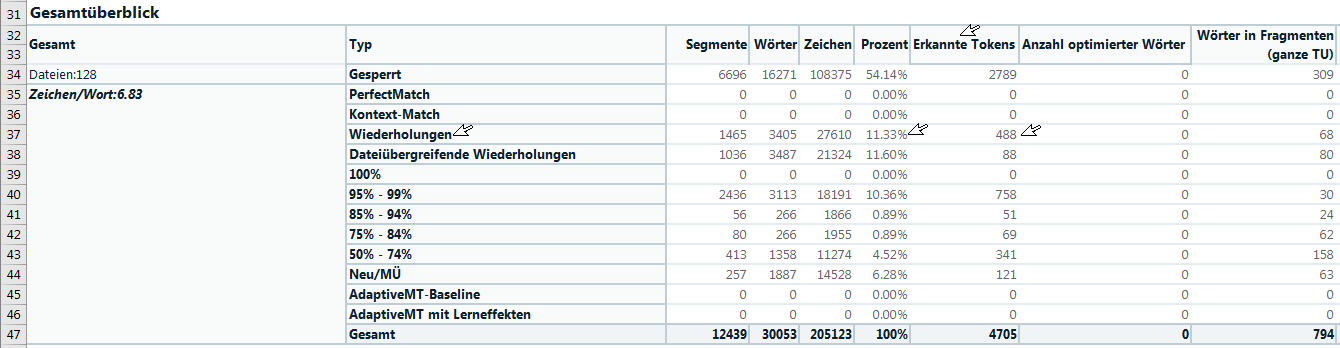
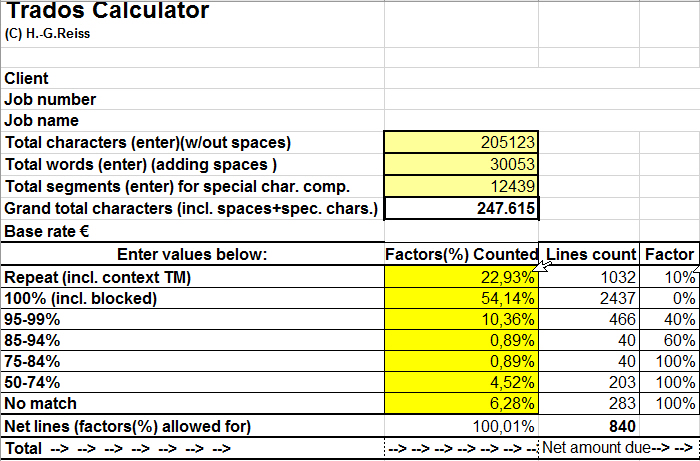
Hi folks, I naturally have to calculate a text to be translated before customer orders. An Excel program prommed by me considers, among others, CAT's analysis (vd. report). There are bandwidths given (e.g. Repeat, 100 %, 95-99%, ..., no match, vd. both figs.). Each of these lines in the calc. spreasheet are assigned to weighing factors that are multiplied by the base rate (e.g. "Repeat" by 10 % of the base rate, ...). The new analysis spreadsheet in "Report" has additional items now, e.g. PerfectMatch, Context Match, Repitions, Cross-file repetitions, etc. All this is taken into account in my Excel spreadsheet. Now, however, I came across an new item which I never had to consider before: "Detected tolkens". These tokens are automatic translations (e.g. capital letter word, underlined in blue). These detected tokens are assigned to their "masters" (e.g. Repetitions, ..., percentage [e.g. 11.33 %] -> e.g. 488 [pieces] in the repetitions. When I calculate e.g. the repetions in my spreadsheet, then with these 11.33 % by 10 % of the base rate. In a nutshell: how would you suggest to take these 488 [token pieces] into account in this "Repetions" line? Any idea would be welcome.
Generated Image Alt-Text
[edited by: Trados AI at 1:50 PM (GMT 0) on 28 Feb 2024]

