
 Translate



Good morning,
We have an issue with our key French translator. We both work with Studio 2017. We have worked together for years without any problems but recently every time he tries to open a Studio 2017 package from us he gets this error message:
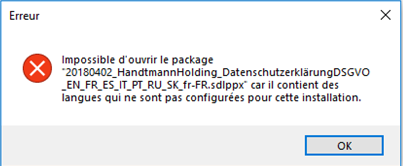
The language combination in our package is correct, DE or EN to FR, and these combinations are also configured in his freelance installation.
We tried repacking and recreating projects over and over again, but the error message stays the same. The only solution so far was sending the source files so he could create his own project. But the we would have to to through the files in our project again to fill in the translation, which is certainly no long-term solution.
This is the only translator we do have these issues with. We do have many multilingual projects and no other translator (also not with the same language combination) has these issues, so it must be something on his computer or Studio installation or ours. We seem to be the only client he has these issues with. Could it be the Windows or Office versions contradicting?
Does anybody have an idea what could be the problem. Or how we could go about figuring out what the issue is? We tried sending the packages in all sorts of form, but always the same error message, regardless of the customer project or whether it is a single language or multi-language project.
I would be thanksful for any idea or hint you may have.
Regards,
Angelika
Generated Image Alt-Text
[edited by: Trados AI at 1:40 PM (GMT 0) on 28 Feb 2024]



