

You are currently working on UAT 

Studio 2014

I have read the discussions concerning following subject:

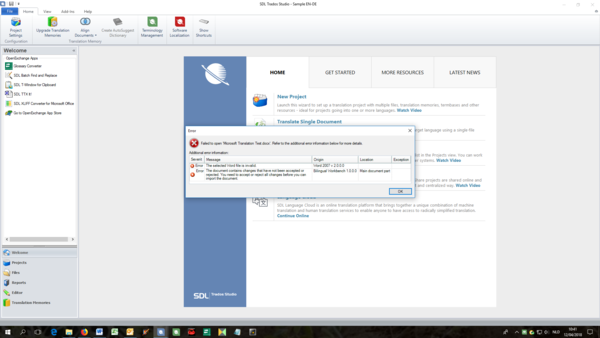
Problem with WordprocessingML v. 2 file type

I have Studio 2014 and I have the same problem. No way to translate let alone to send it back as part of a package.

Consequences: I did not get jobs any more from an outsourcer I used to work with because of this problem and I received a document for a test translation which could not be opened because of this issue.

Pls Note that Studio 2014 is barely 4 years old and things like this should not be allowed to happen - they should be fixed.

I totally agree with Evzen Polenka: "But the upgrade is NOT FREE, it costs a lot actually".

So my question Paul:

1 has it been fixed meanwhile (I could not find any answer to this)?

2 if Trados does not want to fix it we are being forced to upgrade. Will you offer me a free upgrade?
Parents Reply
  • I'm interested what will be the outcome.

    The thing is that recently I'm seeing various difficulties with opening files (Word, Excel) coming from Office 2016.

    It started a month or two(?) ago on a project still using Trados 2007 - the cleanup process cannot save target file (i.e. 'inject' the translations into the Office file used to create the TTX) and throws the famous "Object reference not set to an instance of an object" error.
    Re-saving the Office file in 'earlier' build of the Office 2016 application or in Office 2013/2010 makes the cleanup process finish successfully.

    Now, okay, it's Trados 2007, outdated, blablabla...
    Fine, but first - it worked fine even with files processed using Office 2016 so far, the problems started only recently... and second - I see reports about similar issues in fairly recent Studio versions as well...

    So it looks like some recent Office 2016 update changed something in the Office documents structure, or so...
    But so far I was not able to find out what exactly could it be.

Children
No Data