You are currently working on UAT 

Is there a way to get trados to accept the Islamic calendar?

When I am translating a text that has a date from the Islamic calender, an error message always pops up and the only thing I can do is close the porject, go to the word doc and remove the date then open a new project in trados to carry on. Sometimes this happens 3-4 times in one document where I have to redo everything. Is there a solution?

Parents
  • Hi ,

    Can you share a sample text and confirm the exact language pair you are working with? Can you also confirm what version of Studio you are using and what version of the Windows operating system your are using.

    Paul Filkin | RWS

    Design your own training!
    You've done the courses and still need to go a little further, or still not clear? 
    Tell us what you need in our Community Solutions Hub

  • Thanks Paul. I translate from English to Arabic and vice versa. For example (...formed pursuant to Supreme Judicial Council decision dated 12/06/1437...). Trados version is 2017 and Windows 10 Home Edition. the Error always seems connected to the source file. I can translate this sentence I gave you in Arabic and put the date in full and nothing would happen. The problem is when the English text has this date, trados will work just fine until I get to the segment that has the date and then I get an error message. the only way around it is to close trados, go to the source file and delete the year (1437) then re-open as a new project. If there are similar dates in more than one segment, then every time I reach one such segment, this process repeats all over again.
  • Hi Hana.

    I've just had a quick look at this using the text above as an example and when translating from English to Arabic I also get an error message which basically says the date is not correct as it should be within a set of Gregorian dates, which I presume are set by Windows.

    After finding this out I've gone into my project settings for this document and then into "Language Pairs" and then into the source/target language pair I'm working with. Once here I can then view the TM and its "Fields and Settings" where I have unchecked the Recognize "dates" box. This then seems to overcome the problem as the Islamic date is no longer recognised as a date and you can manually enter it into the source without any problem. It may make sense if you have a lot of translation like this to set up a new TM from scratch that has the recognize date box unchecked and then you can use this for all projects that have this issue.

    Hope this helps, but let me know if you are unsure of what to change and I'll post a screenshot for you.

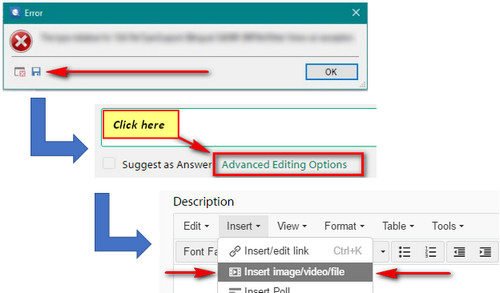
    Paul, the start of the error message I got when trying this was as follows which may allow you to check if this is expected behaviour or not. If you'd like the whole message can you let me know how to attach the file to this entry, or should I email it to you?

    Error Message:
    <?xml version="1.0"?>
    -<SDLErrorDetails time="16/01/2018 16:22:56">
    <ErrorMessage>Specified time is not supported in this calendar. It should be between 04/30/1900 00:00:00 (Gregorian date) and 11/16/2077 23:59:59 (Gregorian date), inclusive. Parameter name: time</ErrorMessage>
    -<Exception>
    <Type>System.ArgumentOutOfRangeException, mscorlib, Version=4.0.0.0, Culture=neutral, PublicKeyToken=b77a5c561934e089</Type>

    All the best
    Phil.
  • Hi  

    Thanks for this... you can add the file like this:

    Paul Filkin | RWS

    Design your own training!
    You've done the courses and still need to go a little further, or still not clear? 
    Tell us what you need in our Community Solutions Hub

  • <SDLErrorDetails time="16/01/2018 16:22:56">
      <ErrorMessage>Specified time is not supported in this calendar. It should be between 04/30/1900 00:00:00 (Gregorian date) and 11/16/2077 23:59:59 (Gregorian date), inclusive.
    Parameter name: time</ErrorMessage>
      <Exception>
        <Type>System.ArgumentOutOfRangeException, mscorlib, Version=4.0.0.0, Culture=neutral, PublicKeyToken=b77a5c561934e089</Type>
        <ParamName>time</ParamName>
        <HelpLink />
        <Source>mscorlib</Source>
        <HResult>-2146233086</HResult>
        <StackTrace><![CDATA[   at System.Globalization.UmAlQuraCalendar.CheckTicksRange(Int64 ticks)
       at System.Globalization.UmAlQuraCalendar.GetDatePart(DateTime time, Int32 part)
       at System.Globalization.UmAlQuraCalendar.GetDayOfMonth(DateTime time)
       at System.DateTimeFormat.FormatCustomized(DateTime dateTime, String format, DateTimeFormatInfo dtfi, TimeSpan offset)
       at System.DateTimeFormat.Format(DateTime dateTime, String format, DateTimeFormatInfo dtfi, TimeSpan offset)
       at System.DateTimeFormat.Format(DateTime dateTime, String format, DateTimeFormatInfo dtfi)
       at Sdl.LanguagePlatform.Core.Tokenization.DateTimeToken.Localize(CultureInfo culture, AutoLocalizationSettings autoLocalizationSettings, ILocalizableToken originalMemoryToken, Boolean adjustCasing)
       at Sdl.LanguagePlatform.Core.Tokenization.DateTimeToken.Localize(CultureInfo culture, AutoLocalizationSettings autoLocalizationSettings)
       at Sdl.TranslationStudio.Editor.TranslationEditor.Intellisense.SuggestionData..ctor(DocumentToken documentToken, CultureInfo culture, AutoLocalizationSettings localizationSettings)
       at Sdl.TranslationStudio.Editor.TranslationEditor.Intellisense.TagFormattingDataProvider.ProcessDocumentTokens(SideBySideEditor editor, IList`1 suggestionData)
       at Sdl.TranslationStudio.Editor.TranslationEditor.Intellisense.TagFormattingDataProvider.GetSuggestionData(EditingContext context)
       at Sdl.TranslationStudio.Editor.TranslationEditor.Actions.LaunchTagFormattingWindowAction.GetSuggestionData(SideBySideEditor editor)
       at Sdl.TranslationStudio.Editor.TranslationEditor.Actions.LaunchTagFormattingWindowAction.IsActionEnabled()
       at Sdl.TranslationStudio.Api.Editor.AbstractActiveDocumentAction.UpdateAction()
       at Sdl.TranslationStudio.Api.Editor.AbstractSelectionDependentAction.OnSelectionChanged(IDocumentEditingView view)
       at Sdl.TranslationStudio.Api.Editor.DocumentEditingViewEventHandler.Invoke(IDocumentEditingView view)
       at Sdl.TranslationStudio.Editor.TranslationEditor.SelectionChangedDelayedEventHandler.<>c__DisplayClass4.<FireEvent>b__2()
       at System.Windows.Forms.Control.InvokeMarshaledCallbackDo(ThreadMethodEntry tme)
       at System.Windows.Forms.Control.InvokeMarshaledCallbackHelper(Object obj)
       at System.Threading.ExecutionContext.RunInternal(ExecutionContext executionContext, ContextCallback callback, Object state, Boolean preserveSyncCtx)
       at System.Threading.ExecutionContext.Run(ExecutionContext executionContext, ContextCallback callback, Object state, Boolean preserveSyncCtx)
       at System.Threading.ExecutionContext.Run(ExecutionContext executionContext, ContextCallback callback, Object state)
       at System.Windows.Forms.Control.InvokeMarshaledCallback(ThreadMethodEntry tme)
       at System.Windows.Forms.Control.InvokeMarshaledCallbacks()]]></StackTrace>
      </Exception>
      <Environment>
        <ProductName>SDL Trados Studio</ProductName>
        <ProductVersion>14.0.0.0</ProductVersion>
        <EntryAssemblyFileVersion>14.1.6413.8</EntryAssemblyFileVersion>
        <OperatingSystem>Microsoft Windows 10 Home</OperatingSystem>
        <ServicePack>NULL</ServicePack>
        <OperatingSystemLanguage>2057</OperatingSystemLanguage>
        <CodePage>1252</CodePage>
        <LoggedOnUser>SONY-VAIO\Sony</LoggedOnUser>
        <DotNetFrameWork>4.0.30319.42000</DotNetFrameWork>
        <ComputerName>SONY-VAIO</ComputerName>
        <ConnectedToNetwork>True</ConnectedToNetwork>
        <PhysicalMemory>4108140 MB</PhysicalMemory>
      </Environment>
    </SDLErrorDetails>

  • Thank you so much for the time and effort Phil. I will try the solution you suggested and let you know how that goes :)
  • Hi Paul,
    Have sent through the full error message for you.

    FYI. I got this message as a few seconds after opening the English source document that included an Islamic date as per Hana's example. Also, even if you hit OK to the message it just kept re-appearing and so had to use Task Manager to close Studio and then re-open again. I then changed the Field Settings in the TM I was using and disabled the Recognize Date option. This then allowed the source Word document to open without the error message and I could then work on the target translation without any error message.

    I'm using Windows 10 and Studio 2017 SR1. My Windows language setting is EN-US and the date/time is set to EN-UK.

    As I was just testing the issue Hana was having and looking fir a quick get-around to help, I've not tested whether changing the Windows date/time setting to Arabic so it shows the Islamic date would have any effect when opening the source document in Studio.

    Hope this helps.

    Phil.
Reply
  • Hi Paul,
    Have sent through the full error message for you.

    FYI. I got this message as a few seconds after opening the English source document that included an Islamic date as per Hana's example. Also, even if you hit OK to the message it just kept re-appearing and so had to use Task Manager to close Studio and then re-open again. I then changed the Field Settings in the TM I was using and disabled the Recognize Date option. This then allowed the source Word document to open without the error message and I could then work on the target translation without any error message.

    I'm using Windows 10 and Studio 2017 SR1. My Windows language setting is EN-US and the date/time is set to EN-UK.

    As I was just testing the issue Hana was having and looking fir a quick get-around to help, I've not tested whether changing the Windows date/time setting to Arabic so it shows the Islamic date would have any effect when opening the source document in Studio.

    Hope this helps.

    Phil.
Children
No Data