Problem with loss of cursor focus in Trados Studio

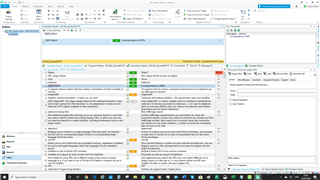
When using either the normal window layout or the alternative layout, confirming and moving to next segment either using Ctrl+Enter or with the right-click menu places the cursor at the beginning of the segment, ready to start typing. This works fine.

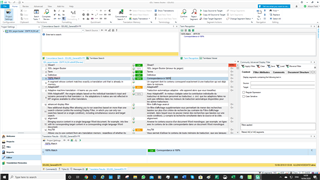
However, when the Translation Results window is detached from either of the layouts above, and placed either somewhere else on the same monitor, or on an adjoining monitor, the Translation Results window grabs focus of the cursor, meaning that I have to mouse back to the Editor window in order to start typing.
This slows down productivity a lot, and means that I can't use the Translation Results window maximized on a separate monitor while using the keyboard only, which is what I'd like to do.
Instead, the only way I can use Trados as efficiently as I would like to is to have everything on one monitor - a bit of a waste when I use 4...

I'm currently using Trados 2017 SR1 14.1.6413.8, but this problem has existed on multiple computers with different versions of Trados for as long as I can remember.
Any suggestions as to how to fix this issue?

Parents
  • I can confirm the problem still exists in Trados Studio 15.2.6.2831 Confounded

  • Hi 

    Have you read through the whole thread and checked out the recommendations/solutions suggested?

    What precisely is the problem for you?
    What steps lead up to it?
    How does the problem manifest itself?
    Are you using more than one screen?
    Have you checked the settings mentioned above under 'File>Options' if you are working via 'Translate single file'?
    Have you checked the settings mentioned above under 'Project settings' if you are working with projects?


    Have you the latest update of Studio 2015 and of MultiTerm 2015? You can check this by opening each of them and clicking on the Help tab then on 'Check for Updates'. A dialog will open. Click on each button 'Next' or 'OK' to see if the product is up to date.

    Enough questions from me for now...

    All the best,

    Ali Slight smile

  • Hi ,

    The problem presents itself exactly as described by : I use multiple screens (3 in my case) and have the Translation/Fragment/Concordance Results pane floating on my left screen. The cursor jumps over when I come to an empty segment.

    I had already come up with pretty much all of the recommendations myself before reading the thread (and yes, I read it all).

    Trados Studio 15.2.6.2831 is actually the very latest Studio 19 version (updated yesterday). I do not use MultiTerm.

    The latest solution I came up with is bringing the Translation/Fragment/Concordance Results pane back into the main window docked to the left and then enlarging the whole window so the Translation/Fragment/Concordance Results pane is on the left screen while the rest is on the middle one. It is ok-ish. I guess I can get used to it. Of course the ribbon is split across the screen and the Project/File... views are split, too.

    All the best

    Angela

Reply
  • Hi ,

    The problem presents itself exactly as described by : I use multiple screens (3 in my case) and have the Translation/Fragment/Concordance Results pane floating on my left screen. The cursor jumps over when I come to an empty segment.

    I had already come up with pretty much all of the recommendations myself before reading the thread (and yes, I read it all).

    Trados Studio 15.2.6.2831 is actually the very latest Studio 19 version (updated yesterday). I do not use MultiTerm.

    The latest solution I came up with is bringing the Translation/Fragment/Concordance Results pane back into the main window docked to the left and then enlarging the whole window so the Translation/Fragment/Concordance Results pane is on the left screen while the rest is on the middle one. It is ok-ish. I guess I can get used to it. Of course the ribbon is split across the screen and the Project/File... views are split, too.

    All the best

    Angela

Children