
 Translate



Hi all,
Since one week I get an error message when starting Studio 2015 (SR3). See the end of this post for the full message. After clicking OK, it opens rather minimized. Most actions/clicks after that will also lead to an error. Although always an "Object reference not set to an instance of an object", it's not the same <type> or <Source> each time though.
I have tried repairing the installation, removing/reinstalling it etc. to no avail. When uninstalling first, I also remove the usual suspects:
- %USERPROFILE%\AppData\Local\SDL\SDL Trados Studio\12\
- %USERPROFILE%\AppData\Local\SDL\SDL Trados Studio\12.0.0.0
- %USERPROFILE%\AppData\Roaming\SDL\SDL Trados Studio\12
- %USERPROFILE%\AppData\Roaming\SDL\SDL Trados Studio\12.0.0.0
- %USERPROFILE%\Documents\Studio 2015\Project Templates
- %USERPROFILE%\AppData\Roaming\SDL International\Sdl.Enterprise.CredentialProvider.xml
- %USERPROFILE%\AppData\Roaming\SDL International\Sdl.Enterprise.ServerConnectionManager.xml
- %USERPROFILE%\AppData\Roaming\SDL International\Sdl.ProjectApi.CustomCredentialProvider.xml
- %USERPROFILE%\AppData\Local\SDL International\Sdl.Enterprise.ServerConnectionManager.xml
- c:\Program Files (x86)\SDL\SDL Trados Studio\Studio4\
When installing a previous version (2014) I get the same error.
I have run out of ideas.
Anyone..?
Thanks & regards,
Richard
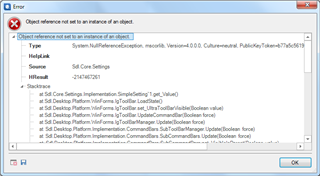
===================================================================
<SDLErrorDetails time="25-9-2017 14:06:50">
  <ErrorMessage>Object reference not set to an instance of an object.</ErrorMessage>
  <Exception>
    <Type>System.NullReferenceException, mscorlib, Version=4.0.0.0, Culture=neutral, PublicKeyToken=b77a5c561934e089</Type>
    <HelpLink />
    <Source>Sdl.Core.Settings</Source>
    <HResult>-2147467261</HResult>
    <StackTrace><![CDATA[   at Sdl.Core.Settings.Implementation.SimpleSetting`1.get_Value()
   at Sdl.Desktop.Platform.Implementation.StudioWindow._form_Load(Object sender, EventArgs e)
   at System.EventHandler.Invoke(Object sender, EventArgs e)
   at System.Windows.Forms.Form.OnLoad(EventArgs e)
   at System.Windows.Forms.Form.OnCreateControl()
   at System.Windows.Forms.Control.CreateControl(Boolean fIgnoreVisible)
   at System.Windows.Forms.Control.CreateControl()
   at System.Windows.Forms.Control.WmShowWindow(Message& m)
   at System.Windows.Forms.Control.WndProc(Message& m)
   at System.Windows.Forms.ScrollableControl.WndProc(Message& m)
   at System.Windows.Forms.Form.WmShowWindow(Message& m)
   at System.Windows.Forms.Form.WndProc(Message& m)
   at Sdl.Desktop.Platform.WinForms.StudioWindowForm.WndProc(Message& message)
   at System.Windows.Forms.Control.ControlNativeWindow.OnMessage(Message& m)
   at System.Windows.Forms.Control.ControlNativeWindow.WndProc(Message& m)
   at System.Windows.Forms.NativeWindow.Callback(IntPtr hWnd, Int32 msg, IntPtr wparam, IntPtr lparam)]]></StackTrace>
  </Exception>
  <Environment>
    <ProductName>SDL Trados Studio</ProductName>
    <ProductVersion>12.0.0.0</ProductVersion>
    <EntryAssemblyFileVersion>12.3.5281.10</EntryAssemblyFileVersion>
    <OperatingSystem>Microsoft Windows 7 Ultimate </OperatingSystem>
    <ServicePack>Service Pack 1</ServicePack>
    <OperatingSystemLanguage>1043</OperatingSystemLanguage>
    <CodePage>1252</CodePage>
    <LoggedOnUser>XXXXX</LoggedOnUser>
    <DotNetFrameWork>4.0.30319.42000</DotNetFrameWork>
    <ComputerName>L12</ComputerName>
    <ConnectedToNetwork>True</ConnectedToNetwork>
    <PhysicalMemory>16665096 MB</PhysicalMemory>
  </Environment>
</SDLErrorDetails>

