

You are currently working on UAT 

TQA - issues: Add comments during review + handle repetitions + graphic export

I'm running a pilot on the TQA feature as an internal reviewer. I set up TQA settings at review stage by creating a template that I upload every time I receive a new project for review. However, I face a few issues that I don't know how to fix them:

1) When I make a correction and change to next segment, TQA pop-up window opens to classify error type. However, the comment section is greyed out (attaching screenshot).
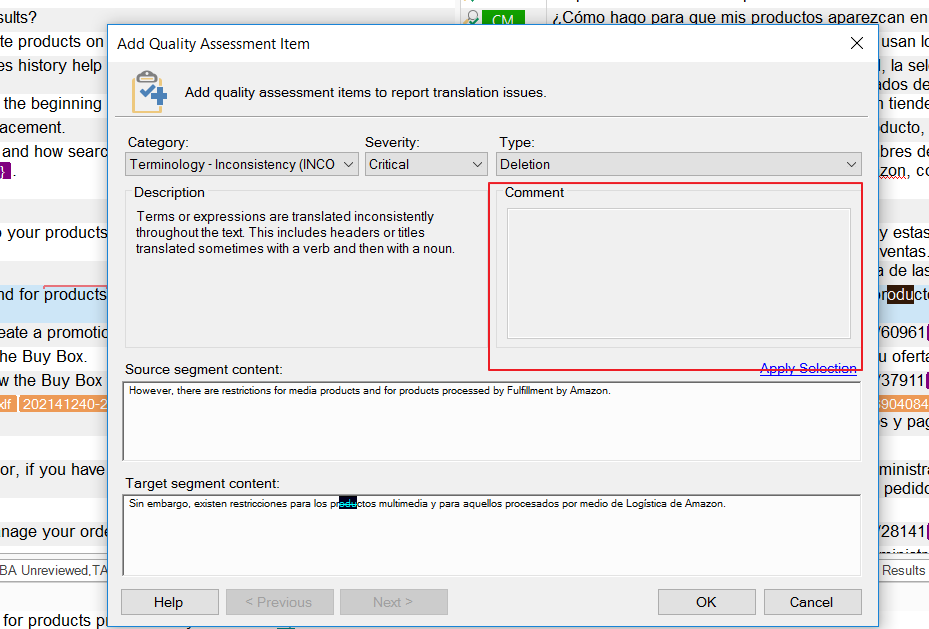
How do I revert this? I'm only able to add comments when completing review/sign-off, below error graphics, as general feedback.


2) During review, errors repeat. How do I mark repetitions so penalties are not applid every time I found the same error? How to handle repetitions?

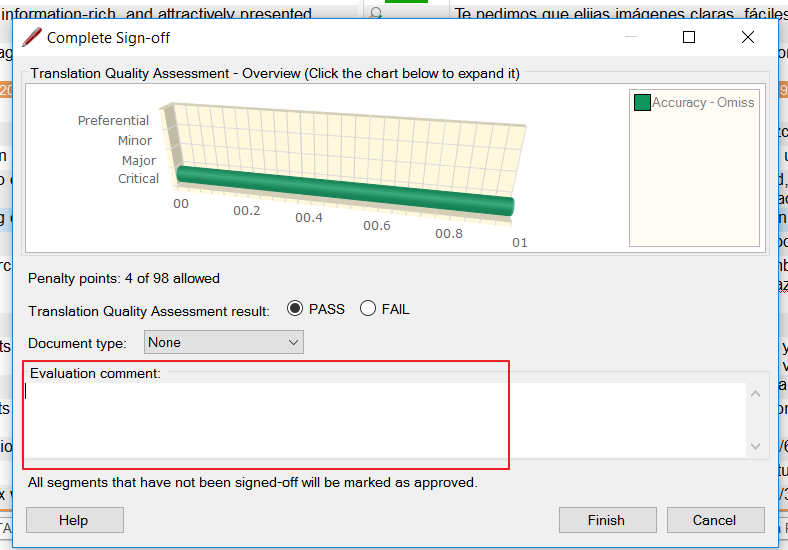
3) When completing my review, a bar graphics shows up (see 2nd screenshot above). Is there a way to export that graphic so I can share it with vendor? I think it's more illustrative than only the TQA final report.

  • Hi  

    Apologies you have not had a response on this yet... are you still reviewing this?

    I had a look at your questions and don't have much in the way of helpful answers I'm afraid.

    Miriam Lorente said:
    1) When I make a correction and change to next segment, TQA pop-up window opens to classify error type. However, the comment section is greyed out (attaching screenshot).

    I can't find a way to reproduce what you have at all.  Maybe you can share a project package I can look at so I can try to reproduce the problem?  It might also help if you confirm the version of Studio you are using and also the steps you go through exactly.

    Miriam Lorente said:
    2) During review, errors repeat. How do I mark repetitions so penalties are not applid every time I found the same error? How to handle repetitions?

    The only way I can think of to handle this is to switch off the TQA when handling corrections to repetitions.  Not very helpful I know and it seems as though we could use an enhancement here.  Unless  has some ideas as he knows this feature a lot better than I do.

    Miriam Lorente said:
    3) When completing my review, a bar graphics shows up (see 2nd screenshot above). Is there a way to export that graphic so I can share it with vendor? I think it's more illustrative than only the TQA final report.
    I think all you can do is capture it with a screenshot tool.  If you click it then it does get larger.  Another nice enhancement I think.

    Sorry I couldn't be more helpful, but maybe someone will enlighten me too :-)

    Regards

    Paul

    Paul Filkin | RWS

    Design your own training!
    You've done the courses and still need to go a little further, or still not clear? 
    Tell us what you need in our Community Solutions Hub

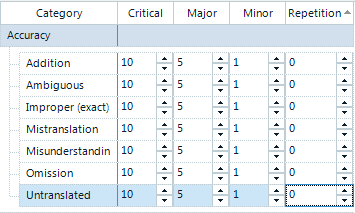
  • Hi - just on the repetitions - some users create a separate severity "repetition" and assign 0 points to it:

    This can then help to mark repetitions as such but not have them count towards the pass/fail threshold.

    Thanks, Daniel

    Daniel Brockmann
    Team Trados @ RWS

  • Thanks Daniel... obvious now you mention it!!

    Paul Filkin | RWS

    Design your own training!
    You've done the courses and still need to go a little further, or still not clear? 
    Tell us what you need in our Community Solutions Hub

  • Hi Paul and Daniel,

    Thanks for your response, I had no rush. :)

    1) I solved that a few days ago. The issue was that I didn't select the option "Require a comment from reviewer" for each category created under "Project Settings > Translation Quality Assessment > Categories". Just needed to follow the same path and click "Edit" to modify it. By the way, I'm using Studio 2015.
    2) I think Daniel's idea below is the best approach by now.
    3) Exactly. I found out that I could actually enlarge the image after I wrote my comment.

    P.S. Sorry about spamming you with this message, I was using the wrong account the first time.

    Thanks a lot for your help,
    Miriam
  • Thanks for your patience. Sharing some solutions regarding my questions above and 's answers.

    a) Solution for 'comments being greyed out:

    1. Go to Project settings > Translation Quality Assessment > Categories
    2. Click on the pencil icon to edit any category
    3. Select the box under Description that reads Require a comment from the reviewer for this category
    4. Repeat this step for all your categories and subcategories
    5. As a result, now you can add text in the comment box during TQA review

    b) Solution for 'Repetitions': I used 's piece of advice and created a new severity named 'Repetition' with 0 penalties. Useful to highlight error repetition after the first ocurrence but not applying further penalties.

    c) For 'Bar graphics export' I have no better solution than the approach Paul indicated above - Capture it with a screenshot.


    Regards,

    Miriam