 Translate



Yesterday, while I was trying to import some file on Trados Studio, the company PC shut down due to automatic rebooting.
This morning, when I came back to restart Trados Studio, it give me this error:
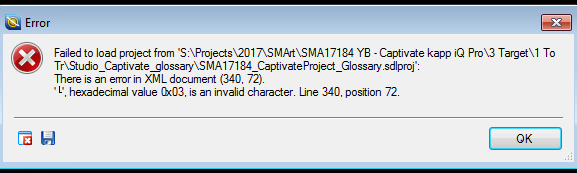
Is there way to solve this issue?
Thanks.
Yuko
You are currently working on UAT

Yesterday, while I was trying to import some file on Trados Studio, the company PC shut down due to automatic rebooting.
This morning, when I came back to restart Trados Studio, it give me this error:
Is there way to solve this issue?
Thanks.
Yuko
Hi Yuko,
Open your studio folder in My Documents and delete the projects.xml file.
Note that this will clear your projects list so you will need to readd them manually.
Hi Yuko,
Open your studio folder in My Documents and delete the projects.xml file.
Note that this will clear your projects list so you will need to readd them manually.

