

You are currently working on UAT 

Strange Analyze/Export unknown segments results

Hi,

When I run Analyze Files on a document with Export unknown segments ticked, the same amount of text is always exported, no matter what I set as Maximum match value (e.g either 49 or 85 per cent), though my analyze report looks like this:
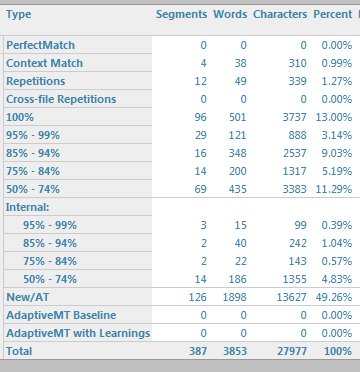
Is that normal?

Kind regards


Sandor

Parents Reply
  • Hi Sandor,

    Just a stab in the dark, but the Analyze options are in two places in your project settings: under "All Language Pairs" and under your specific language pair.

    If you accidentally set a value under your specific language pair, it will override the value under "All Language Pairs". This happened to me once and later I could not figure out why changing the setting (under "All Language Pairs") did not work.

    It took a while to figure out since, like most normal translators, I only use one language pair for each client, and never set options under my specific language pair -- except by accident. I guess it is valuable for some people, but for me having these settings in two places is just another potential source of problems.

    Best regards,
    Bruce Campbell
    ASAP Language Services
Children