Translate



Dear everybody,
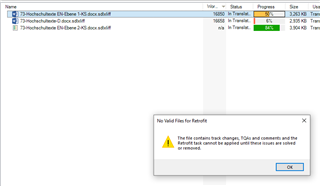
I am trying to carry out an aupdating of my translation through the retrofit batch task from a reviewed target file sent back to me by the customer (.docx file). I am following the instructions as listened from an SDL video (A beginner's guide to SDL Trados Studio 2017 - part 2). When I click on the retrofit task the following message appears:
"the file contains track changes, TQAs and comments and the retrofit task cannot be applied untill these issues are solved or removed". But, which file? I don't know how to go on because I don't know which "track changes, TQAs and comments" I have to solve or remove. There aren't any in the target file as shown in Editor. I don't understand. Thank you for any help!
After writing the above message I read an answer to the same problem, so I have understood that:
1) the "file" concerned is the sdlxliff file, ok, this is what I thought it was
2) I have to remove from it "track changes, TQAs and comments", but I don't see any in the file. Where are they? And if any, how to solve them? If I click on Verify the system says there are no errors at all and I don't see any comment.
2) I have to remove from it "track changes, TQAs and comments", but I don't see any in the file. Where are they? And if any, how to solve them? If I click on Verify the system says there are no errors at all and I don't see any comment.
thank You!