Excluding ‘+’ signs in UI strings from word count

I am setting up a project in Studio 2022 for 116 Excel files of UI strings. The strings look like this:

head north to + [street_name] + and turn right

The parameters in square brackets, such as "[street_name]," do not need to be translated, so I set up a regex rule below, and it works fine. 

Start Tag: \[

End Tag: \]

Non-translatable

However, even though the text in square brackets is locked, there is a large number of ‘+’ signs throughout the files, and I suspect they significantly increase the word count.

Two lines of text with UI strings, showing 'head north to + street_name + and turn right' and 'head south to + street_name + and turn right'. The 'street_name' parts are highlighted and locked for translation.

I would like to know how to exclude the ‘+’ sign from the word count.

Thank you in advance.


Generated Image Alt-Text
[edited by: RWS Community AI at 12:31 PM (GMT 0) on 14 Nov 2024]
emoji
Parents Reply
  • Hi Paul,

    Yes, of course.

    Here is the string with a '+' sign tat is not before/after the square brackets.

    you have reached + your charging station + [chargingstation_address] + in + [parent_poi_name]

    These two strings show in the Excel file as follows:

    head north to + [street_name] + and turn left

    head south to + [street_name] + and turn left

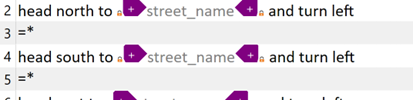
     The same strings showing in Studio Editor (with added '=*'

    Screenshot of an Excel file showing two rows of navigation instructions with placeholders for street names. Both rows have a purple warning icon indicating a potential issue with the text.

    emoji


    Generated Image Alt-Text
    [edited by: RWS Community AI at 7:40 PM (GMT 1) on 6 Jun 2024]
Children