Xpath query

I have this Xml file:


<trans-unit>
<note>Catch this</note>
</trans-unit>
<trans-unit>
<note>Do not catch this</note>
</trans-unit>

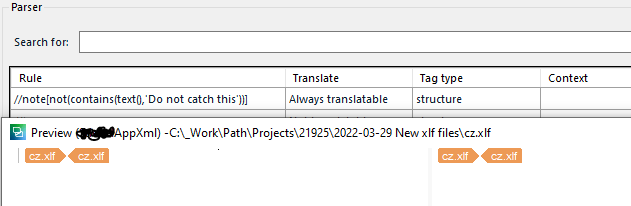
This is my Xpath query: //note[not(contains(text(),'Do not catch this'))]

Which works outside of Studio:
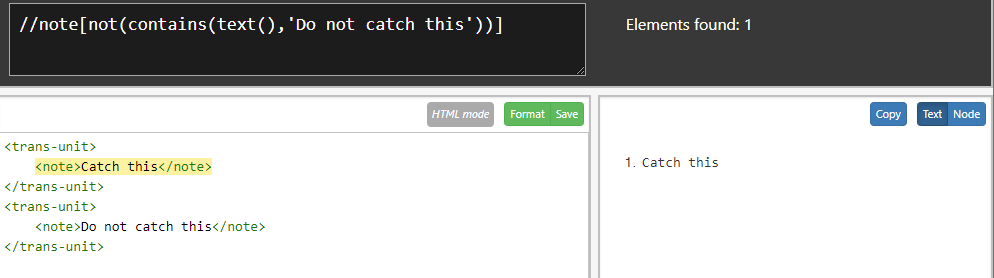
Screenshot of Trados Studio showing an XPath query and the XML file with two trans-unit elements, one being highlighted as a result of the query.

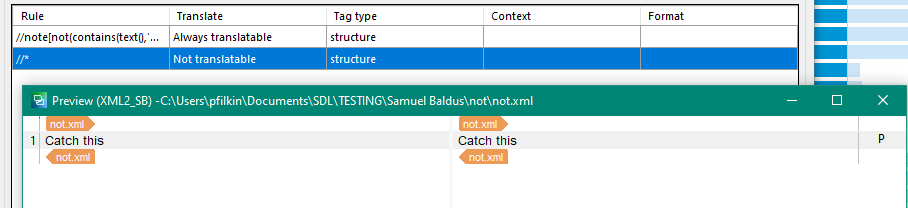
..but not in Studio.

Screenshot of Trados Studio parser settings displaying the XPath rule, its translation setting as 'Always translatable', and the tag type as 'structure'.

Any ideas?

Thanks

Samuel


Generated Image Alt-Text
[edited by: Trados AI at 4:42 AM (GMT 0) on 5 Mar 2024]

emoji
Parents Reply Children
  • Thanks , that seems to work well as a translatable item.

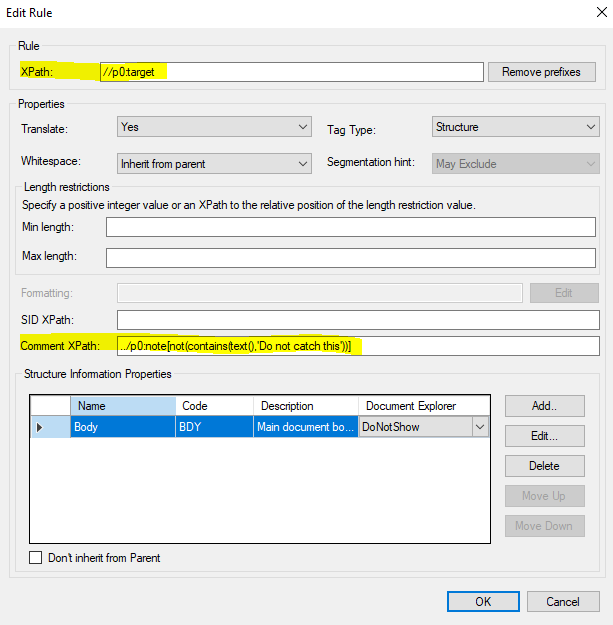
    It doesn't seem to work though, if you want to use it as a Comment XPath:

        
    <?xml version="1.0" encoding="utf-8"?>
    <xliff version="1.2" xmlns="urn:oasis:names:tc:xliff:document:1.2">
    <trans-unit>
    <target>First source term</target>
    <note>Catch this</note>
    </trans-unit>
    <trans-unit>
    <target>Second source term</target>
    <note>Do not catch this</note>
    </trans-unit>
    </xliff>

    Trados Studio Edit Rule dialog box showing an XPath rule for 'Target' and a Comment XPath with a condition to exclude a specific note text.

    Is that at all possible?

    Thanks

    Samuel
    emoji


    Generated Image Alt-Text
    [edited by: Trados AI at 4:42 AM (GMT 0) on 5 Mar 2024]
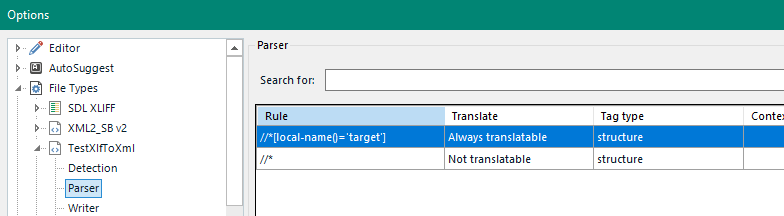
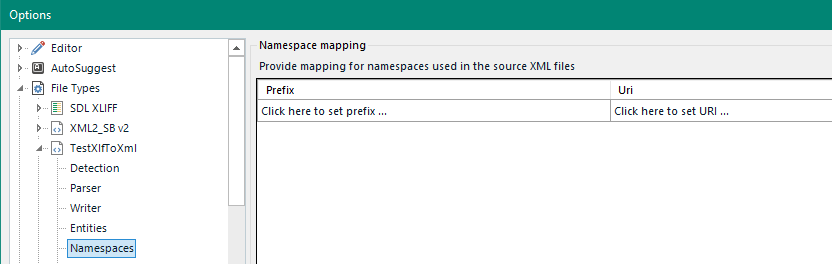
  • Apologies for the delayed response.  I tried it in a quick few minutes yesterday and could not make it work.  So, I played around a bit today after thinking about it on a long walk ;-) I can only make this work if I remove the namespace parameters and use local-name instead.  So these:

    Trados Studio options menu with Parser settings open, showing XPath rule 'local-name()='target'' set to 'Always translatable' and 'structure' tag type.

    Trados Studio options menu with Namespaces settings open, showing empty fields for 'Prefix' and 'Uri' with clickable options to set them.

    Then these rules:

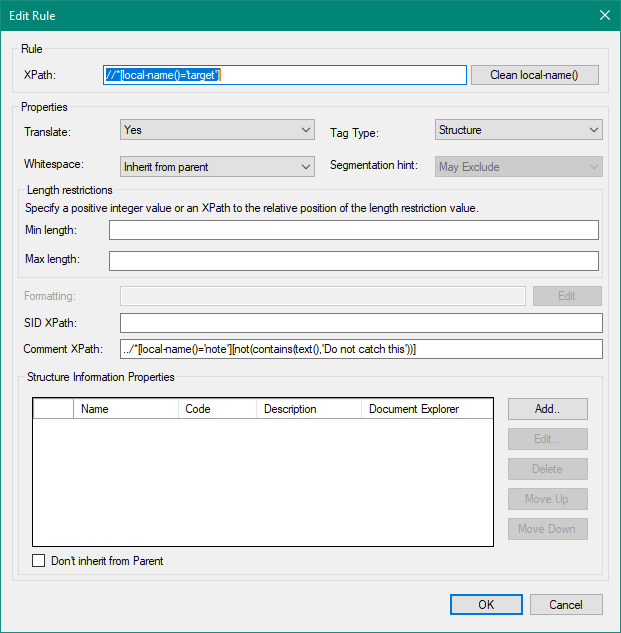
    Edit Rule window in Trados Studio with XPath 'local-name()='target'' selected, properties set to 'Translate: Yes' and 'Tag Type: Structure', and a Comment XPath rule excluding specific text.

    //*[local-name()='target']

    ../*[local-name()='note'][not(contains(text(),'Do not catch this'))]

    I think may be able to comment on this.  To me it looks as though the comment XPath doesn't respect the use of namespaces, but I could easily be doing something wrong!

    But hopefully this gives you a way to handle the file as you wish.

    Paul Filkin | RWS

    Design your own training!
    You've done the courses and still need to go a little further, or still not clear? 
    Tell us what you need in our Community Solutions Hub

    emoji


    Generated Image Alt-Text
    [edited by: Trados AI at 4:42 AM (GMT 0) on 5 Mar 2024]
  • Hi

    Thanks for your efforts, nothing like a good walk to clear the mind, I tried your solution and it seems to work.

    The only problem I am facing now is that this method does not work when the HTML Embedded Content Processor is used.

    Kind regards

    emoji
  • The only problem I am facing now is that this method does not work when the HTML Embedded Content Processor is used.

    Hmnn... nothing like being drip fed the requirements.  Interesting how this thread has evolved!

    This indeed will be a problem.  We can across this when we did the MultilingualXML filetype and actually built our own solution to support embedded content in XML in a better way wrt segmentation and being able to benefit from both using an embedded content processor (like html) and also use regex to catch anything the html processor will miss.

    During the development of that filetype we also discussed comments and omitted it for the time being while we waited to see if anyone really wanted that.  I think you are the first person to present a usecase where it would be helpful.  And your usecase is an interesting one!  So we'll take a look at this for a future release... when we get some time as we're ridiculously swamped at the moment.  For now I think you are probably stuck.

    Although as before... providing more details on your requirement and even your filetype settings would be more helpful than drip-feeding the information.  Maybe there will be a solution after all?

    Paul Filkin | RWS

    Design your own training!
    You've done the courses and still need to go a little further, or still not clear? 
    Tell us what you need in our Community Solutions Hub

    emoji
  • Hi

    Apologies for not giving you everything in one go.

    My approach when something isn't working as expected, is to strip it down to be bare minimum and go from there.

    If the base level functionality does not work or make logical sense, then it's easier to trouble-shoot that rather than getting lost in a haystack of potential issues.

    Thanks for the explanation though, I hope to see the comments in embedded content in future releases.

    emoji
  • I hope to see the comments in embedded content in future releases.

    I think this is something you should probably add to the ideas site as well along with an explanation of why you would need this?  It could be quite tricky to achieve and if you're the only person who wants it I doubt it'll get a lot of traction.  When we looked at it our thoughts were just about exposing the possibility to extract a comment using XPath.  I don't think we even dreamed about this also containing tagged content we would need to process further!

    Paul Filkin | RWS

    Design your own training!
    You've done the courses and still need to go a little further, or still not clear? 
    Tell us what you need in our Community Solutions Hub

    emoji
  • Hi

    I think there might be some crossed wires here.

    The comments themselves do not contain embedded content.

    The Comments Xpath does not work when embedded content is enabled in the XML file type. 

    emoji
  • Thank you for that clarification.  I was thinking something different.  I just tested this and you're right.  I'm going to raise both problems discussed in here with support so they can validate, explain better, and raise with development.

    Paul Filkin | RWS

    Design your own training!
    You've done the courses and still need to go a little further, or still not clear? 
    Tell us what you need in our Community Solutions Hub

    emoji
  • I have an update on this in two parts.

    1. the fact you have to use local-name and can't use the namespace prefix is a confirmed bug.  I'll have a bug number for this in due course... hopefully next week.
    2. the use of embedded content problem is only a problem because I didn't now how to work around it.  According to support this is the intended behaviour because when using embedded content the text moves from the xml filter to the html one where there is no option for comments.

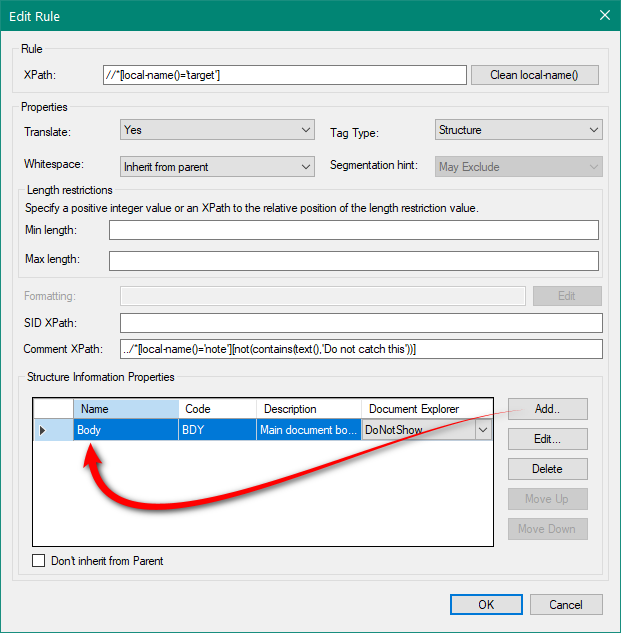
    There is a way to deal with this though by using the feature to tackle it through a defined document structure.  So you add structure like this for example:

    Trados Studio Edit Rule dialog showing an XPath rule with a red arrow pointing to the 'Body' structure information property.

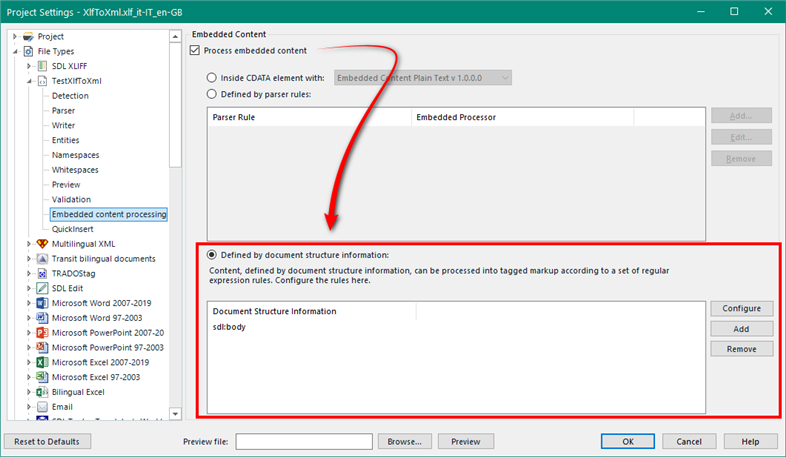
    Then use this option for the embedded content:

    Trados Studio Project Settings dialog with Embedded Content section highlighted, showing 'Defined by document structure information' selected.

    Unfortunately this means you can't use the embedded content filetypes such as HTML and will have to create the rules you need.  Not a bug, but definitely worth raising as an enhancement idea.

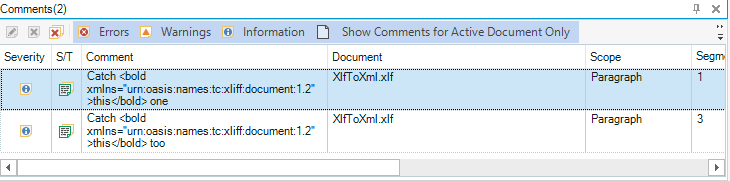
    It also means you get a pretty horrible experience if there is embedded content on the comments:

    Trados Studio Comments window displaying two errors related to embedded content in XML comments.

    But it does work.

    A long old thread and quite a lot of useful information in here I think.

    Paul Filkin | RWS

    Design your own training!
    You've done the courses and still need to go a little further, or still not clear? 
    Tell us what you need in our Community Solutions Hub

    emoji


    Generated Image Alt-Text
    [edited by: Trados AI at 4:42 AM (GMT 0) on 5 Mar 2024]