Thousands separators

I have an irritating problem. In the source the numbers are 50,801 which translated automatically to 50801, but I want a separator, 50 801. I set the space, but then Studio takes it bak to 50801 again. Where are the settings for that. Have looked at others with the same problem where you are supposed to start a new TM, but there must be an easier way to get around the problem.

/Maria

Parents Reply
  • Hi Maria,

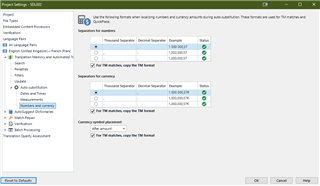
    Here's where you change the type of separator for the language pair in Project settings (you can also add a language pair directly to your profile via File>Options but it will be overruled by different project settings):

    Trados Studio Project Settings dialog showing Language Pairs section with options to change Thousand Separator and Decimal Separator for source and target languages.

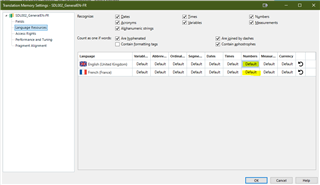
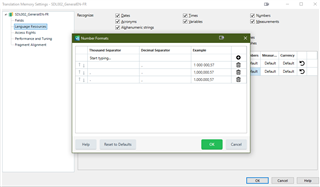
    Here's where you change the type of separator for the individual translation memory, via the translation memory settings. These are accessible via the project settings to which you have the translation memory added (also available via the Translation Memories view, also can be added, again, via File>Options):

    Trados Studio Translation Memory Settings dialog with Recognition, Fields, and Numbers tabs, showing language pair English (United States) - French (France) with options for separators. > Trados Studio Translation Memory Settings dialog on Numbers tab displaying Number Format options for Thousand Separator and Decimal Separator with examples.

    I hope this helps

    All the best

    Ali Slight smile

    emoji


    Generated Image Alt-Text
    [edited by: Trados AI at 4:33 AM (GMT 0) on 5 Mar 2024]
Children