
Regex and dates in Studio

Hello,

I am trying to change American format dates (ie: 12/15/23) to a particular French format (ie: 15.12.2023) (after I copied source to segment as all these are names of securities).

Obviously, doing this (the intuitive thing, for me anyway!)
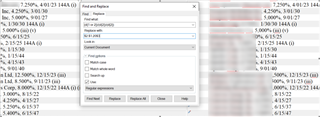
Trados Studio interface showing a list of securities with American date formats alongside a 'Find and Replace' dialog box with fields for 'Find what' and 'Replace with'.

But this doesn't work.  Can you help me please?

Kind regards

Corinne


Generated Image Alt-Text
[edited by: Trados AI at 4:25 AM (GMT 0) on 5 Mar 2024]

emoji
Parents Reply
  • My bad, I'm blind today. All d must be preceded by a backslash in the expression.

    So it must look as Paul suggests.

    _________________________________________________________

    When asking for help here, please be as accurate as possible. Please always remember to give the exact version of product used and all possible error messages received. The better you describe your problem, the better help you will get.

    Want to learn more about Trados Studio? Visit the Community Hub. Have a good idea to make Trados Studio better? Publish it here.

Children
No Data