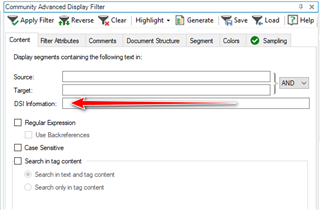
Show XML attribute value in document structure information !

I am working in a specific XML type:


<Product ID="2112570">

<Values>

<Value AttributeID="Colour">foo</Value>
<Value AttributeID="Size">foo</Value>
<MultiValue AttributeID="CODE">

<Value>8717868033539</Value>

</MultiValue>

<Value AttributeID="Description">foo</Value>

</Values>

</Product>

I designed a custom XML file type, with parser rules that work fine, except for the Document Explorer. In the Document Structure pane of the Editor, I want to show a hierarchical view:

[Product ID value]

Colour

Size

Description
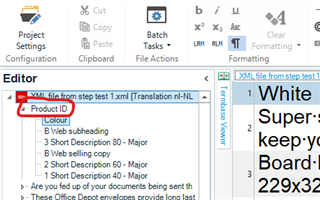
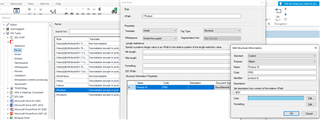
In other words, I want to use the value of the Product element's ID attribute. I can easily come up with an XPath and put it in the parser rules. However, Studio doesn't take the value (e.g. 2112570), but the name of the attribute (e.g. Product ID).

I'd think this would work, but it doesn't:
I found another user on this forum who managed to do it, but I don't understand his solution: https://community.sdl.com/product-groups/translationproductivity/f/studio/8664/display-element-content-in-document-explorer-in-studio-editor

Any help would be appreciated!

Parents
  • Hello ,
    I hope I can:
    As far as I know, in what is called "Editor view navigation pane", only text nodes of XML documents can be made visible.
    On the other hand in the popup that can be opened from the "Document Structure column", you can visualize virtually everything:
    text nodes, attribute values, XML comments and even content of processing instructions.
    I hope this is the answer you were looking for.

    Regards

    Frank

  • Hi Frank,

    Thanks for your response. I managed to configure the Document Structure column without many issues. It's a relatively easy and powerful feature. However, having to click it every segment to see the product ID is a bit of a drag...

    In the post I refer to, it seems like you found a solution 3 years ago:

    thanks for your reply. I was on the wrong track. The way to obtain the values I want, is to define parser rules for "Name" elements (translatable and non-translatable ones) and then it is possible to have the names displayed in the Document Explorer. And if I want to see both the hierarchy of products and the names, I need to enable "ShowElementContent" for both elements.

    Any clue what you meant by that? (c:

Reply
  • Hi Frank,

    Thanks for your response. I managed to configure the Document Structure column without many issues. It's a relatively easy and powerful feature. However, having to click it every segment to see the product ID is a bit of a drag...

    In the post I refer to, it seems like you found a solution 3 years ago:

    thanks for your reply. I was on the wrong track. The way to obtain the values I want, is to define parser rules for "Name" elements (translatable and non-translatable ones) and then it is possible to have the names displayed in the Document Explorer. And if I want to see both the hierarchy of products and the names, I need to enable "ShowElementContent" for both elements.

    Any clue what you meant by that? (c:

Children