HTM with embedded content in { }

Has anyone tried to make use of the embedded content function in the HTML file type?

I have a file, where beside the html code such content is included:

<h1>ESG Report{% if preview %} - <strong>Preview</strong>{% endif %}</h1>

As the complete text would perfectly work with HTML, I would like simply to exclude the { } content. So I just assumed, I add this to plain text (I added {{1,2}.*?}{1,2} as inline tag) in the embedded content processors and activate that in the html parser, but id does not work.

So what I am doing wrong here?

_________________________________________________________

When asking for help here, please be as accurate as possible. Please always remember to give the exact version of product used and all possible error messages received. The better you describe your problem, the better help you will get.

Want to learn more about Trados Studio? Visit the Community Hub. Have a good idea to make Trados Studio better? Publish it here.

Parents
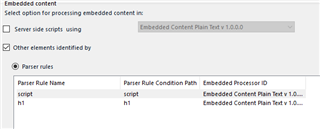
  • Hard to tell with such a sparse description of what you did.  I tested this and it works fine so this is what I did.  First I set up the embedded content rule:

    Trados Studio screenshot showing the Embedded Content settings with server side scripts using 'Embedded Content Plain Text v 1.0.0.0' and parser rules for 'script' and 'h1' tags.

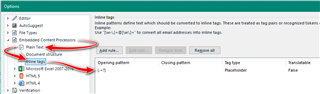
    Then I edited the embedded content plan text filetype like this:

    Trados Studio screenshot highlighting the 'Plain Text' option under 'File Types' in the 'Options' menu, with additional settings for 'Opening pattern' and 'Closing pattern' outlined in red.

    See if that helps.

    Paul Filkin | RWS

    Design your own training!
    You've done the courses and still need to go a little further, or still not clear? 
    Tell us what you need in our Community Solutions Hub

    emoji


    Generated Image Alt-Text
    [edited by: Trados AI at 4:14 AM (GMT 0) on 5 Mar 2024]
  • Hi Paul

    You are the greatest, but it won't work...

    The file in question is attached.

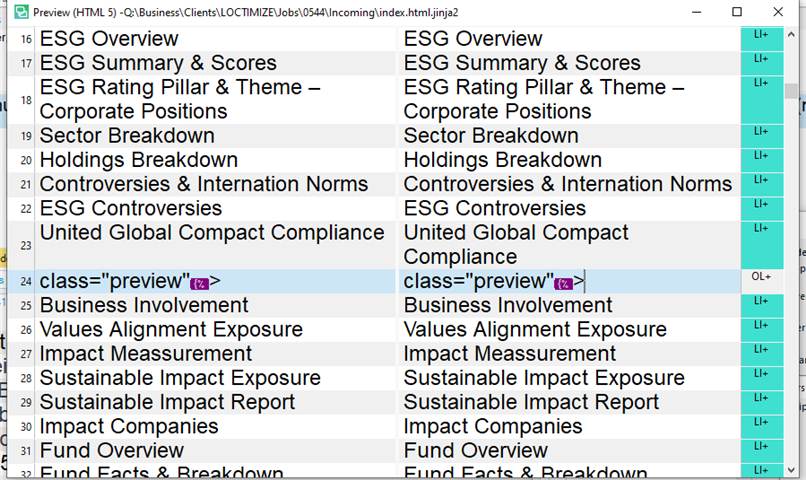
    The problem here are tags like list element (standard html tag), but it contains also text in { }. This is why I am until now not able to write a regex text file type. So I tried to use HTML with embedded content. But even if I add the same regex as you or {[^}]*}, it seems not to work. I am really puzzled by that file...

    index.html.zip

    _________________________________________________________

    When asking for help here, please be as accurate as possible. Please always remember to give the exact version of product used and all possible error messages received. The better you describe your problem, the better help you will get.

    Want to learn more about Trados Studio? Visit the Community Hub. Have a good idea to make Trados Studio better? Publish it here.
  • Hi

    Helps to see your file :-)

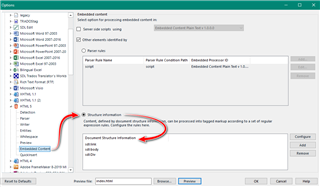
    Try something like this:

    Screenshot of Trados Studio options menu with embedded content settings, showing a red arrow pointing to 'Document Structure Information' rule configuration.

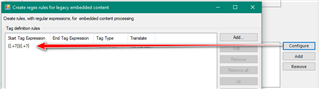
    And I changed the rule to this:

    Screenshot of Trados Studio 'Create regex rules for legacy embedded content' dialog box, with a red arrow indicating the 'Tag Text Expression' input field containing text expressions.

    {{.+?}}|{.+?}

    Seemed cleaner.  It's not perfect but I'm sure you'll be able to finish it off from here.  The only stuff you can't handle is the crap at the top which shouldn't really be there anyway so you'd have to simply lock those segments.

    Paul Filkin | RWS

    Design your own training!
    You've done the courses and still need to go a little further, or still not clear? 
    Tell us what you need in our Community Solutions Hub

    emoji


    Generated Image Alt-Text
    [edited by: Trados AI at 4:14 AM (GMT 0) on 5 Mar 2024]
  • Hi Paul

    Thank you. I cannot find an element called DIV...

    The list is unfortunately not clearly sorted. Where can I find this necessary element?

    _________________________________________________________

    When asking for help here, please be as accurate as possible. Please always remember to give the exact version of product used and all possible error messages received. The better you describe your problem, the better help you will get.

    Want to learn more about Trados Studio? Visit the Community Hub. Have a good idea to make Trados Studio better? Publish it here.
Reply
  • Hi Paul

    Thank you. I cannot find an element called DIV...

    The list is unfortunately not clearly sorted. Where can I find this necessary element?

    _________________________________________________________

    When asking for help here, please be as accurate as possible. Please always remember to give the exact version of product used and all possible error messages received. The better you describe your problem, the better help you will get.

    Want to learn more about Trados Studio? Visit the Community Hub. Have a good idea to make Trados Studio better? Publish it here.

Children