How to select CDATA text in functions for XML parser rules?

Hello,

Does anybody know how selecting CDATA section text in the starts-with() function works when writing XPath-based parser rules?

I've been trying to test this using the following XML and I'm having no luck:
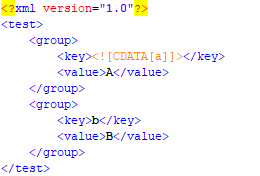
XML code snippet showing a test group with key-value pairs, where the key contains CDATA section text.

I tried writing a parser rule that selects <value> elements if the <key> element starts with the letter 'a'. I wrote the following XPath query as a test:

//group[starts-with(key,'a')]/value

This should work - in fact, every other XPath processor I've tried here returns the correct nodeset. For example, here's XPath Visualizer:
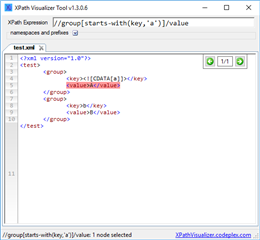
XPath Visualizer Tool interface displaying the XPath expression and the selected node result for the test XML.

But when used in an XML parser rule, the query returns absolutely nothing.

Here's the parser rule:
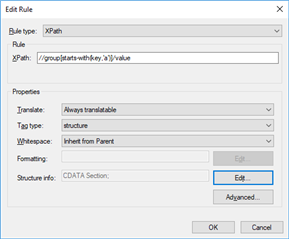
Trados Studio Edit Rule dialog box with XPath expression input field and CDATA Section structure info.

Here's the result - there are no segments:
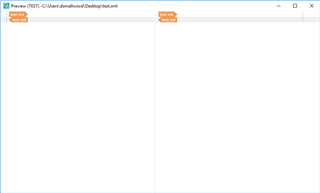
Trados Studio Preview window showing no segments generated from the XML parser rule.

I've also tried selecting the text node on <key> elements instead:

//group[starts-with(key/text(),'a')]/value

//group[key[starts-with(text(),'a')]]/value

Neither of these work either.

Is this a limitation of the starts-with() function in Studio? Or does anybody know how Studio expects these types of nodes to be selected? I'm running out of ideas here!

Thanks very much.


Generated Image Alt-Text
[edited by: Trados AI at 4:13 AM (GMT 0) on 5 Mar 2024]

emoji
Parents
  • It's embedded content so you need to use the embedded content processor.  This article will explain:

    https://multifarious.filkin.com/2014/06/01/custom-xml/

    Paul Filkin | RWS

    Design your own training!
    You've done the courses and still need to go a little further, or still not clear? 
    Tell us what you need in our Community Solutions Hub

  • Hi Paul,

    Thanks for your response, but in this particular case, the node containing the CDATA section is part of a predicate in the XPath query, not the node to process for translation, so it won't be ran through the embedded content processor.

    As a workaround, I've stripped the CDATA section syntax from the necessary elements so that the predicate works as expected. This is OK in my particular case but is not an ideal solution, especially if the content in CDATA section contains reserved XML characters. It would be great if anybody knows a way around this!

    Thanks,

    David

  • By bad for not reading your post completely.  Sorry.

    I can verify your find and I think it should work as I think starts-with is an xpath 1.0 feature (I believe fn: was introduced in xpath 2.0 and this is not supported).  I eacalated to the filetype manager for more information.

    In the meantime do you have to use this method for finding hat you need or can you apply something else?  I don't know how much of an example to illustrate starts-with you used compared to the real life requirement.  For xample this works:

    //group[contains(key,'a')]/value

    Perhaps the real data could work in some way like this?

    Paul Filkin | RWS

    Design your own training!
    You've done the courses and still need to go a little further, or still not clear? 
    Tell us what you need in our Community Solutions Hub

  • Thanks for your help with this, Paul - much appreciated!

    Whenever I've come across this behaviour in the past, I've always been able to do exactly what you mentioned and use the contains() function instead, but I've been working on a file this morning where the only option would be to use starts-with(). Using contains() in this particular case would pull through parts of the document that shouldn't be translated.

    As I say, I was able to workaround this particular case by removing the CDATA syntax from the affected elements, so I have managed to work around this in the meantime. I've also noticed that if the element doesn't contain a CDATA section, the starts-with() function works as expected, so it's definitely only happening with CDATA sections. I'll be interested to hear what your filetype manager thinks though!

    EDIT: I should also clarify that I'm using Studio 2017 SR1!

    Thanks again,

    David

Reply
  • Thanks for your help with this, Paul - much appreciated!

    Whenever I've come across this behaviour in the past, I've always been able to do exactly what you mentioned and use the contains() function instead, but I've been working on a file this morning where the only option would be to use starts-with(). Using contains() in this particular case would pull through parts of the document that shouldn't be translated.

    As I say, I was able to workaround this particular case by removing the CDATA syntax from the affected elements, so I have managed to work around this in the meantime. I've also noticed that if the element doesn't contain a CDATA section, the starts-with() function works as expected, so it's definitely only happening with CDATA sections. I'll be interested to hear what your filetype manager thinks though!

    EDIT: I should also clarify that I'm using Studio 2017 SR1!

    Thanks again,

    David

Children